Are you puzzled by the array of gadgets and devices scattered around your home? Ever wondered how to categorize all your home electronic installations effectively?
Whether you’re setting up a smart home or just trying to keep your entertainment system organized, understanding how to categorize your home electronics can save you time, frustration, and even money. Imagine walking into a home where every device is seamlessly integrated, each serving its purpose without a hitch.
It’s not just about convenience; it’s about creating an environment that works for you. We will unravel the mystery of home electronic categorization, offering you practical tips and insights that will transform your living space. Ready to take control of your tech-filled haven? Let’s dive in!
Types Of Home Electronic Installations
Home electronic installations cover a wide range of systems that enhance comfort, security, and entertainment in your living space. Understanding the different types can help you decide what fits your lifestyle and budget best. Let’s look at some of the key categories and what they offer.
Audio And Video Systems
Setting up audio and video systems can transform your home entertainment experience. This includes surround sound speakers, home theaters, and multi-room audio setups. Have you ever noticed how a good sound system changes the way you enjoy movies or music?
Simple installations might involve wall-mounted TVs and soundbars. More advanced setups include hidden speakers and custom lighting that syncs with your media. These systems can be tailored to any room size or style.
Security And Surveillance
Security systems protect your home and provide peace of mind. Cameras, motion sensors, alarms, and smart locks are common elements. You can monitor your property remotely through your smartphone, which adds convenience and control.
Consider how often you worry about leaving doors unlocked or packages unattended. Installing security devices can reduce these worries. Some systems even alert you instantly if something unusual happens.
Smart Home Automation
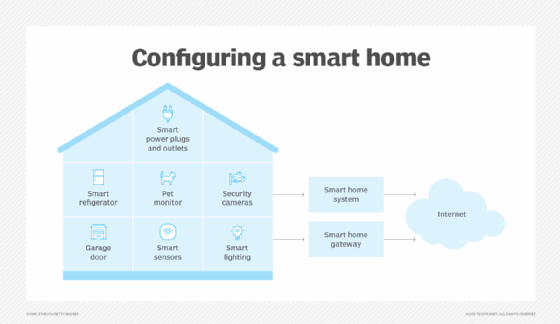
Smart home automation connects various devices to work together seamlessly. Lights, appliances, and thermostats can be controlled with voice commands or apps. Have you tried turning off lights from your bed without getting up?
Automation can save energy by adjusting settings based on your routine. It also adds comfort by customizing environments. The challenge is choosing compatible devices that fit your needs.
Networking And Connectivity
A reliable network is the backbone of most modern homes. This includes Wi-Fi routers, range extenders, and wired connections like Ethernet. Slow internet can be frustrating—have you ever experienced buffering during an important call?
Proper installation ensures strong signals throughout your home. It supports all your smart devices, streaming, gaming, and work-from-home needs. Planning your network layout can prevent dead zones and improve overall performance.
Climate Control Systems
Climate control systems manage heating, cooling, and air quality. Smart thermostats are popular choices that learn your schedule and adjust temperatures automatically. Imagine coming home to the perfect temperature without lifting a finger.
Some systems integrate with other smart devices to optimize energy use. Installing sensors can track humidity and air quality for healthier living spaces. These setups offer both comfort and potential savings on energy bills.
Credit: taselectricandsecurity.com
Choosing The Right Installation Service
Choosing the right installation service is key to a smooth home electronic setup. The right professional ensures safety, quality, and efficiency. It helps avoid costly mistakes and protects your devices. Picking a good service means your electronics work perfectly from day one.
Licensed Vs. Unlicensed Technicians
Licensed technicians have passed tests and meet industry standards. They follow safety rules and local codes. Unlicensed workers may offer lower prices but lack proper training. Using licensed experts reduces risks and guarantees quality work. Always ask for proof of license before hiring.
Experience And Specialization
Experience matters in complex electronic installations. Specialists understand specific devices and systems better. They handle challenges quickly and avoid common errors. Check how long the technician has worked in the field. Prefer those with experience in your exact type of installation.
Customer Reviews And Testimonials
Reviews show real customer experiences. Positive feedback signals reliable and skilled technicians. Watch for repeated praise about punctuality, cleanliness, and communication. Negative comments can reveal hidden problems. Reading testimonials helps build trust before choosing a service.
Cost Considerations
Price should match the quality of work. Cheap services may cut corners or use poor materials. Expensive does not always mean better. Ask for detailed quotes to compare costs fairly. Consider warranties or guarantees included with the service.
Planning Your Home Electronic Setup
Planning your home electronic setup is more than just picking the latest gadgets. It’s about creating a system that fits your lifestyle, works smoothly, and grows with your needs. A well-thought-out plan helps you avoid costly mistakes and ensures your home feels comfortable and connected.
Assessing Your Needs
Start by listing what you want your home electronics to do. Do you need a smart security system, entertainment setup, or automated lighting? Think about who will use the system and how often.
Ask yourself: What problems am I trying to solve? What features will make daily life easier? This clarity guides your choices and prevents overspending on unnecessary tech.
Budgeting For Installation
Set a clear budget before you buy anything. Installation costs can surprise you if you only focus on the price of devices. Include expenses for wiring, professional help, and any extra parts.
Remember, sometimes spending a bit more upfront saves money later by avoiding upgrades or fixes. Are you prepared to invest in quality that lasts, or will you opt for cheaper, short-term solutions?
Space And Layout Considerations
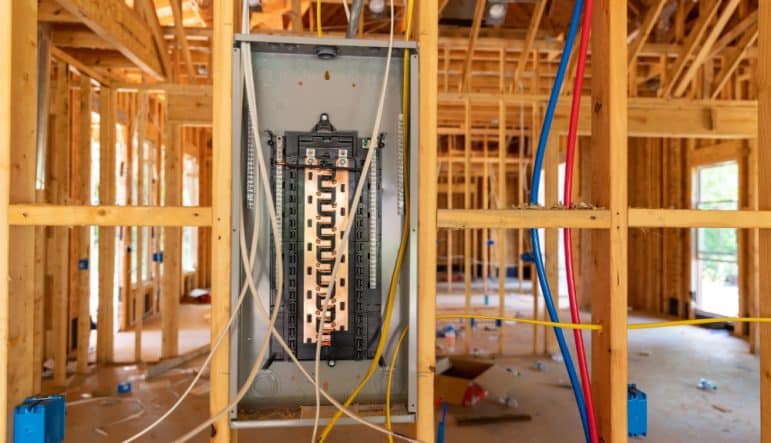
Look at the physical space where your electronics will live. Some devices need wall mounts, extra outlets, or specific lighting conditions. Plan where cables will run to keep everything neat and safe.
Think about how the setup will affect your room’s flow. Will a large TV block natural light? Could speakers be placed for the best sound? Small adjustments here improve daily comfort.
Future-proofing Your System
Technology changes fast. Design your setup so you can add new devices without tearing everything apart. Choose systems with open standards or easy upgrades.
Consider how your needs might evolve. Will you want more smart home features? More security cameras? Planning ahead helps you avoid complete overhauls later.
Credit: fieldedge.com
Installation Best Practices
Following best practices during home electronic installation ensures safety, efficiency, and long-lasting performance. Correct steps prevent damage to devices and reduce risks of electrical hazards. Proper planning and attention to detail improve system functionality and user experience.
Proper Wiring And Safety
Use high-quality cables suited for your devices. Avoid overloading circuits by distributing power evenly. Secure wires neatly to prevent tripping or damage. Always turn off power before starting any wiring work. Ground all electrical connections to avoid shocks. Follow local electrical codes and regulations strictly.
Integration With Existing Systems
Check compatibility between new devices and existing systems. Use compatible communication protocols for smooth operation. Keep the user interface consistent across different devices. Plan for future upgrades by choosing scalable solutions. Avoid mixing brands without ensuring interoperability. Document all connections for easy troubleshooting later.
Testing And Troubleshooting
Test each component separately before full system setup. Use diagnostic tools to check signal strength and connection quality. Identify and fix loose or faulty connections immediately. Verify device settings match installation requirements. Perform a complete system test under normal operating conditions. Keep a checklist to track all testing steps.
Maintenance Tips
- Regularly clean electronic components to prevent dust buildup.
- Check wiring for signs of wear or damage.
- Update software and firmware to fix bugs and improve security.
- Schedule periodic inspections to catch potential issues early.
- Replace worn-out parts promptly to avoid system failure.
- Keep user manuals and installation documents handy for reference.
Common Challenges And Solutions
Installing home electronics can bring many benefits but also some challenges. These issues can affect how well devices work together and how reliable the whole system is. Knowing common problems and how to fix them helps create a smooth setup and better user experience.
Compatibility Issues
Many devices use different brands or technologies that may not work well together. This can cause devices to fail or lose some features. Choosing products that support common standards helps reduce this problem.
- Check device specifications before buying.
- Use universal hubs or bridges to connect different systems.
- Stick to one ecosystem when possible.
Signal Interference
Wireless devices often face interference from walls, appliances, or other electronics. This can lower signal quality and cause slow or lost connections. Placing devices carefully and using wired options can improve stability.
- Keep devices away from metal objects and thick walls.
- Use Wi-Fi extenders or mesh networks for larger homes.
- Switch to less crowded frequency bands like 5 GHz.
Software Updates
Devices need regular updates to fix bugs and add features. Missing updates can cause security risks or performance drops. Setting devices to update automatically keeps them safe and working well.
- Enable automatic updates in device settings.
- Check for firmware updates regularly.
- Restart devices after updates to apply changes.
Dealing With Obsolete Technology
Older devices may stop receiving support or fail to work with new gadgets. This can limit system upgrades or cause security gaps. Planning for gradual replacement helps maintain a modern and secure system.
- Identify outdated devices in your setup.
- Replace critical devices with newer models step-by-step.
- Recycle or donate old electronics responsibly.
Credit: www.techtarget.com
Frequently Asked Questions
What Categories Fall Under Home Electronic Installation?
Home electronic installation includes security systems, entertainment setups, smart home devices, and networking. It also covers lighting control and HVAC automation.
How To Categorize Smart Home Electronic Devices?
Smart home devices are categorized by function: security, climate control, lighting, entertainment, and energy management systems.
Why Is Proper Categorization Important For Home Electronics?
Proper categorization helps in organizing devices, simplifying installation, troubleshooting, and future upgrades. It ensures efficient system integration.
Which Home Electronics Need Professional Installation?
Security cameras, home theaters, smart thermostats, and complex networking systems typically require professional installation for optimal performance.
Conclusion
Home electronic installation covers many types of devices and systems. It includes lighting, security, entertainment, and smart home gadgets. Each category needs different tools and skills to set up. Knowing these groups helps you plan and organize better. It also makes it easier to find help when needed.
Clear categories simplify your choices and improve your home’s function. Think of it as sorting parts for a smoother process. This way, you keep your home safe, smart, and comfortable without confusion.
Leave a Reply