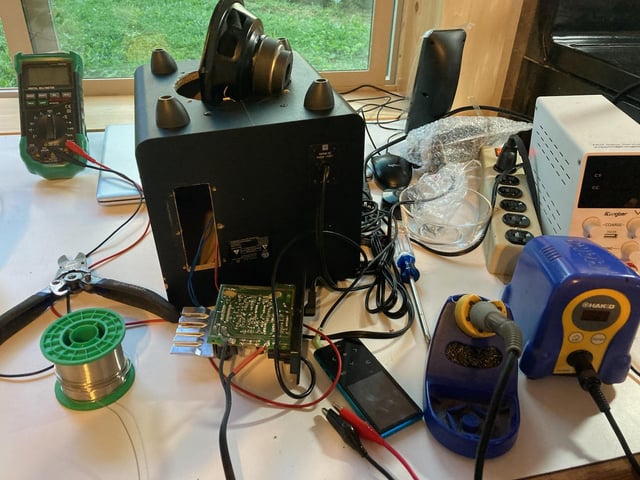
Are you curious about building your own gadgets and learning how electronics really work? Getting started with DIY electronics can seem tricky, but it’s easier than you think.
Imagine creating cool projects that light up, move, or even connect to the internet—all made by your own hands. This guide will show you simple steps to dive into DIY electronics, so you can turn your ideas into real, working devices.
Ready to unlock your creativity and skills? Keep reading, and you’ll discover how to start your DIY electronics adventure with confidence.
Getting Started With Diy Electronics
Getting started with DIY electronics is exciting and rewarding. It allows you to create projects and learn how gadgets work. You do not need a lot of experience to begin. Just a few tools and some basic knowledge can open many doors.
This section guides you through the essentials. You will learn about the tools, components, and safety tips. These basics help you build confidence and avoid common mistakes.
Essential Tools And Equipment
Start with a small set of tools. They make your work easier and more precise. Here are key items to have:
- Soldering iron – for joining wires and components
- Wire cutters and strippers – to prepare wires
- Multimeter – to measure voltage, current, and resistance
- Breadboard – for testing circuits without soldering
- Small screwdriver set – to assemble and disassemble parts
- Tweezers – to handle tiny components
These tools cover most beginner projects. Buy good quality but affordable versions.
Basic Components To Know
Components are the building blocks of circuits. Understanding common parts helps you design projects. Start with these:
| Component | Purpose |
|---|---|
| Resistor | Limits electric current |
| Capacitor | Stores and releases energy |
| LED | Light source and indicator |
| Transistor | Amplifies or switches signals |
| Diode | Allows current in one direction |
| Microcontroller | Small computer to control circuits |
Learn their symbols and functions. It helps when reading circuit diagrams.
Safety Tips For Beginners
Safety is important in electronics. Follow these tips to avoid accidents:
- Work in a clean, dry area
- Use safety glasses to protect eyes
- Unplug power before changing circuits
- Handle soldering iron carefully to avoid burns
- Check components’ voltage ratings
- Keep liquids away from electronics
Good habits keep you safe and protect your equipment.

Credit: www.circuits-diy.com
Learning The Fundamentals
Starting with the basics is key to enjoying DIY electronics. Learning the fundamentals helps you understand how electronic parts work together. This knowledge builds confidence and makes projects easier to complete.
Understanding Circuits And Schematics
Circuits are paths for electricity to flow. Schematics are drawings that show these paths. They use symbols for parts like resistors, capacitors, and batteries. Learning to read schematics helps you build and fix circuits correctly.
Focus on these points:
- Identify common symbols
- Follow the flow of electricity
- Understand how parts connect
Reading Datasheets
Datasheets provide details about electronic parts. They explain how parts work and their limits. Reading datasheets helps you pick the right parts for your project.
Look for:
- Pin layout and functions
- Voltage and current ratings
- Operating temperature range
Simple Projects To Build Skills
Start with easy projects that use basic parts. These projects improve your skills and build your confidence. Examples include:
- LED blink circuits
- Simple alarms
- Basic light sensors
Practice soldering and wiring. Each project teaches a new skill. Keep projects small and manageable to avoid frustration.
Choosing Your First Projects
Choosing your first projects is a crucial step in your DIY electronics journey. The right project can keep you motivated and build your skills quickly. It’s important to pick projects that match your current knowledge and spark your interest.
Starter Kits For Beginners
Starter kits are a great way to begin. They include all the parts you need and clear instructions to guide you. Kits like the Arduino Starter Kit or Raspberry Pi Beginner Kit provide hands-on experience without overwhelming you.
These kits often come with several small projects, helping you learn basic concepts step by step. You’ll get to see immediate results, which keeps the excitement alive. Have you checked out what’s inside a popular starter kit lately?
Easy And Fun Electronics Projects
Starting with simple projects helps you build confidence. Projects like blinking LEDs, simple alarms, or a basic light-sensitive circuit teach core skills. They are quick to complete and offer visible results.
Try projects that solve small problems around your home or create something you’ll enjoy using. This makes the learning process personal and rewarding. What small electronic gadget would you like to build for yourself?
Using Online Resources And Tutorials
The internet is full of free tutorials and guides. Websites like Instructables, Adafruit, and YouTube channels offer step-by-step lessons. Many tutorials include detailed photos and videos that make complex topics easier to understand.
Look for projects with clear instructions and active community feedback. This helps you avoid common mistakes and learn from others’ experiences. Have you bookmarked any favorite tutorial sites yet?
Building Your Workspace
Building your workspace is the foundation of a successful DIY electronics journey. A well-organized, efficient area not only saves time but also reduces frustration. When you invest effort into creating a space tailored to your needs, you’ll find projects flow smoother and creativity sparks more often.
Organizing Tools And Components
Start by sorting your tools and components logically. Use clear containers or labeled drawers to separate resistors, capacitors, wires, and other small parts. This way, you won’t waste precious minutes hunting for that one tiny resistor when inspiration strikes.
Keep frequently used tools like wire cutters, pliers, and screwdrivers within easy reach. A pegboard or magnetic strip can hold these tools visibly and accessibly. Ask yourself: How often do you reach for a tool? Place it accordingly.
Setting Up A Soldering Station
Your soldering station is the heart of many electronics projects. Choose a flat, sturdy surface with enough space for your soldering iron, stand, and a heat-resistant mat. Safety matters—always have a small fan or fume extractor nearby to avoid inhaling fumes.
Invest in a good quality soldering iron with adjustable temperature control. It makes a huge difference when working with different components. Don’t forget a cleaning sponge or brass wire tip cleaner to keep your iron in top condition.
Creating A Comfortable Work Environment
Comfort can make or break your focus during long build sessions. Ensure your workspace has good lighting—natural light is best, but a bright LED desk lamp works well too. Avoid harsh shadows that can strain your eyes.
Choose a chair that supports your back and allows you to sit upright. Small details like a wrist rest or anti-fatigue mat can reduce discomfort. Have you noticed how a small change in seating can boost your productivity?
Common Challenges And How To Overcome Them
Getting started with DIY electronics can be exciting but also full of hurdles. You might face circuit issues, make simple errors, or feel stuck without guidance. Understanding common challenges and knowing how to tackle them will keep your projects moving forward and boost your confidence.
Troubleshooting Circuits
When a circuit doesn’t work, it’s easy to feel frustrated. Start by checking the basics: power supply, connections, and component orientation. Use a multimeter to test voltages and continuity; this helps pinpoint where the fault lies.
Sometimes, swapping out a single component can solve the problem. Don’t rush—test each part methodically. Have you ever spent hours troubleshooting only to find a loose wire? Taking a step back and testing systematically saves time and stress.
Avoiding Common Mistakes
Beginners often overlook simple things like reading datasheets or mixing up polarities. Double-checking your work before powering up can prevent damage. Label your wires and keep your workspace organized to reduce errors.
Writing down your circuit plan or using schematic software helps visualize connections. Mistakes happen, but learning to spot them early makes your projects smoother. Think about the last time a small oversight caused a big headache—how could better planning have helped?
Seeking Help From Communities
Don’t hesitate to ask for help when you’re stuck. Online forums, social media groups, and maker spaces are great places to get advice. Sharing your problem often leads to quick solutions and new ideas.
Engaging with others also keeps you motivated. You might discover tips or tools that speed up your learning. Have you joined any electronics communities yet? They can be your best resource beyond manuals and tutorials.

Credit: www.youtube.com
Expanding Your Skills
Expanding your skills in DIY electronics opens new doors for creativity and problem-solving. It builds confidence and helps you take on more complex projects. Learning new concepts and tools makes the process more enjoyable. Practice and curiosity push your abilities beyond basic circuits.
Learning Microcontrollers And Programming
Microcontrollers are small computers that control electronic devices. Learning to program them gives you control over your projects. Start with beginner-friendly boards like Arduino or Raspberry Pi. Use simple coding languages such as C++ or Python. Experiment with sensors, motors, and displays to see how code affects hardware.
Exploring Advanced Components
Advanced components add new functions and challenges to your projects. Try using transistors, relays, and integrated circuits. Learn about communication modules like Bluetooth and Wi-Fi. Understanding these parts helps you build smarter devices. Test components in small circuits before adding them to larger builds.
Joining Maker Groups And Workshops
Maker groups connect you with others who share your interest. Workshops offer hands-on experience and expert guidance. These communities provide support and ideas. Sharing your projects brings feedback and motivation. Find local clubs or online forums to join discussions and events.
Staying Updated In 2025
Staying updated in 2025 is key to thriving in DIY electronics. The field changes fast. New tools, trends, and events appear regularly. Keeping pace helps you learn new skills and complete better projects. It also connects you with others who share your interest.
Latest Trends In Diy Electronics
Smart home devices remain popular. Many hobbyists build custom automation tools. Wearable tech grows with new sensors and small parts. Sustainable electronics gain attention with eco-friendly materials. Microcontrollers like Raspberry Pi and Arduino keep evolving. Wireless charging and low-power gadgets become common. These trends shape what projects you can try next.
Useful Apps And Tools
- Fritzing: Easy circuit design and PCB layout tool.
- Tinkercad: Online simulator for electronics and 3D design.
- EasyEDA: Free schematic capture and PCB design software.
- Multimeter Apps: Turn smartphones into basic measuring tools.
- Code Editors: Platforms like Visual Studio Code for programming microcontrollers.
These tools save time and help test ideas before building. Many have free versions for beginners.
Upcoming Events And Competitions
- Maker Faire: A global festival for DIY creators and tech fans.
- Hackaday Prize: Contest with themes around open-source hardware.
- Local electronics meetups: Great for hands-on learning and networking.
- Online challenges: Monthly competitions hosted on platforms like GitHub.
- Workshops and webinars: Often run by electronics clubs or stores.
Participating in events improves skills and offers fresh ideas. Competitions push you to solve real problems creatively.

Credit: www.youtube.com
Frequently Asked Questions
What Tools Do I Need To Start Diy Electronics?
To start DIY electronics, you need a soldering iron, multimeter, breadboard, jumper wires, and basic hand tools. These help you build and test circuits safely and effectively.
How Can Beginners Learn Diy Electronics Easily?
Beginners can learn DIY electronics by following online tutorials, joining maker communities, and practicing simple projects. Start with basic circuits to build confidence and skills.
What Safety Tips Should I Follow In Diy Electronics?
Always work in a well-ventilated area and use safety goggles. Avoid touching live circuits and unplug devices before modifications to prevent shocks and injuries.
Which Components Are Essential For Diy Electronics Projects?
Essential components include resistors, capacitors, LEDs, transistors, and microcontrollers like Arduino. These parts form the building blocks for most electronic projects.
Conclusion
Embarking on a DIY electronics journey is both fun and rewarding. Start with simple projects to build confidence. Gradually, expand your skills by experimenting with new components. Join online communities to share experiences and gain insights. Always prioritize safety when working with electronics.
Patience is key; mistakes are part of learning. Use available resources like tutorials and guides to improve. Keep your curiosity alive, and don’t hesitate to ask for help. Practice consistently to enhance your understanding. Enjoy creating your own electronic gadgets and innovations.
Dive in and let your passion for DIY electronics grow!
Leave a Reply