Imagine having the power to create your own electronic voting machine right at home. Not only does it sound intriguing, but it also puts you at the forefront of understanding how technology and democracy intersect.
If you’ve ever been curious about the mechanics behind these devices, you’re in the right place. This guide breaks down the process into simple steps, using materials you might already have. By diving into this project, you’re not just learning about circuits and coding; you’re building a tool that symbolizes trust and transparency.
Stay with us as we unravel the mysteries of this fascinating DIY project, and by the end, you’ll not only have a functional voting machine but also a deeper appreciation for the technology that powers modern elections.

Credit: internetfreedom.in
Materials Needed
Gathering the right materials is the first step to build an electronic voting machine at home. Each part plays a key role in making the device work smoothly. Careful selection saves time and avoids frustration later. Below are the materials and tools you will need.
Essential Components
- Microcontroller (Arduino or Raspberry Pi)
- Push buttons for voting options
- LCD display to show results
- Resistors (various values)
- Breadboard for circuit assembly
- Connecting wires and jumper cables
- Power supply or USB cable
- LED indicators for feedback
- Memory storage module (optional)
Tools Required
- Soldering iron and solder wire
- Wire stripper and cutter
- Small screwdriver set
- Multimeter for testing circuits
- Hot glue gun for securing parts
- Computer with coding software
- Protective gloves (optional)

Credit: globalnews.ca
Basic Electronics Concepts
Understanding basic electronics concepts is essential before you dive into making your own electronic voting machine at home. These fundamentals will help you build a reliable and efficient device that can handle inputs, process data, and display results accurately. Don’t worry if you’re new to electronics; breaking down these ideas will make the project much easier.
Circuit Basics
A circuit is simply a path for electricity to flow. You’ll use components like resistors, capacitors, and switches to control this flow. Think of it as creating a roadmap for electrical signals to follow.
When building your voting machine, you need to ensure the circuit connects buttons (for votes) to a processing unit without any interruptions. Understanding how to read a circuit diagram can save you a lot of troubleshooting time.
- Resistorscontrol the amount of current flowing through the circuit.
- Capacitorsstore and release electrical energy when needed.
- Switchesact as input devices, like voting buttons.
Have you ever wondered why a simple button press can trigger a complex action? It’s all about how circuits translate physical actions into electrical signals.
Microcontroller Introduction
The microcontroller is the brain of your voting machine. It receives signals from the buttons, processes the information, and controls the display showing the vote count.
Popular microcontrollers like Arduino are beginner-friendly and come with plenty of online tutorials. They are programmable, meaning you can write code to decide how your voting machine behaves.
Think about it: without a microcontroller, your electronic voting machine would just be a bunch of wires and buttons with no way to actually count or store votes. This tiny chip turns your hardware into a smart device.
Designing The Circuit
Designing the circuit is the heart of building your own electronic voting machine at home. This phase requires careful planning to ensure every component works together smoothly. Your goal is to create a reliable and straightforward setup that captures votes accurately and displays results clearly.
Wiring The Buttons
Each button in your voting machine represents a candidate or choice. Start by connecting one terminal of each push button to a digital input pin on your microcontroller or circuit board.
The other terminal should connect to a common ground to complete the circuit. This setup allows the microcontroller to detect a button press as a change in voltage.
Use resistors (typically 10k ohms) as pull-down resistors to keep the input stable and avoid false signals. Double-check that none of the wires are loose or crossing incorrectly—this can cause unpredictable behavior.
Connecting The Display
The display is where users see the current vote count or confirmation of their selection. If you’re using a simple LCD or 7-segment display, connect its data pins to the microcontroller’s output pins.
Don’t forget to supply the correct voltage and ground connections to the display to prevent damage. Keep your wiring tidy and label each connection, so troubleshooting later becomes easier.
Consider adding a small breadboard or a prototyping shield to keep components organized. How would you test each display segment or character? Running a simple test program that cycles through all display elements can save hours of debugging.
Programming The Microcontroller
Programming the microcontroller is the heart of making your own electronic voting machine. This step lets you control how the machine records votes, displays options, and stores results. Getting the code right is crucial because it determines the accuracy and reliability of your voting system.
Writing The Code
Start by choosing a programming language compatible with your microcontroller, like C or Arduino’s simplified C++. Your code should handle tasks such as displaying candidate names, registering button presses, and counting votes.
Focus on writing clear and simple functions. For example, create a function that increments the vote count whenever a button is pressed. Test each part of your code separately to avoid confusion later.
Think about security too. How can you ensure votes aren’t counted twice? Adding debouncing code to your button inputs can prevent accidental multiple counts.
Uploading The Program
Once your code is ready, connect your microcontroller to your computer using a USB cable or programmer device. Use software like the Arduino IDE or another suitable uploader tool specific to your board.
Make sure to select the correct board and port settings before uploading. This small step saves a lot of headache if your program doesn’t upload properly.
After uploading, monitor the microcontroller’s behavior. Does it respond correctly to inputs? If not, revise your code and try again. Patience here pays off in building a reliable voting machine.
Assembling The Machine
Assembling your electronic voting machine is where all the parts come together. This stage requires patience and precision to ensure each component fits perfectly and functions properly. Taking your time here sets the foundation for a reliable and effective device.
Mounting Components
Start by organizing all the components on a clean workspace. Secure the microcontroller, keypad, and LCD display onto a sturdy base such as a wooden or plastic board. Use screws or double-sided tape to keep them firmly in place.
Arrange the components so that wiring will be neat and easy to follow. This not only looks better but helps avoid connection mistakes later. Have you thought about the best layout that balances accessibility and compactness?
- Fix the microcontroller near the center for easy wiring.
- Place the keypad where it can be comfortably reached.
- Position the LCD screen at eye level for clear visibility.
Power Supply Setup
Your voting machine needs a stable power source. Using a regulated 5V power supply is common for most microcontrollers and peripherals. Connect the power supply wires carefully, matching positive and negative terminals to avoid damage.
Consider adding a switch between the power supply and the circuit to control power easily. If you want portability, think about using rechargeable batteries with a charging circuit. How will you ensure your machine stays powered throughout the voting process?
- Check voltage output with a multimeter before connecting.
- Secure the power supply away from other components to prevent overheating.
- Use insulated wires to minimize short circuits.
Testing And Troubleshooting
Testing and troubleshooting your homemade electronic voting machine is essential to ensure it works reliably and accurately. Skipping this step can lead to incorrect vote counts or device failure at critical moments. Let’s focus on how you can check your connections and debug common issues effectively.
Checking Connections
Start by inspecting every wire and component on your breadboard or circuit board. Loose or misaligned connections are often the root cause of malfunction.
- Use a multimeter to verify continuity between points. This confirms that your wires and solder joints are properly connected.
- Double-check that all components are plugged into the correct pins according to your circuit diagram.
- Ensure power supply lines are stable and correctly polarized to avoid damaging components.
Remember, even a single misplaced jumper wire can disrupt the entire system. Have you ever spent hours troubleshooting only to find a tiny connector was off? This step saves time and frustration.
Debugging Common Issues
Once connections are verified, power up your machine and observe its behavior. If the display doesn’t show expected results or buttons seem unresponsive, start isolating the problem.
- Check if your microcontroller is receiving power and running the program. An unlit LED near the chip often indicates a power or code issue.
- Test each button individually by connecting it to a simple input test sketch. This helps identify faulty switches or wiring.
- Look for shorts or crossed wires that might cause the system to freeze or reset unexpectedly.
If your voting machine skips votes or counts incorrectly, review your code logic. Sometimes, a minor programming error can cause major functional problems.
Have you tried swapping out components one at a time to pinpoint the fault? This hands-on approach can reveal hidden issues faster than guesswork.
Enhancing Security Features
Security is the backbone of any voting system, especially when you’re building an electronic voting machine at home. Without strong security features, the integrity of your votes can be easily compromised. Enhancing security means protecting your data from errors and ensuring every vote counts only once.
Data Validation
Data validation is essential to make sure only correct votes are recorded. You can add simple checks to verify inputs before accepting them. For instance, if your voting options are numbers 1 through 5, your system should reject any input outside this range.
Another useful trick is to display a confirmation screen showing the selected choice before final submission. This gives voters a chance to double-check their vote and reduces accidental errors. Have you thought about what might happen if invalid data slips through unnoticed?
Preventing Multiple Votes
Stopping someone from voting more than once is critical. You can do this by assigning unique voter IDs and tracking which IDs have already voted. Once a vote is cast under a particular ID, the system should block any further attempts from the same ID.
Consider storing these IDs in a simple database or a local file that updates in real-time. This way, your machine won’t accept duplicate votes, maintaining fairness. What strategies will you use to ensure no one can trick your machine into counting extra votes?
Practical Applications
Building an electronic voting machine at home is more than just a fun project—it has real-world uses that can help you understand voting systems better and even manage small-scale elections. The hands-on experience you gain can deepen your appreciation for the challenges and security concerns involved in voting technology. Let’s look at some practical ways you can use your homemade voting machine.
Using For Small Elections
Your electronic voting machine can be a reliable tool for managing small elections within clubs, organizations, or community groups. It simplifies vote counting, reducing human error and speeding up the process. Imagine running a fair election for your book club’s next read or your local sports team’s captain without the usual paper ballots.
Using the machine also encourages transparency. Everyone can see how votes are recorded and counted, which builds trust in the results. Have you considered how digital voting might influence participation rates in your community events?
- Quick vote tallying for efficiency
- Easy customization for different types of elections
- Secure and private voting experience
Educational Projects
Building and operating an electronic voting machine offers valuable lessons in electronics, programming, and data security. It’s an excellent educational tool for students learning about digital systems and civic engagement. When I built one with my students, they were amazed at how many factors go into making voting secure and reliable.
You can use your machine to demonstrate concepts like encryption, input validation, and error handling in a tangible way. It also sparks discussions about election integrity and the importance of voter privacy. What if schools adopted projects like this to teach both technology and citizenship?
- Hands-on experience with microcontrollers and coding
- Understanding the impact of technology on democracy
- Encouraging critical thinking about election security
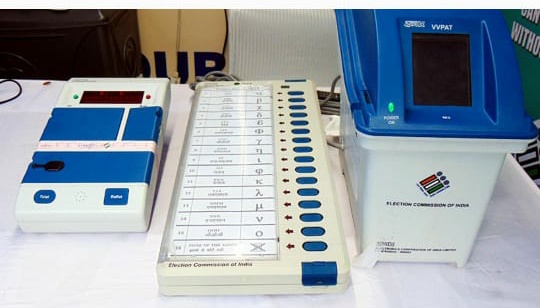
Credit: en.themooknayak.com
Frequently Asked Questions
What Materials Are Needed To Build An Electronic Voting Machine?
You need a microcontroller, push buttons, LCD display, resistors, wires, and a power source. These components help record and display votes accurately.
How Does An Electronic Voting Machine Work At Home?
It registers button presses as votes, stores data in memory, and shows results on the LCD screen. This process ensures quick and secure vote counting.
Is It Safe To Make An Electronic Voting Machine At Home?
Yes, if you follow proper circuit design and programming guidelines. Avoid data tampering by securing the code and hardware carefully.
Can Beginners Build An Electronic Voting Machine Easily?
Yes, with basic electronics knowledge and step-by-step instructions, beginners can create a simple voting machine at home.
Conclusion
Building an electronic voting machine at home is simple and fun. It helps you learn about electronics and coding. You can test your skills and understand how voting works. Keep safety in mind and follow the steps carefully. This project is great for students and hobbyists.
Try it out and see how technology can solve real problems. Practice makes perfect, so don’t stop experimenting. Enjoy creating your own electronic voting machine today!
Leave a Reply