Finding the best electronic notepad with pen can improve how you take notes and organize ideas. These devices combine digital convenience with the natural feel of writing by hand.
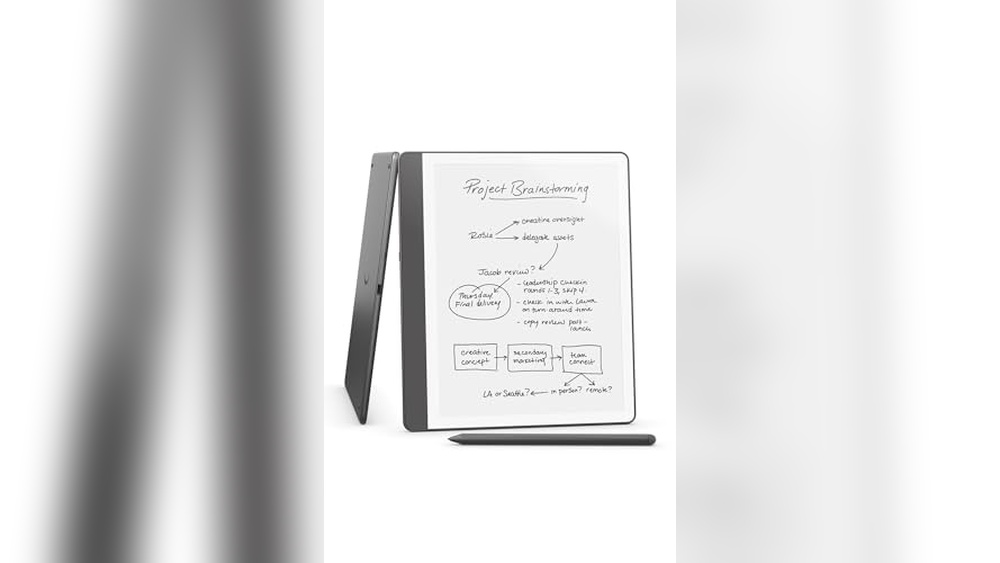
Electronic notepads help you write, draw, and store your work easily. Many models offer pressure-sensitive pens for smooth, precise writing. Some include features like handwriting-to-text conversion, cloud sync, and long battery life. Popular choices range from the Amazon Kindle Scribe with AI notebook summarization to the reMarkable Paper Tablet known for its paper-like experience.
Others, like the XPPen and HUION tablets, serve artists and students alike. Whether for study, work, or creativity, the right electronic notepad makes note-taking simple and efficient. This guide covers top options to help you pick the best fit for your needs.
Amazon Kindle Scribe

The Amazon Kindle Scribe (64GB) is ideal for avid readers, students, and professionals who want to seamlessly combine reading, note-taking, and document management in one sleek device. If you are someone who values having your books, notes, and documents organized digitally, along with the benefit of AI-powered notebook summarization, this device is perfect for you.
Pros:
- Generous 64GB storage capacity for extensive book and note collections.
- Includes a Premium Pen in Tungsten for precise and comfortable writing.
- Built-in AI notebook summarization enhances productivity by providing quick summaries.
- Lightweight design at 0.95 pounds for easy portability.
- Elegant Tungsten color with slim dimensions for a modern look and feel.
Cons:
- May have a learning curve for users new to digital note-taking.
- Premium Pen replacement could be costly if lost or damaged.
- Limited to Amazon’s ecosystem which might restrict some functionalities.
The Amazon Kindle Scribe offers a unique blend of features that cater to both readers and note-takers. Its 64GB storage allows users to carry a vast library of books and documents without worrying about space. The device’s integration of a Premium Pen provides a natural writing experience, making it easier to jot down ideas, annotate texts, or sketch diagrams directly on the screen. This adds a layer of convenience for users who prefer digital notes over traditional paper.
Another standout feature is the built-in AI notebook summarization, which intelligently processes your handwritten notes and generates concise summaries. This not only saves time but also helps in better understanding and retention of information. The lightweight and sleek design ensure that the Kindle Scribe is comfortable to hold for long reading or writing sessions. Overall, the device is a powerful tool for anyone looking to enhance their reading and productivity habits in a digital format.
Xppen 3 In 1 Color Digital Notebook

The XPPen 3 in 1 Color Digital Notebook 10.95” Paper Note Taking Tablet is ideal for professionals, students, and creatives who need a versatile and efficient tool for writing, reading, and meeting notes. If you value a seamless digital note-taking experience combined with the tactile feel of paper, this device is perfect for boosting productivity and organization. Its compact design and advanced features make it suitable for on-the-go users and anyone looking to replace traditional notebooks with a smart solution.
Pros:
- Equipped with a 16384 pressure levels battery-free X3 Pro pencil for precise and natural writing or drawing.
- 3 in 1 functionality allows for writing, reading, and note-taking in one device.
- Comes with a magnetic folio for easy protection and portability.
- Includes 6+128GB storage for ample space to save notes and documents.
- Lightweight and slim design (0.661 pounds and 0.2 inches thickness) for comfortable handling.
Cons:
- May have a learning curve for users new to digital note-taking devices.
- Limited to the XP-PEN ecosystem which might restrict software compatibility.
- Battery-free stylus, while convenient, might require more delicate handling to avoid damage.
The XPPen 3 in 1 Color Digital Notebook stands out with its advanced 16384 pressure levels stylus technology, which offers a highly responsive and natural writing experience. Users can effortlessly switch between writing, reading, and meeting modes, making it a multifunctional device that adapts to various tasks. The magnetic folio adds convenience by protecting the tablet while maintaining a sleek profile for easy transport, perfect for students and professionals on the move.
With generous 6+128GB storage capacity, users can store extensive notes, documents, and sketches without worrying about running out of space. The lightweight and compact dimensions ensure the device is comfortable to hold for extended periods, reducing hand fatigue. Overall, the XPPen digital notebook combines functionality and portability, making it a valuable tool for enhancing productivity in academic, professional, and creative environments.
Remarkable Paper Pro Bundle

The reMarkable Paper Pro Bundle is ideal for professionals, students, and creatives who seek a seamless digital note-taking experience that mimics the feel of real paper. If you value distraction-free writing, sketching, and document annotation in a sleek, lightweight device, this bundle is designed specifically for you. It’s perfect for those who want to stay organized, enhance productivity, and reduce paper clutter.
Pros:
- Includes an 11.8” reMarkable Paper Tablet with a large, high-resolution display for comfortable reading and writing.
- Marker Plus Pen with Eraser offers a natural writing experience and easy correction without switching tools.
- Slim and lightweight design (1.16 Pounds) makes it highly portable and easy to carry.
- Minimalistic gray color and sleek build enhance professional aesthetics.
- Excellent for converting handwritten notes into digital files, boosting efficiency and organization.
Cons:
- Relatively high price compared to traditional tablets and paper notebooks.
- Limited color options available, only in gray.
- May require a learning curve for users new to digital paper tablets.
The reMarkable Paper Pro Bundle features an 11.8” display that offers a paper-like texture, significantly reducing glare and providing an eye-friendly reading and writing experience. The tablet’s high resolution ensures that handwritten notes and sketches are crisp and clear, making it suitable for detailed work such as technical drawings or note-taking in meetings and lectures. The lightweight and slim dimensions of the device make it easy to carry around, fitting comfortably in bags or briefcases.
The included Marker Plus Pen with Eraser adds to the convenience by allowing users to write naturally and correct mistakes effortlessly, without interrupting their workflow. Together, the tablet and pen create a distraction-free environment, eliminating notifications and apps that typically compete for attention on other devices. This focused setup helps users enhance productivity, organize their ideas efficiently, and reduce reliance on paper, contributing to an eco-friendlier work style.
Remarkable Starter Bundle – Remarkable 2

The reMarkable Starter Bundle is perfect for professionals, students, and creatives who want a distraction-free digital note-taking experience. Ideal for those who prefer the feel of writing on paper but want the convenience of digital organization, this bundle suits anyone looking to boost productivity and creativity with a lightweight, portable device.
Pros:
- Paper-like writing experience with low latency on a 10.3” display
- Includes Marker Plus Pen with built-in eraser for seamless editing
- Lightweight and slim design makes it easy to carry around
- Supports cloud syncing for easy access to notes across devices
- Long battery life enabling extended use without frequent charging
Cons:
- Limited to black and white display, no color support
- May require some time to get used to digital writing for paper traditionalists
- Higher price point compared to standard tablets or notebooks
The reMarkable 2 tablet features a 10.3-inch monochrome E Ink display that closely mimics the look and feel of real paper, providing users with a natural writing experience. Its slim and lightweight gray design enhances portability, making it convenient for taking notes or sketching on the go. The inclusion of the Marker Plus Pen with a built-in eraser allows users to easily make corrections, enhancing the overall usability of the device.
With its seamless integration into digital workflows, the reMarkable Starter Bundle offers cloud syncing capabilities, allowing users to access their documents and notes from multiple devices. This feature benefits professionals and students who need to organize and share their work efficiently. Moreover, the device’s long battery life ensures uninterrupted productivity during extended use, making it a reliable companion for daily tasks and creative projects alike.
Penstar Enote 2 Paper Tablet Bundle
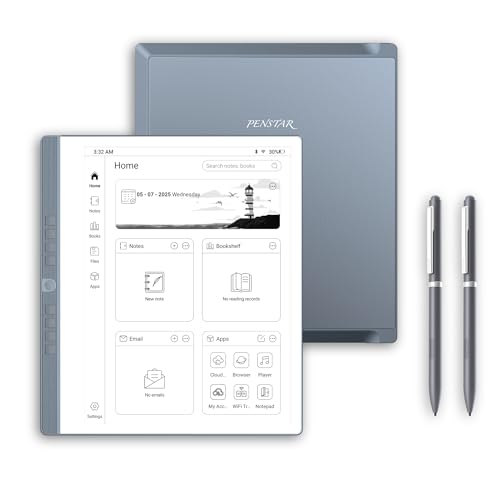
The Penstar eNote 2 Paper Tablet Bundle is ideal for professionals, students, and creatives who prefer a digital writing experience that closely mimics traditional pen and paper. If you are looking for a lightweight, portable device to take notes, sketch ideas, or read documents without the strain of a backlit screen, this electronic notepad is a perfect choice. It suits those who value precision, convenience, and a clutter-free workspace.
Pros:
- High-resolution 10.3-inch 300 PPI E-Ink display for clear, paper-like visuals
- Comes with a folio cover & two B5 pens for added protection and versatility
- Large 128GB storage to save numerous notes and documents
- Supports 4G connectivity for on-the-go syncing and sharing
- Ultra-thin and lightweight design (0.22 inches thick, 2.14 pounds) for easy portability
Cons:
- May have a learning curve for users new to E-Ink technology
- Limited color options, available only in gray
- Pen functionality limited to the included B5 pens, which may require replacements
The Penstar eNote 2 Paper Tablet Bundle offers a high-resolution 10.3-inch E-Ink display that provides a comfortable, non-glare reading and writing experience, closely resembling real paper. This makes it excellent for lengthy note-taking sessions, brainstorming, or reading without causing eye fatigue common with traditional screens. The included folio cover ensures the device remains protected during transport, enhancing durability for everyday use.
With a massive 128GB of storage and 4G connectivity, users can store extensive notes, sketches, and documents while syncing data conveniently on the move. The lightweight and slim profile make it effortless to carry around, fitting perfectly into backpacks or briefcases. This bundle is designed to streamline digital note-taking while maintaining the tactile satisfaction of pen on paper.
Mloas Smart Sync Pen

The Mloas Smart Sync Pen for Note Taking is ideal for students, professionals, and creatives who want to seamlessly digitize their handwritten notes while maintaining a natural writing experience. If you are looking for a versatile digital notebook that enhances productivity by combining traditional note-taking with modern technology, this device is perfect for you. It supports both iOS and Android platforms, making it accessible for a wide range of users.
Pros:
- Enables synchronized handwriting that instantly digitizes notes
- Includes OCR to Text feature for easy text conversion
- Supports offline storage for note-taking without internet
- Audio recording integration for enhanced note context
- Allows note sharing across devices and platforms
- Comes with 160 pages in a compact gray digital notebook
Cons:
- Learning curve for users new to digital note-taking tools
- Battery life dependent on usage of audio and sync features
- May require app updates for optimal compatibility with all devices
The Mloas Smart Sync Pen boasts innovative features such as synchronized handwriting and OCR technology, which allows users to convert handwritten notes into editable text effortlessly. This greatly enhances productivity by making notes easy to organize, search, and share. The pen’s compatibility with both iOS and Android devices ensures broad usability, while the offline storage feature means users can take notes anytime without worrying about connectivity.
Additionally, the integrated audio recording function enables users to capture lectures, meetings, or personal reminders alongside their written notes, providing a richer context for review. The digital notebook’s 160 pages offer ample space for extended note-taking sessions, and the sleek gray design adds a professional touch. Overall, the Mloas Smart Sync Pen is a comprehensive tool that bridges the gap between analog and digital note-taking, making it a valuable asset for anyone looking to enhance their workflow.
Ophayapen Smart Sync Pen

The Ophayapen Smart Sync Pen is perfect for students, professionals, and creatives who want to seamlessly digitize their handwritten notes. If you value efficiency and organization, and frequently use paper notebooks but desire the convenience of digital storage and sharing, this smart pen is an ideal choice for you. It is especially useful for anyone who needs to convert handwritten content into editable digital text in real time.
Pros:
- Real-time syncing of notes with smartphone or iPad via the dedicated app
- Converts handwritten notes to editable digital text automatically
- Supports both Android and iOS platforms for wide compatibility
- Includes a notebook and writing board for a smooth writing experience
- Lightweight design at 2.44 pounds, making it portable
- Black color offers a sleek and professional look
Cons:
- Requires use of the specific app for full functionality
- May have a learning curve for users new to smart pen technology
- Battery life details are not specified, which might concern heavy users
The Ophayapen Smart Sync Pen boasts an innovative feature that allows users to digitize their handwritten notes instantly. With its ability to sync in real time to your smartphone or iPad, it eliminates the hassle of manual transcription, saving significant time and effort. The pen’s compatibility with both Android and iOS devices makes it accessible to a broad audience, ensuring that users can easily integrate it with their existing technology.
Additionally, the pen comes with a specially designed notebook and writing board, providing a smooth and comfortable writing experience that feels natural. The digital conversion of notes into editable text further enhances productivity, allowing users to organize, store, and share their notes effortlessly via the app. Its compact and lightweight design makes it convenient to carry for on-the-go note-taking, making it a valuable tool for students and professionals alike.
Lcd Writing Tablet

The LCD Writing Tablet for Adult is ideal for professionals, students, and educators who need a convenient and eco-friendly way to jot down notes, brainstorm ideas, or teach concepts. This 6.5 Inch Mini Full Screen Drawing Board is perfect for those seeking a portable, reusable digital notepad to enhance productivity in the office, classroom, or at home.
Pros:
- Lightweight and compact design for easy portability
- Full screen writing area for ample space to draw or write
- Reusable and eco-friendly, reducing paper waste
- Quick and easy to erase with the touch of a button
- Durable black surface with clear, sharp writing visibility
Cons:
- Small 6.5 inch screen may not be suitable for detailed drawings or extensive note-taking
- Limited to monochrome display, no color option available
- Requires occasional battery replacement to maintain functionality
The YOLIPULI LCD Writing Tablet boasts a sleek and slim profile measuring only 0.1 inches in height, 3.0 inches in width, and 6.1 inches in length, making it incredibly easy to carry around. Its lightweight build, at just 0.11 pounds, ensures users can slip it into bags or pockets without any hassle. The tablet features a full black screen that provides clear contrast for writing or drawing, enhancing readability and reducing eye strain during prolonged use.
Designed with practicality in mind, this digital notepad allows users to erase their notes instantly with a simple button press, eliminating the need for multiple sheets of paper and contributing to a sustainable lifestyle. It’s an excellent tool for quick brainstorming sessions, to-do lists, or teaching aids, helping users stay organized and efficient. Additionally, the portability and ease of use make it a versatile accessory for both office and educational environments.
Xppen 10.95″ Standalone Drawing Tablet

The XPPen 10.95″ Standalone Drawing Tablet is ideal for creative professionals, digital artists, and students who need a versatile device for sketching, drawing, and note-taking. If you are looking for a portable, high-performance tablet that offers a natural drawing experience with advanced features, this device is a perfect fit. It is especially suitable for users who appreciate precision, responsiveness, and convenience in a standalone tablet without the need for a computer connection.
Pros:
- High 16K pressure sensitivity for precise and detailed strokes
- Tilt support enhances natural drawing and shading techniques
- 90Hz refresh rate ensures smooth and lag-free visuals
- Anti-glare screen for comfortable use in various lighting conditions
- Runs on Android 14 providing a modern and flexible operating system
- Portable and lightweight design weighing only 3.55 pounds
Cons:
- Standalone functionality might limit compatibility with some professional software
- Battery life may vary depending on usage intensity
The XPPen 10.95″ Standalone Drawing Tablet features a vibrant, anti-glare display that reduces eye strain and allows users to work comfortably for extended periods. Its high pressure sensitivity of 16K combined with tilt support offers an incredibly natural drawing experience, closely mimicking traditional media. This makes it a powerful tool for artists who want to create detailed and expressive work with precision. The 90Hz refresh rate guarantees smooth line rendering, which significantly improves the fluidity of sketches and notes.
Powered by Android 14, this tablet supports a wide range of creative applications and offers a user-friendly interface. Its standalone design means you can work anywhere without being tethered to a computer, making it perfect for on-the-go creativity and productivity. Weighing just under four pounds, it is both portable and durable, ideal for students and professionals alike who need a reliable digital notepad and sketching device.
Huion H420 Osu Graphics Drawing Tablet

The HUION H420 OSU Graphics Drawing Tablet Signature Pad is ideal for beginners and intermediate digital artists, students, and professionals who need a compact and efficient tool for digital drawing, signature capture, and graphic design. Those who want an affordable, portable, and user-friendly tablet with basic features for creative work or everyday digital tasks will find this item especially useful.
Pros:
- Compact and lightweight design makes it highly portable and easy to carry.
- Includes a digital stylus that offers smooth and precise drawing experience.
- Equipped with 3 express keys for customizable shortcuts that improve workflow efficiency.
- Compatible with a wide range of operating systems and popular drawing software.
- Affordable price without compromising essential features for digital art and signature input.
Cons:
- Small active area may limit detailed drawing for professional artists.
- Lacks advanced pressure sensitivity levels found in higher-end tablets.
- Not suitable for users needing multi-touch or gesture support.
The HUION H420 features a compact size with dimensions of 7.0 inches in length and 4.4 inches in width, making it extremely portable and perfect for users with limited desk space. Its slim profile at 0.3 inches thickness and lightweight of approximately 0.28 pounds ensures easy transportation. The included digital stylus provides a smooth and responsive drawing experience, ideal for note-taking, signature capturing, or basic digital artwork. The tablet’s compatibility with various operating systems and popular creative software adds to its versatility and user-friendliness.
Additionally, the 3 express keys allow users to customize shortcuts, significantly enhancing productivity and workflow efficiency. This feature is particularly beneficial for students and professionals who perform repetitive tasks and want to save time. While the tablet is designed with beginners and casual users in mind, it still delivers reliable performance, making it a great entry-level option for anyone looking to explore digital art or streamline digital signature processes without a steep investment.
Frequently Asked Questions
What Features Make The Amazon Kindle Scribe Unique?
The Kindle Scribe combines note-taking, document reading, and book access in one device. It includes built-in AI for notebook summarization and comes with a premium tungsten pen. This makes it ideal for users who want a versatile electronic notepad.
How Does The Xppen 3 In 1 Digital Notebook Enhance Note-taking?
The XPPen 3 in 1 offers a 10. 95″ paper-like screen with 16,384 pressure levels. It supports color note-taking and includes a battery-free stylus. This tablet is perfect for writing, reading, meetings, and study sessions.
What Benefits Does The Remarkable Paper Pro Bundle Offer?
The reMarkable Paper Pro Bundle features an 11. 8” e-ink tablet with Marker Plus Pen and eraser. It provides a natural paper feel, ideal for detailed note-taking, sketching, and reading without distractions. Perfect for professionals and students.
How Does The Penstar Enote 2 Improve Digital Note-taking?
Penstar eNote 2 has a 10. 3-inch E-Ink display with 300 PPI and 4G connectivity. It includes two B5 pens and a folio cover for convenience. This device suits users who want a high-resolution digital notepad with advanced features.
What Syncing Features Does The Mloas Smart Sync Pen Provide?
The Mloas Smart Sync Pen enables synchronized handwriting with OCR to convert notes to text. It supports offline storage, audio recording, and note sharing. Compatible with iOS and Android, it’s great for efficient digital note management.
Is The Huion H420 Suitable For Beginners In Digital Note-taking?
Yes, the HUION H420 is a compact drawing tablet with a digital stylus and three express keys. It’s user-friendly, affordable, and works well for signature capture, note-taking, and simple digital sketches. Ideal for beginners and casual users.
Conclusion
Choosing the best electronic notepad with pen depends on your personal needs. Devices like the Amazon Kindle Scribe offer a great mix of reading and note-taking. For artists and note-takers, XPPen and HUION provide pressure-sensitive options for smooth writing and drawing.
The reMarkable tablets stand out for their paper-like feel and easy erasing features. Some smart pens like Mloas and Ophayapen sync your handwriting to digital text, which helps organize your work. Battery-free pens and portable LCD writing tablets are perfect for quick notes and sketches on the go.
Think about what matters most: screen size, pressure sensitivity, or syncing options. The right electronic notepad can make your writing, drawing, or studying easier and more fun. Take your time to compare features and pick the one that fits your lifestyle best.
This will help you stay organized and creative every day.