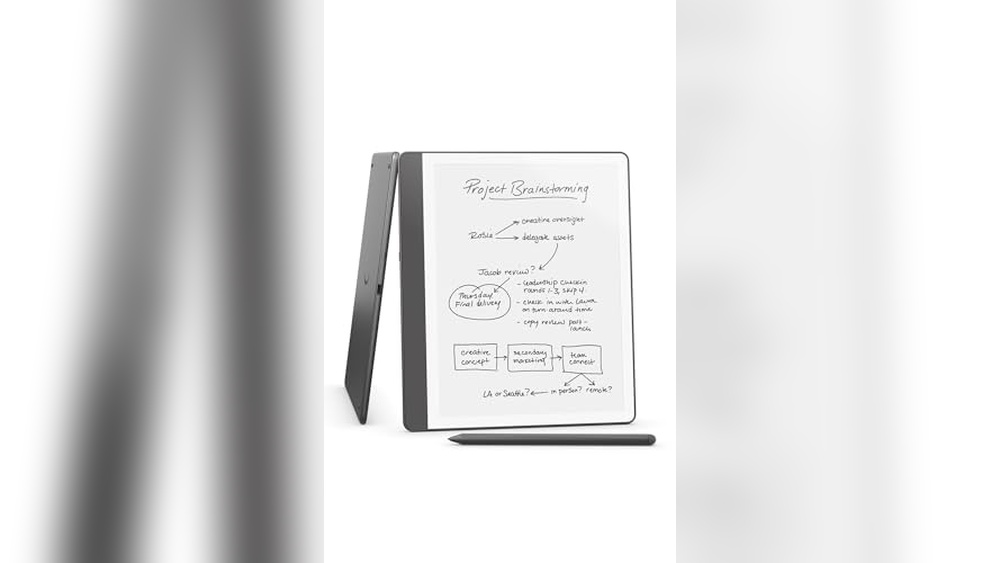
Electronic notepads and pens offer a modern way to write, draw, and organize ideas. They combine digital convenience with the feel of paper.
Choosing the best electronic notepad and pen can boost productivity and creativity. Devices like the Amazon Kindle Scribe and reMarkable Paper Pro provide smooth writing experiences with advanced features. Some come with pressure-sensitive pens, allowing precise drawing and note-taking. Others offer syncing options to save and share notes easily.
Whether for work, study, or art, these tools help keep ideas clear and accessible. This guide explores popular models to help find the right fit for your needs. Simple, portable, and efficient—electronic notepads make note-taking easier than ever.
Amazon Kindle Scribe

The Amazon Kindle Scribe (64GB) is perfect for avid readers, students, and professionals who want to combine reading, note-taking, and document management into one sleek device. If you are someone who values portability, organization, and the convenience of having your notes and books accessible anytime, this device is designed for you.
Pros:
- Generous 64GB storage for books, documents, and notes
- Includes a Premium Pen in Tungsten color for precise writing and drawing
- Features built-in AI notebook summarization to quickly review key points
- Lightweight and slim design with dimensions of 0.23 inches thickness and weighing only 0.95 pounds
- Seamlessly integrates notes, documents, and books all in one place
Cons:
- Higher price point compared to basic e-readers
- Limited to Amazon’s ecosystem which might restrict file compatibility
- Premium Pen may require occasional charging or replacement
The Amazon Kindle Scribe stands out with its remarkable ability to merge the functions of an e-reader and a digital notebook. Its large 64GB storage capacity allows users to store an extensive library of books alongside numerous documents and handwritten notes. The included Premium Pen offers a natural writing experience, making it ideal for annotating books or jotting down ideas during meetings or study sessions. This synergy of reading and note-taking enhances productivity and convenience for users who are constantly on the go.
Another standout feature is the built-in AI notebook summarization, which automatically condenses notes into key insights, saving time and improving information retention. The device’s slim and lightweight design ensures it is easy to carry throughout the day, fitting comfortably in bags or backpacks. Overall, the Kindle Scribe offers a premium, all-in-one solution for anyone looking to elevate their reading and note-taking experience with a single, smart device.
Xppen 3 In 1 Color Digital Notebook

The XPPen 3 in 1 Color Digital Notebook 10.95” is ideal for professionals, students, and creative individuals who want a versatile device for writing, reading, meetings, and study. If you are looking for a powerful and portable solution that combines the tactile experience of paper with digital convenience, this notebook is designed for you. It is perfect for those who value precision and efficiency in note-taking and digital art creation.
Pros:
- Features a 10.95” color display for clear, vibrant visuals
- Equipped with a battery-free X3 Pro pencil offering 16384 pressure levels for precise input
- Includes a 2 magnetic folio for protection and easy carrying
- Large storage capacity with 6+128GB memory for extensive note and file saving
- Lightweight and slim design (0.661 lbs, 0.2 inches thick) for portability
Cons:
- May have a learning curve for users unfamiliar with digital note-taking devices
- Limited to XP-PEN brand accessories and software for optimal use
- Screen size might be small for users who prefer larger display areas
The XPPen 3 in 1 Color Digital Notebook offers an innovative blend of digital technology and traditional note-taking. Its high-resolution color screen enhances the reading and writing experience, making it easier to review notes and sketches in vivid detail. The battery-free X3 Pro pencil with an impressive 16384 pressure levels allows for natural and accurate strokes, which benefits artists and note-takers who require precision. Additionally, its compact and lightweight design makes it highly portable, ideal for busy professionals and students on the go.
Beyond its core features, the device’s large storage capacity ensures users can save a significant number of notes, documents, and files without worrying about space constraints. The included magnetic folio protects the device while adding convenience for carrying it to meetings or classes. Overall, this digital notebook enhances productivity and creativity, making it a valuable tool for anyone looking to streamline their workflow in a modern and efficient way.
Remarkable Paper Pro Bundle

The reMarkable Paper Pro Bundle is ideal for professionals, students, and creatives who seek a seamless digital note-taking experience combined with the feel of real paper. Those who want to reduce their paper usage while maintaining the tactile sensation of writing will find this bundle especially beneficial.
Pros:
- Includes the 11.8” reMarkable Paper Tablet and Marker Plus Pen with Eraser for a complete writing solution
- Lightweight and slim design with a weight of only 1.16 pounds, making it highly portable
- Elegant gray color that looks professional and modern
- High-quality writing surface that mimics the feel of real paper
- Precise erasing functionality with the Marker Plus Pen’s eraser
Cons:
- Limited to the reMarkable ecosystem and apps
- Higher price point compared to traditional tablets or notebooks
- No color display, only grayscale rendering
The reMarkable Paper Pro Bundle offers a distinctive experience by combining the convenience of a digital device with the natural feel of writing on paper. Its 11.8-inch screen provides ample space for note-taking, sketching, and reading, making it ideal for meetings, lectures, and creative projects. The device’s lightweight and slim dimensions ensure that users can carry it effortlessly wherever they go.
Equipped with the Marker Plus Pen with Eraser, users enjoy precise input and easy correction, enhancing productivity and reducing frustration. The gray-colored design adds a sleek and professional aesthetic, suitable for both business and academic settings. Overall, the bundle delivers a focused, distraction-free writing experience tailored for those who value digital efficiency without sacrificing the tactile joy of pen and paper.
Remarkable Starter Bundle – Remarkable 2

The reMarkable Starter Bundle – reMarkable 2 is ideal for professionals, students, and creatives who seek a digital alternative to traditional paper without sacrificing the tactile writing experience. Those who want to efficiently take notes, sketch, or annotate documents with precision will find this 10.3” writing tablet an excellent tool to enhance productivity and creativity. It is perfect for individuals who prefer a distraction-free, paper-like interface over conventional tablets.
Pros:
- Paper-like writing experience with minimal latency
- Includes Marker Plus Pen with built-in eraser for seamless editing
- Lightweight and compact design in elegant gray color
- Large 10.3-inch display ideal for note-taking and sketching
- Durable build from the trusted reMarkable brand
Cons:
- Higher price point compared to regular tablets and e-readers
- Lacks full-color display, limiting multimedia use
- May require time to adapt to the digital writing interface
The reMarkable 2 tablet boasts a slim, lightweight design measuring just under 0.04 inches in height and weighing less than a pound, making it extremely portable for daily use. Its gray finish offers a professional and minimalist aesthetic. The standout feature is the ultra-responsive, high-friction display that mimics the feel of real paper, providing users with a natural writing and drawing experience. This helps reduce eye strain often caused by backlit screens and enhances focus during long note-taking or brainstorming sessions.
The bundle includes the Marker Plus Pen with a built-in eraser, allowing users to easily correct mistakes without interrupting their workflow. The pen’s precision and pressure sensitivity enable detailed sketches and handwriting. Furthermore, the device’s ability to convert handwritten notes into typed text and its cloud syncing capabilities make organization and sharing effortless. Overall, the reMarkable Starter Bundle is an excellent investment for those seeking a premium, distraction-free digital paper tablet to elevate their creative and professional tasks.
Penstar Enote 2 Paper Tablet Bundle
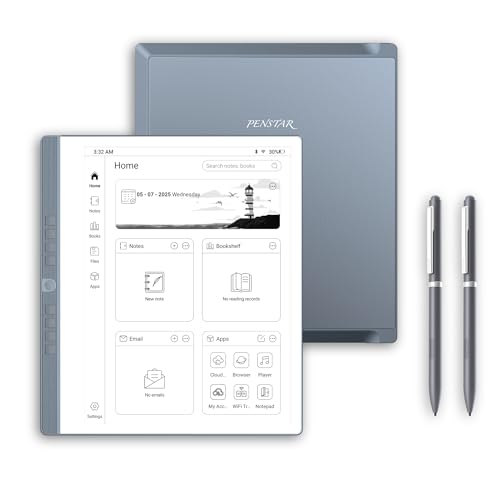
The Penstar eNote 2 Paper Tablet Bundle is ideal for professionals, students, and creative individuals who prefer a digital yet paper-like writing experience. If you are looking for a lightweight, portable device that combines the convenience of an electronic notebook with the natural feel of pen and paper, this 10.3-inch Pen Only Writing Tablet with a high-resolution 300 PPI E-Ink display is perfect for you. It’s especially suited for those who want to organize notes, annotate documents, or sketch ideas without the distractions of a traditional tablet.
Pros:
- High-resolution 300 PPI E-Ink screen offers clear and crisp display for comfortable reading and writing.
- Comes with two B5 pens for precise and natural writing experience.
- Lightweight design (2.13 pounds) and slim dimensions make it highly portable.
- 4G connectivity enables easy synchronization and cloud access.
- 128GB storage provides ample space for notes, documents, and drawings.
- Includes a folio cover for protection and easy carrying.
Cons:
- Limited color options, only available in gray.
- May have a learning curve for users new to digital note-taking devices.
- Does not support full tablet functionalities like apps and multimedia.
The Penstar eNote 2 Paper Tablet Bundle features a 10.3-inch e-ink display with a sharp 300 PPI resolution, designed to mimic the look and feel of real paper. This allows users to write and draw with exceptional clarity while reducing eye strain compared to traditional backlit screens. The included two B5 pens enhance the natural writing experience, providing smooth and accurate input that is ideal for note-taking, sketching, and annotating documents.
Additionally, the device’s 4G connectivity and generous 128GB storage capacity enable seamless synchronization and ample space for all your files and notes. Its slim and lightweight design, along with the protective folio cover, ensures that it can be carried anywhere with ease. This combination of features makes the Penstar eNote 2 an excellent digital notepad for anyone looking to improve productivity and organization without sacrificing the tactile pleasure of handwriting.
Mloas Smart Sync Pen

The Mloas Smart Sync Pen for Note Taking is ideal for students, professionals, and creatives who want to digitize their handwritten notes effortlessly. If you seek a seamless way to convert your manual note-taking into editable digital text, synchronize your work across devices, and enhance productivity with audio recording features, this digital notebook with pen is perfect for you.
Pros:
- Synchronized Handwriting enables real-time digital conversion of notes.
- OCR to Text feature allows easy editing and sharing of handwritten content.
- Offline Storage ensures your notes are saved securely without needing constant internet access.
- Audio Recording complements note-taking by capturing important discussions or lectures.
- Compatible with both iOS and Android devices for versatile use.
- Includes 160 pages of digital notebook space with a stylish gray finish.
Cons:
- May require initial setup time to sync with devices properly.
- Audio recording feature might drain battery faster during extended use.
- Limited to the 160 pages included; additional pages require replenishment or upgrades.
The Mloas Smart Sync Pen combines the traditional feel of handwriting with the convenience of digital technology. Its ability to synchronize handwriting instantly across devices means users can access their notes anytime and anywhere. The integration of OCR technology transforms handwritten notes into editable text, making it easier to organize, search, and share information efficiently.
Moreover, the built-in audio recording feature enhances the note-taking experience by allowing users to record lectures, meetings, or brainstorming sessions simultaneously. The offline storage capacity ensures that notes are saved without the need for continuous internet connectivity, providing reliability and peace of mind. Compatible with both iOS and Android, this smart pen offers broad usability for various users, making it a versatile tool for modern note-taking needs.
Ophayapen Smart Sync Pen

The Ophayapen Smart Sync Pen is ideal for students, professionals, and creatives who want to seamlessly combine traditional note-taking with digital technology. If you frequently jot down ideas, lecture notes, or meeting minutes on paper but wish to have them instantly digitized for easy access and sharing, this smart pen is perfect for you. Users looking for a reliable tool to enhance productivity and organization across devices will find this product highly beneficial.
Pros:
- Real-time syncing of handwritten notes to smartphone or iPad via the dedicated app.
- Converts handwritten text to digital text for easy editing and sharing.
- Supports both Android and iOS platforms, ensuring wide compatibility.
- Includes a notebook and writing board for a complete note-taking experience.
- Compact and lightweight design for portability.
Cons:
- Requires app installation and occasional syncing to maintain functionality.
- Learning curve for users unfamiliar with digital note-taking devices.
- Battery life may limit extended use without recharging.
The Ophayapen Smart Sync Pen offers a unique blend of traditional writing comfort and modern digital convenience. Its ability to sync notes in real-time means you never have to worry about losing important information or manually transferring handwritten data. This feature is especially useful for professionals attending meetings or students in lectures, allowing seamless organization and quick sharing of notes across devices.
Equipped with a notebook and a writing board, the pen enhances the writing experience while maintaining accuracy in digitization. The app’s capability to convert handwriting into editable text saves time and effort, making it easier to organize, store, and search your notes. With compatibility across major mobile operating systems like Android and iOS, the Ophayapen Smart Sync Pen ensures that users can integrate it into their existing digital workflows effortlessly.
Lcd Writing Tablet

The LCD Writing Tablet for Adult is perfect for professionals, students, and educators who need a convenient and eco-friendly way to jot down notes, brainstorm ideas, or teach lessons. Its compact size and portability make it ideal for those who require a digital notepad that can be easily carried between the office, classroom, or home study area. If you are looking for a lightweight, reusable drawing board that helps reduce paper waste, this device is an excellent choice.
Pros:
- Compact and lightweight design, measuring only 6.5 inches for easy portability.
- Reusable digital screen that helps reduce paper consumption.
- Clear and responsive full-screen writing surface suitable for drawing and note-taking.
- Simple one-button erase function for quick content clearing.
- Perfect for various uses including office work, studying, and teaching.
Cons:
- Screen size may be too small for extensive note-taking or detailed drawings.
- Limited color display, only available in black background with writing lines.
- Does not support saving or transferring notes digitally.
The 6.5 Inch Mini Full Screen Drawing Board by YOLIPULI offers a sleek and practical solution for everyday note-taking and sketching. Its ultra-thin profile, measuring just 0.1 inches in height, ensures it fits comfortably in your hand or bag, making it easy to carry wherever you go. The black color and sharp LCD screen provide a clear contrast for your handwriting or drawings, enhancing readability and user experience. This tablet is particularly useful for quick reminders, to-do lists, or teaching aids without the clutter of traditional paper.
Built by Shenzhen Zhuobielin Technology Co., Ltd., this digital notepad is designed with user convenience in mind. The responsive screen allows for smooth writing with a stylus or even a finger, and the single erase button lets you clear the screen instantly to start fresh. Although it lacks digital storage capabilities, its reusable nature makes it an eco-friendly alternative to paper notebooks. Whether you are taking notes during meetings, solving math problems, or explaining concepts to students, this LCD Writing Tablet serves as a versatile tool to boost productivity and creativity.
Xppen 10.95″ Standalone Drawing Tablet

The XPPen 10.95″ Standalone Drawing Tablet is ideal for artists, designers, and students who want a versatile and portable device for sketching, drawing, and note-taking. Those who seek a digital tool with high responsiveness and natural feel, combined with the convenience of an anti-glare screen and smooth performance, will find this tablet especially beneficial. It is perfect for creative professionals and hobbyists looking for a standalone device without the need for a computer connection.
Pros:
- 16K Pressure Sensitivity provides precise and natural drawing experience.
- Tilt Support allows for varied brush strokes and shading techniques.
- 90Hz Refresh Rate ensures smooth and lag-free interaction.
- Anti-Glare Screen enhances visibility even in bright environments.
- Runs on Android 14, offering wide compatibility with apps and seamless user interface.
- Lightweight design at just 3.55 pounds, making it highly portable.
Cons:
- Slightly heavier compared to some other standalone tablets in the market.
- Limited screen size of 10.95″ may feel small for users preferring larger working areas.
- May require some adjustment time for beginners to fully utilize tilt and pressure features.
The XPPen 10.95″ Standalone Drawing Tablet boasts advanced features like 16K pressure sensitivity and tilt support, allowing artists to create detailed and expressive artwork with ease. The high 90Hz refresh rate ensures that strokes appear smooth and natural, reducing lag and enhancing the overall drawing experience. Its anti-glare screen is designed to minimize reflections, providing clear visibility and reducing eye strain during long creative sessions.
Powered by Android 14, this tablet supports a wide range of creative and productivity applications, making it suitable not only for digital artists but also for students and professionals who need a reliable digital note-taking device. Its lightweight and compact build make it easy to carry, while the standalone nature of the device eliminates the hassle of connecting to external computers, offering true mobility and convenience for creative work on the go.
Huion H420 Osu Graphics Drawing Tablet

The HUION H420 OSU Graphics Drawing Tablet Signature Pad is ideal for beginners, students, and casual digital artists who are looking for an affordable and compact solution for drawing, signature capture, or OSU gameplay. If you need a lightweight and portable device with basic functionality and easy-to-use features, this tablet is perfect for you.
Pros:
- Compact and lightweight design for easy portability
- Comes with a digital stylus for precise input
- Includes 3 customizable express keys for enhanced productivity
- Compatible with various operating systems
- Affordable price point suitable for beginners
Cons:
- Small active drawing area may not suit advanced artists
- Limited pressure sensitivity compared to higher-end models
- Not ideal for professional graphic design or heavy use
The HUION H420 features a compact active area measuring 4.4 inches by 7.0 inches, making it highly portable and easy to carry anywhere. Its slim profile, with a height of only 0.3 inches and weighing approximately 0.28 pounds, allows users to work comfortably without bulky equipment. The inclusion of 3 express keys enables users to customize shortcuts, streamlining workflow and improving efficiency for digital art or signature tasks.
Equipped with a responsive digital stylus, the tablet offers smooth and accurate input, suitable for note-taking, casual drawing, and OSU gameplay. The device supports multiple operating systems, ensuring compatibility for a wide range of users. Overall, the HUION H420 provides a balance of portability, ease of use, and essential features, making it an excellent choice for those new to digital drawing or needing a simple signature pad.
Frequently Asked Questions
What Features Make Kindle Scribe Ideal For Note-taking?
Kindle Scribe offers 64GB storage and built-in AI notebook summarization. It combines notes, documents, and books in one device. The Premium Tungsten Pen enhances writing precision and comfort. This makes it perfect for students, professionals, and avid readers who value efficient note-taking.
How Does Xppen’s Color Digital Notebook Enhance Creativity?
XPPen 3 in 1 Color Digital Notebook features a 10. 95” screen and 16,384 pressure levels. Its battery-free X3 Pro Pencil and magnetic folio improve user experience. This tablet suits artists and note-takers seeking versatile tools for writing, drawing, and sketching.
What Benefits Does Remarkable Paper Pro Bundle Offer?
The reMarkable Paper Pro Bundle includes an 11. 8” tablet and Marker Plus Pen with eraser. It mimics paper texture for natural writing. Ideal for meetings and studies, it supports distraction-free digital note-taking with a premium feel.
How Does Penstar Enote 2 Improve Digital Note Storage?
Penstar eNote 2 offers a 10. 3-inch screen with 300 PPI and 128GB storage. It supports 4G connectivity and comes with folio cover and two pens. This device provides high-resolution reading and writing with ample space for notes and documents.
What Features Distinguish Mloas Smart Sync Pen For Notes?
Mloas Smart Sync Pen enables synchronized handwriting and OCR text conversion. It supports offline storage, audio recording, and note sharing across iOS and Android. This pen is perfect for users needing digital organization and easy content transfer.
Why Choose Xppen 10.95″ Standalone Drawing Tablet?
XPPen’s standalone tablet boasts 16K pressure sensitivity, tilt support, and 90Hz refresh rate. Its anti-glare screen and Android 14 OS provide smooth note-taking and drawing. This device suits creatives needing a portable and responsive digital notebook.
Conclusion
Choosing the best electronic notepad and pen depends on your needs and budget. Devices like the Amazon Kindle Scribe offer a seamless way to keep notes, books, and documents together. Tablets such as the reMarkable series provide a natural writing feel, ideal for meetings and study.
For artists and note-takers, options like XPPen and HUION offer pressure-sensitive pens and vibrant screens. Some smart pens, like Mloas and Ophayapen, sync your handwriting with digital devices for easy sharing and editing. Battery-free pens add convenience by reducing the need for charging.
Whether you want to read, write, draw, or record audio, there is a device that fits your style. These tools help organize ideas and boost productivity without paper clutter. Think about what features matter most, such as screen size, pen pressure levels, or app compatibility.
The right electronic notepad and pen can make note-taking simpler and more enjoyable every day.