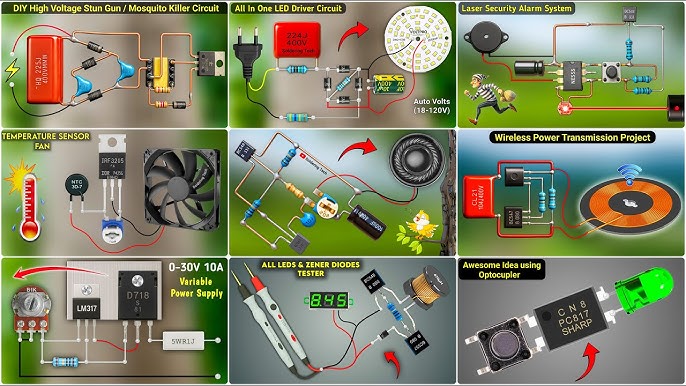
Are you ready to bring your ideas to life with your own hands? Starting electronic projects DIY can seem tricky at first, but it’s easier than you think.
Imagine building gadgets that work exactly how you want them to, learning new skills along the way, and feeling proud of every small success. In this guide, you’ll discover simple steps to get started, tools you actually need, and tips to avoid common mistakes.
Keep reading, and soon you’ll be creating your own amazing electronic projects with confidence.
Choosing Your First Project
Choosing your first electronic project can feel overwhelming. You want something that’s manageable but also sparks your curiosity. Picking the right project sets the tone for your DIY electronics journey and keeps you motivated to learn more.
Simple Projects For Beginners
Starting with simple projects helps build confidence. Consider making a basic LED circuit or a small light-sensitive alarm. These projects teach you about components like resistors, LEDs, and switches without too much complexity.
Another great beginner project is a blinking LED using a 555 timer IC. It’s straightforward and gives you hands-on experience with integrated circuits. Have you thought about what kind of device excites you the most? Starting with something you find interesting makes learning easier.
Tools And Materials Needed
You don’t need a full workshop to begin. Basic tools like a soldering iron, wire cutters, a multimeter, and a breadboard are essential. These tools let you experiment safely and check your work as you go.
For materials, start with a beginner’s electronics kit. These kits usually include resistors, capacitors, LEDs, transistors, and jumper wires. Having everything organized in one place saves time and reduces frustration.
- Soldering iron:For making permanent connections
- Breadboard:Lets you build circuits without soldering
- Multimeter:Measures voltage, current, and resistance
- Basic components:LEDs, resistors, capacitors, transistors
- Jumper wires:For easy connections on a breadboard
What project will you choose to start with? Think about what excites you and what tools you feel comfortable using. This focus will make your first project rewarding and fun.
Basic Electronics Concepts
Before diving into any DIY electronic project, grasping the basic electronics concepts sets a strong foundation. These concepts help you understand how different parts work together and how to troubleshoot issues effectively. Getting comfortable with these ideas will boost your confidence and make your projects more enjoyable.
Understanding Circuits
A circuit is a closed loop that allows electricity to flow, powering your devices. Imagine it as a path where electrons travel from a power source, through various components, and back to the source. Without a complete circuit, your project won’t work.
Circuits come in different types:
- Series Circuits:Components are connected one after another, so the current flows through each part sequentially.
- Parallel Circuits:Components are connected alongside each other, allowing current to split and flow through multiple paths.
Knowing the difference helps you decide how to connect parts for your project’s needs. Have you ever wondered why some devices stop working when one component fails? That’s often because of series circuits.
Common Components Explained
Starting with a few basic components can make your first project manageable and fun. Here are some you’ll frequently use:
| Component | Function | Example Use |
|---|---|---|
| Resistor | Limits the flow of electric current | Protects LEDs from burning out |
| Capacitor | Stores and releases electrical energy | Smooths out voltage fluctuations |
| LED (Light Emitting Diode) | Emits light when current passes through | Indicator lights on devices |
| Transistor | Amplifies or switches electrical signals | Controls power to motors or speakers |
Each component plays a role like a player in a team. Understanding what they do lets you mix and match to build what you imagine. What simple component would you start experimenting with first?
Essential Tools For Diy Electronics
Starting electronic projects at home requires the right tools. Essential tools help you build circuits safely and accurately. Choosing good tools saves time and avoids mistakes.
Basic tools let you work on simple and complex projects. Some tools are for joining parts, others for testing and measuring. Having these tools ready makes your DIY electronics fun and successful.
Soldering Equipment
Soldering is key for connecting electronic parts. Good soldering tools make clean and strong joints. A soldering iron with adjustable temperature works best for various components.
- Soldering iron with a fine tip for precision
- Solder wire, preferably lead-free for safety
- Helping hands or a soldering stand to hold parts steady
- Desoldering pump or wick to fix mistakes
- Heat-resistant mat to protect your workspace
These tools help you join wires and components firmly. Proper soldering prevents circuit problems and increases durability.
Measuring Instruments
Measuring tools check voltage, current, and resistance in your circuits. They ensure your project works correctly and safely. A multimeter is the most useful measuring instrument for beginners.
- Digital multimeter to measure voltage, current, and resistance
- Oscilloscope for viewing electrical signals (optional for advanced projects)
- Logic analyzer to test digital signals (useful for microcontroller projects)
These instruments help find errors and confirm connections. Accurate measurements improve project success and reduce damage risks.
Step-by-step Project Building
Building an electronic project yourself can feel overwhelming at first. But breaking the process into clear, manageable steps makes it easier and more enjoyable. Each phase teaches you important skills, from understanding the design to making sure everything works correctly.
Reading Schematics
Start by carefully studying the schematic diagram. It’s like the blueprint for your project, showing how every part connects. Don’t rush—take your time to identify symbols and lines representing components and connections.
If you see unfamiliar symbols, look them up or ask in online forums. Recognizing parts like resistors, capacitors, and transistors will make assembling simpler. Have you ever tried reading a schematic and felt lost? Try sketching the circuit on paper to visualize it better.
Assembling Components
Gather all the components listed in your schematic before you start. Lay them out on your workspace to avoid confusion. Use a breadboard for your first builds—it allows easy adjustments without soldering.
Follow the schematic closely while placing components. Double-check orientation for parts like LEDs and diodes; getting these wrong can cause your circuit to fail. A tip from my first project: label wires and parts to keep track of connections easily.
Testing And Troubleshooting
Once assembled, it’s time to test your project. Power it up carefully and observe if it behaves as expected. If it doesn’t work, don’t get discouraged—troubleshooting is part of learning.
Check connections, component placement, and polarity first. Use a multimeter to measure voltages and continuity. Ask yourself, “Could any part be loose or incorrectly placed?” Systematic testing will help you find and fix issues quickly.
Safety Tips For Diy Electronics
Safety is the top priority in any DIY electronics project. Taking the right precautions can prevent accidents and injuries. Small mistakes may cause serious harm or damage to your components. Follow these safety tips to protect yourself and your workspace while building electronic projects.
Handling Tools Safely
Use tools only for their intended purpose. Always hold tools firmly and keep fingers away from sharp edges. Keep your workspace clean and organized to avoid accidents. Store tools in a safe place after use. Wear protective gear like safety glasses to protect your eyes from flying debris. Be cautious with hot tools such as soldering irons. Let them cool down before putting them away. Avoid distractions while working with tools to maintain focus.
Electrical Precautions
Always disconnect power before starting any work on circuits. Use insulated tools to reduce the risk of electric shock. Check wires and components for damage before use. Never work on live circuits unless you are trained. Use a multimeter to verify voltage levels safely. Keep liquids away from your work area to prevent short circuits. Work in a well-ventilated space to avoid inhaling fumes from solder or other chemicals. Understand the power ratings of your components to avoid overloads and fires.

Credit: www.circuits-diy.com
Resources For Beginners
Starting electronic projects can feel overwhelming without the right resources. Finding beginner-friendly materials makes a huge difference in how quickly you learn and enjoy the process. Here are some of the best resources to help you build your skills and confidence.
Online Tutorials And Communities
The internet is full of step-by-step tutorials designed for beginners. Websites like Instructables and Adafruit offer clear instructions and project ideas that you can follow at your own pace.
Joining online communities such as Reddit’s r/arduino or the Electronics Stack Exchange can provide immediate help when you get stuck. Have you ever had a question that seemed too simple to ask? These forums encourage beginners and experts to share advice without judgment.
Watching YouTube channels like GreatScott! or EEVblog can also give you visual guidance and explain complex concepts in easy terms. Watching someone build a circuit can make your own project less intimidating.
Recommended Books And Kits
Books like “Make: Electronics” by Charles Platt offer hands-on experiments with detailed explanations. This book helped me understand how components work together, which made my projects more successful.
Starter kits from brands like Arduino and Raspberry Pi come with all necessary parts and instruction booklets. These kits save you time searching for components and provide ready-to-build projects that teach you fundamentals.
Consider kits that include a variety of sensors and modules so you can experiment freely. Do you prefer learning by trial and error? Kits let you test ideas without worrying about buying extra parts.
Expanding Your Skills
Expanding your skills in electronic projects opens new doors to creativity and learning. It pushes your limits beyond simple circuits. This growth helps you build more complex and useful devices.
As you gain confidence, you can explore advanced ideas. These ideas challenge your knowledge and improve your problem-solving skills. Combining electronics with programming creates exciting possibilities.
Advanced Projects To Try
Try building projects that use sensors and microcontrollers. These projects teach you how to collect and use data from the environment.
- Smart home devices like automated lights or fans
- Robots that follow lines or avoid obstacles
- Weather stations measuring temperature and humidity
- Wireless remote controls and simple drones
Each project adds new skills. You learn to connect parts, write code, and debug problems. These challenges make your skills stronger.
Learning Programming For Electronics
Programming is key to controlling electronic projects. It lets you tell devices what to do step-by-step.
Start with easy languages like Arduino or Python. These languages have many tutorials and examples online. They help you write simple commands and see results fast.
- Learn basic syntax and commands first
- Practice writing code to turn LEDs on and off
- Move to reading sensor data and making decisions
- Try combining multiple inputs to create complex behaviors
Programming skills grow with practice and patience. This knowledge lets you build smart, interactive projects. It expands your ability to create and innovate in electronics.

Credit: www.youtube.com

Credit: www.youtube.com
Frequently Asked Questions
How Do I Choose An Electronic Project?
Start by identifying your interests and skill level. Research trending projects for inspiration. Ensure you have the required tools and components. Select a project that challenges you but is feasible. Opt for projects with available tutorials or community support for guidance.
This approach ensures a rewarding DIY experience.
What Tools Are Essential For Beginners?
For beginners, essential tools include a soldering iron, multimeter, and wire cutters. A breadboard and jumper wires are also crucial. Don’t forget a small screwdriver set and safety goggles. These tools will help you build and troubleshoot basic electronic projects effectively, ensuring a smooth learning curve.
Where Can I Find Electronic Project Ideas?
Explore online platforms like Instructables, Arduino Project Hub, and YouTube tutorials. Join forums like Reddit or electronics communities. Books and magazines on electronics also provide inspiration. Engaging with these resources helps you discover diverse DIY electronic projects suitable for various skill levels and interests.
How Do I Ensure Project Safety?
Always work in a well-ventilated area and use safety gear like goggles. Double-check connections to prevent short circuits. Keep flammable materials away and follow voltage guidelines. Use insulated tools and never work on live circuits. Adhering to safety protocols minimizes risks and ensures a safe DIY experience.
Conclusion
Starting electronic projects DIY is fun and rewarding. Begin with simple kits to build your skills. Use clear instructions and take time to learn each step. Practice safety and double-check your connections. Mistakes happen; they help you grow. Keep experimenting and enjoy solving problems.
Soon, you will create projects you can be proud of. Stay curious and keep building. Your DIY journey starts now.
Leave a Reply