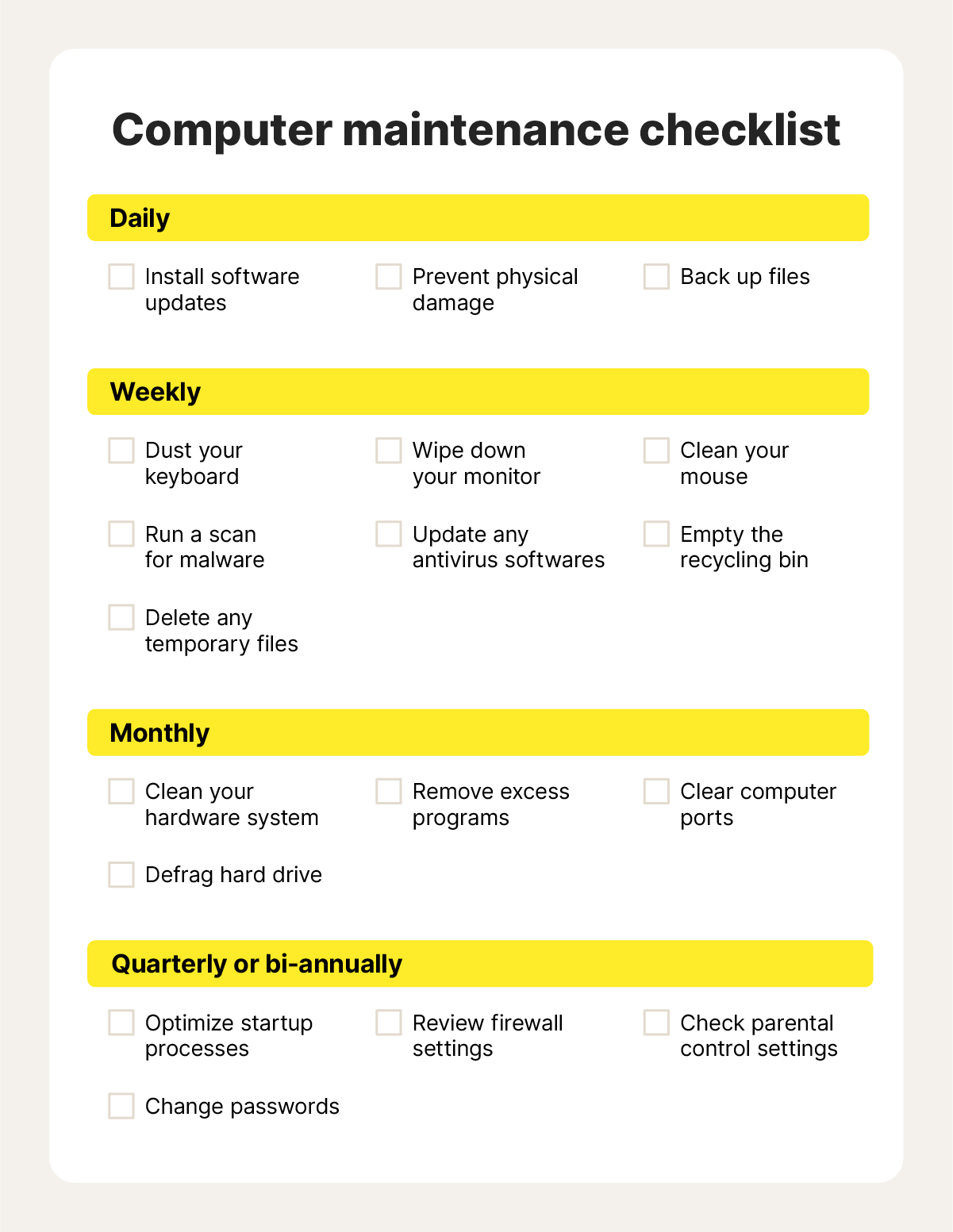
Have you ever wondered why your computer or smartphone sometimes slows down or stops working properly? The secret often lies in something called system maintenance.
Understanding system maintenance can save you time, frustration, and even money by keeping your devices running smoothly. You’ll discover what system maintenance really means, why it’s important for you, and simple steps you can take to protect your technology. Ready to unlock the key to a faster, healthier system?
Let’s dive in!

Credit: safetyculture.com
Importance Of System Maintenance
System maintenance is essential for smooth and reliable operations. It keeps hardware and software working efficiently. Without regular upkeep, systems can fail or slow down. This causes frustration and lost productivity. Proper maintenance helps avoid these problems.
It also protects data and prevents security breaches. Systems that are well maintained last longer and cost less to repair. Investing time in maintenance saves money and effort later.
Enhancing System Performance
Regular maintenance ensures systems run quickly and smoothly. It removes unnecessary files and fixes errors. This reduces crashes and downtime. Users experience better speed and response.
Preventing Security Risks
System maintenance includes updating software and security patches. These updates block viruses and hackers. Keeping systems safe protects sensitive information. It prevents costly data loss or theft.
Extending Hardware Lifespan
Cleaning and checking hardware parts prevent damage. Dust and wear can cause breakdowns. Proper care makes devices last longer. This saves money on replacements.
Reducing Unexpected Failures
Routine checks find problems early. Fixing small issues avoids big failures. It reduces emergency repairs and downtime. Systems stay reliable and available for use.
Saving Costs Over Time
Regular maintenance lowers repair and replacement costs. It improves energy efficiency, reducing bills. Avoiding downtime also protects business income. Maintenance is a smart investment.

Credit: medium.com
Types Of System Maintenance
System maintenance is essential to keep software and hardware working well. It involves different types of activities to ensure systems run smoothly and last longer. Each type of maintenance focuses on specific goals and helps solve various problems.
Understanding the types of system maintenance helps businesses plan better and avoid costly downtime. These types include corrective, preventive, perfective, and adaptive maintenance. Each plays a unique role in system care.
Corrective Maintenance
Corrective maintenance fixes errors or faults found in a system. It happens after a problem occurs. The goal is to restore the system to normal working condition. This type often involves bug fixes and repairs.
Preventive Maintenance
Preventive maintenance stops problems before they happen. It includes regular checks and updates to avoid failures. Tasks like cleaning, updating software, and hardware checks fall under this type. It helps extend system life and reduce unexpected breakdowns.
Perfective Maintenance
Perfective maintenance improves system performance and features. It focuses on enhancing user experience and system efficiency. This type includes adding new functions or refining existing ones. It helps keep the system relevant to users’ needs.
Adaptive Maintenance
Adaptive maintenance adjusts systems to new environments or requirements. Changes in hardware, software, or regulations often require this. It ensures the system stays compatible and compliant. This type helps systems evolve with changing conditions.
Key Practices For Effective Maintenance
Effective system maintenance isn’t just about fixing issues after they appear—it’s about preventing problems before they disrupt your work. You can keep your system running smoothly by sticking to some key practices that protect your data, improve performance, and enhance security. Paying attention to these areas will save you time and headaches in the long run.
Regular Updates
Keeping your system updated is crucial. Updates often include fixes for bugs, performance improvements, and important security patches. Ignoring updates leaves your system vulnerable to threats and can cause compatibility issues with new software.
Set your system to update automatically if possible. If not, schedule regular check-ins to install the latest updates. This habit keeps your system running efficiently and reduces the risk of unexpected crashes.
System Backups
Backing up your data regularly is one of the smartest moves you can make. It protects you from data loss due to hardware failure, accidental deletion, or malware attacks. Imagine losing all your files and not having a backup—it’s a nightmare no one wants to face.
Use reliable backup solutions like cloud storage or external drives. Make sure backups happen consistently and test restoring files occasionally. This ensures your backup plan actually works when you need it most.
Security Checks
Security checks are more than just running antivirus scans. They include reviewing system permissions, monitoring for unusual activity, and ensuring your firewall is active. Overlooking these can leave gaps that hackers exploit.
Regularly audit your system’s security settings and update passwords. Think about your system as a house—would you leave the front door unlocked? Security checks help keep your digital space safe and give you peace of mind.
Challenges In System Maintenance
System maintenance is crucial for keeping your technology running smoothly, but it comes with its own set of hurdles. Managing ongoing updates, troubleshooting, and ensuring minimal disruption can be tricky. Understanding these challenges helps you prepare better and avoid common pitfalls.
Resource Allocation
Allocating the right resources for system maintenance can be a balancing act. You need skilled personnel, time, and the right tools, but these are often limited. Sometimes, you might find yourself juggling urgent fixes while regular maintenance gets delayed, leading to bigger problems later.
Think about the last time your system went down unexpectedly. Was your team stretched too thin? Ensuring that you have dedicated resources for maintenance tasks can prevent such crises and keep your system healthy.
Cost Management
Maintenance costs can quickly add up, especially if your systems are complex or outdated. Budgeting for regular updates, emergency repairs, and potential hardware replacements requires careful planning.
Have you ever faced unexpected expenses from a system failure? These surprise costs can disrupt your financial plans. Tracking maintenance expenses closely and investing in preventive care can save money in the long run.
Downtime Issues
Downtime during maintenance can impact productivity and frustrate users. Scheduling updates without interrupting business operations is a tough task, especially for systems that need to run 24/7.
Consider how often your system needs to be offline for maintenance. Could you use techniques like rolling updates or off-peak scheduling to reduce downtime? Minimizing disruption keeps your users happy and your business running smoothly.
Tools And Technologies
System maintenance relies heavily on the right tools and technologies to keep everything running smoothly. These tools help you automate routine tasks, monitor system health, and manage updates without constant manual effort. Choosing the right solutions can save you time and reduce errors in your maintenance process.
Automation Tools
Automation tools take repetitive tasks off your hands, allowing you to focus on more critical issues. They can schedule backups, clean up logs, and even restart services automatically when problems occur.
Think about how much time you spend on routine checks—automation can cut that down drastically. Tools like Ansible, Puppet, or Jenkins help you create workflows that run without your intervention, reducing human error and speeding up maintenance.
Monitoring Software
Monitoring software keeps an eye on your system’s performance and alerts you when something goes wrong. It tracks CPU usage, memory, disk space, and network activity in real time.
Have you ever missed a critical failure because you weren’t watching the system? With tools like Nagios, Zabbix, or Datadog, you get instant notifications and dashboards that show you exactly where the problem lies. This helps you act quickly before small issues turn into big outages.
Patch Management Solutions
Keeping your software updated is vital for security and stability. Patch management solutions help you organize, test, and deploy updates across your systems efficiently.
Without a proper patching tool, you risk leaving vulnerabilities open or causing downtime with untested updates. Solutions like WSUS, ManageEngine, or SolarWinds automate the update process and provide reports to track compliance, so you can be confident your systems stay protected.

Credit: safetyculture.com
Future Trends In System Maintenance
The future of system maintenance is shaping up to be smarter, faster, and more efficient. As technology evolves, so do the tools and methods that keep systems running smoothly. Understanding these emerging trends can help you stay ahead and make informed decisions about maintaining your own systems.
Ai And Machine Learning
Artificial intelligence and machine learning are changing how maintenance is handled. These technologies can analyze vast amounts of data to detect issues before they become problems. Imagine a system that learns from past failures and adapts maintenance schedules automatically—that’s what AI offers.
Using AI, you can reduce downtime and extend the lifespan of your equipment. It’s not just about fixing issues faster; it’s about preventing them altogether.
Predictive Analytics
Predictive analytics goes hand in hand with AI but focuses specifically on forecasting future failures. By examining trends and patterns in system data, it predicts when a component might fail. This allows you to plan maintenance exactly when it’s needed, saving both time and money.
Have you ever faced unexpected system crashes? Predictive analytics can help you avoid that surprise by giving you a heads-up.
Cloud-based Solutions
Cloud technology is making system maintenance more accessible and collaborative. Instead of relying on local servers, maintenance data and tools are hosted online. This means you can monitor and manage systems from anywhere, often in real time.
Cloud solutions also make it easier to update software and share information across teams. If you manage multiple locations, this trend could simplify your entire maintenance process.
Frequently Asked Questions
What Is System Maintenance In Computing?
System maintenance involves regular updates and checks to ensure software and hardware function properly. It prevents errors, improves performance, and extends system lifespan.
Why Is System Maintenance Important For Businesses?
System maintenance keeps business operations smooth by preventing downtime, securing data, and enhancing system efficiency. It reduces repair costs and boosts productivity.
How Often Should System Maintenance Be Performed?
System maintenance should be done regularly, typically monthly or quarterly. Frequency depends on system complexity, usage, and critical business needs.
What Are Common System Maintenance Tasks?
Common tasks include software updates, hardware checks, data backups, virus scans, and system optimization. These keep systems secure and efficient.
Conclusion
System maintenance keeps devices running smoothly and safely. It helps prevent problems before they start. Regular checks improve performance and extend device life. Ignoring maintenance can cause slowdowns and failures. Simple tasks like updates and cleaning make a big difference.
Everyone using technology should know basic maintenance steps. Staying proactive saves time and money in the long run. Keep your systems healthy to avoid unexpected issues. System maintenance is a small effort with big rewards.
Leave a Reply