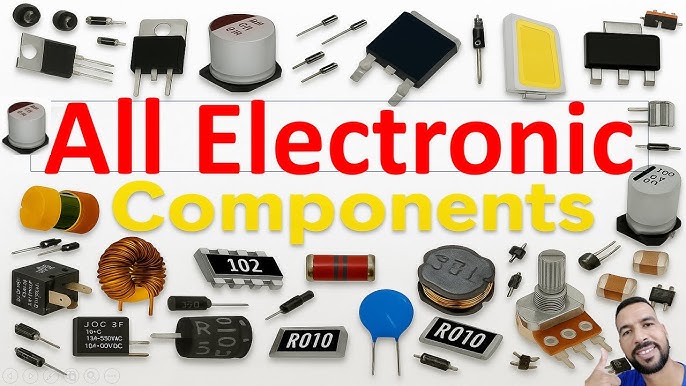
Which electronic component should you choose for your next project? If you’ve ever felt overwhelmed by the endless options and technical jargon, you’re not alone.
Picking the right part can make all the difference between success and frustration. This guide will help you cut through the confusion and find the perfect component that fits your needs. By the end, you’ll feel confident and ready to bring your ideas to life.
Keep reading to unlock the secrets that experts use when deciding which electronic component is best for you.
Understanding Electronic Components
Understanding electronic components is key to building or repairing any device you use daily. These small parts work together to make your gadgets function. Knowing what each component does can save you time and help you troubleshoot problems effectively.
Basic Types And Functions
Electronic components come in various types, each serving a unique purpose. Here are some common ones you’ll encounter:
- Resistors:Control the flow of electric current by adding resistance.
- Capacitors:Store and release electrical energy when needed.
- Diodes:Allow current to flow in only one direction, protecting circuits.
- Transistors:Act as switches or amplifiers in circuits.
- Inductors:Store energy in a magnetic field when current passes through.
Think about how a transistor in your phone’s amplifier boosts sound signals. Without it, your music would be barely audible.
Importance In Modern Electronics
Every electronic device you own depends on these components working perfectly together. From simple toys to complex computers, these parts form the building blocks of technology.
Have you ever wondered why your smartphone battery lasts longer after a software update? Sometimes, it’s because the device manages power better through its electronic components.
Understanding how these components function can help you make smarter choices when buying or fixing gadgets. It also opens up possibilities for creating your own projects, turning ideas into reality.

Credit: www.electronicsandyou.com
Resistors And Capacitors
Resistors and capacitors are fundamental components in almost every electronic circuit you’ll encounter. They control current flow and store energy, shaping how devices work. Understanding their types and how to choose the right one can save you from frustrating troubleshooting and optimize your projects effectively.
Types Of Resistors
Resistors come in various forms, each designed for specific functions. The most common types include:
- Carbon Film Resistors:Affordable and widely used for general purposes.
- Metal Film Resistors:Offer higher precision and stability, ideal for sensitive circuits.
- Wirewound Resistors:Handle high power and are often found in power supplies.
- Variable Resistors (Potentiometers):Allow you to adjust resistance manually, perfect for tuning circuits.
If you’ve ever struggled with a circuit that overheated, it might be because the resistor type wasn’t suitable for the power load. Choosing a wirewound resistor could prevent that issue.
Capacitor Varieties
Capacitors store and release electrical energy, but not all capacitors work the same way. Common varieties include:
- Ceramic Capacitors:Small, inexpensive, and great for high-frequency applications.
- Electrolytic Capacitors:Offer high capacitance but are polarized, meaning you must connect them correctly.
- Tantalum Capacitors:More stable and reliable than electrolytic but costlier.
- Film Capacitors:Known for low loss and high stability, often used in audio circuits.
Ever wondered why some capacitors fail quickly in your projects? Using a capacitor with the wrong voltage rating or type can cause premature failure. Always check the specs before adding one to your circuit.
Choosing The Right Resistor And Capacitor
Selecting the right component depends on your circuit’s needs and operating conditions. Ask yourself:
- What voltage and current will the component handle?
- Do I need precision or just a general-purpose part?
- Will the component face temperature extremes or high power?
In my experience, starting with a resistor or capacitor that matches your design specs closely avoids headaches later. For example, using a metal film resistor for a sensitive sensor circuit reduces noise and improves accuracy.
Think about where your circuit will be used and what it must achieve. Your choice of resistors and capacitors can make the difference between a reliable device and a frustrating project.
Diodes And Transistors
Diodes and transistors are fundamental building blocks in electronics. They control the flow of electricity in circuits, acting as gates and amplifiers. Understanding their types and how to select the right ones can make a huge difference in your project’s success.
Common Diode Types
Diodes allow current to flow in one direction only, protecting circuits from damage. Here are some popular types you’ll encounter:
- Rectifier Diodes:Used to convert AC to DC, essential in power supplies.
- Zener Diodes:Designed to regulate voltage, perfect for voltage stabilization.
- Light Emitting Diodes (LEDs):Emit light when current passes through; common in indicators and displays.
- Schottky Diodes:Known for low forward voltage drop, useful in high-speed switching.
Choosing the right diode depends on your circuit’s voltage, current, and speed requirements. Ever tried using a regular diode where a Zener was needed? It usually leads to frustration and failure.
Transistor Variants
Transistors work as switches or amplifiers in your circuit. You’ll mainly find two types:
- Bipolar Junction Transistors (BJTs):Control current through base, collector, and emitter terminals.
- Field Effect Transistors (FETs):Use voltage on the gate to control current flow; include MOSFETs, which are popular for power applications.
Each type suits different tasks—BJTs are great for analog signals, while FETs excel in digital and power circuits. Selecting the wrong transistor can cause overheating or poor performance.
Selecting Diodes And Transistors For Your Project
Start by identifying your circuit’s voltage, current, and switching speed needs. Check the datasheets for maximum ratings and characteristic curves.
- For diodes, consider forward voltage drop and reverse recovery time.
- For transistors, focus on gain, maximum current, and switching speed.
Remember, buying components with a margin above your circuit’s requirements improves reliability. Have you ever faced a project fail because a transistor couldn’t handle the load? Learning from that experience is key.
Integrated Circuits
Integrated circuits (ICs) are the heart of modern electronics. They combine numerous tiny components like transistors and resistors into a single chip. This miniaturization makes devices faster, smaller, and more reliable.
Analog Vs Digital Ics
Analog ICs handle continuous signals. They are used in devices like amplifiers and radio receivers. These circuits process real-world signals such as sound and light.
Digital ICs work with discrete signals, mainly zeros and ones. They power your computer’s processor and memory. You rely on digital ICs for fast, precise data processing.
Which type fits your project depends on whether you need to process real-world inputs or perform calculations. Sometimes, you might need both in one system.
Ic Applications
Integrated circuits show up everywhere—from your smartphone to your car’s engine control unit. They make gadgets smarter and more energy-efficient. Think about how your TV remote or fitness tracker depends on ICs.
Here are some common areas where ICs shine:
- Consumer electronics like smartphones and tablets
- Automotive systems such as airbags and fuel injection
- Medical devices including pacemakers and imaging equipment
- Industrial automation and robotics
Have you ever wondered how your smartwatch tracks your heartbeat so accurately? That’s the power of specialized ICs at work.
Evaluating Integrated Circuits For Use
Choosing the right IC means looking beyond just the price tag. Check the power consumption and speed to match your device’s needs. Size and packaging also matter, especially for portable gadgets.
Reliability is crucial. Look for datasheets and user reviews to understand how an IC performs under real conditions. Sometimes, a slightly more expensive chip saves you headaches down the line.
Ask yourself: Does the IC support the voltage levels and interfaces your project requires? Can it handle the temperature range where it will operate? These questions help avoid costly mistakes.
Sensors And Actuators
Sensors and actuators are the backbone of countless electronic systems you interact with daily. Sensors gather information from the environment, while actuators take action based on that data. Understanding how these components work together can help you design smarter, more responsive devices.
Sensor Types
Sensors come in many forms, each designed to detect specific physical or chemical changes. Some common types include:
- Temperature sensors:Measure heat levels, useful in thermostats and weather stations.
- Proximity sensors:Detect the presence or absence of objects, often used in smartphones and automotive safety systems.
- Light sensors:Measure ambient light, helping devices adjust screen brightness automatically.
- Motion sensors:Track movement, essential for security systems and gaming controllers.
Have you ever wondered how your phone knows when to turn off the screen during a call? That’s a proximity sensor at work.
Understanding Actuators
Actuators convert electrical signals into physical movement or action. They are the muscles behind robotic arms, automatic doors, and even your car’s fuel injection system.
Common actuator types include:
- Motors:Create rotational or linear motion.
- Solenoids:Use electromagnetic force to push or pull.
- Pneumatic actuators:Use compressed air to move parts.
- Hydraulic actuators:Rely on fluid pressure for heavy-duty tasks.
Think about how your printer moves the paper precisely—actuators make that happen seamlessly.
Matching Sensors And Actuators To Applications
Choosing the right sensor and actuator depends on the specific needs of your project. You want sensors that provide accurate data and actuators that respond quickly and reliably.
Consider these practical tips:
- Match sensor sensitivity with the environment to avoid false readings.
- Ensure actuators can handle the required load and speed.
- Look for compatibility in voltage and communication protocols.
For example, pairing a motion sensor with a motor can automate a door to open when someone approaches. Have you thought about what kind of sensor and actuator combo could improve your daily routine?
Microcontrollers And Microprocessors
Microcontrollers and microprocessors are the brains behind many electronic devices you use daily. They control everything from your microwave to your smartphone, making complex tasks simple and efficient. Understanding their differences and uses will help you choose the right one for your projects or products.
Differences Between Microcontrollers And Microprocessors
Microcontrollers are compact integrated circuits designed to perform specific tasks. They include a processor, memory, and input/output peripherals all on one chip.
Microprocessors, on the other hand, are more powerful chips that require external components like memory and input/output devices to function. They focus on processing power rather than integration.
| Feature | Microcontroller | Microprocessor |
|---|---|---|
| Integration | Processor, memory, and peripherals on one chip | Processor only; requires external components |
| Processing Power | Lower; designed for specific control tasks | Higher; designed for complex computations |
| Power Consumption | Low, suitable for battery-powered devices | Higher, often requires more cooling |
| Cost | Generally cheaper | Typically more expensive |
Common Uses In Electronics
Microcontrollers often power everyday gadgets like home appliances, toys, and automotive systems. Their low cost and integrated design make them ideal for dedicated control tasks.
Microprocessors are found in devices requiring high computational power, such as computers, smartphones, and gaming consoles. They handle complex operating systems and multitasking environments.
- Microcontrollers:Thermostats, remote controls, wearable fitness devices.
- Microprocessors:Laptops, tablets, servers.
Selecting The Right Microcontroller Or Microprocessor
Ask yourself what the primary function of your device is. Does it need to perform a single, repetitive task, or will it run complex software?
Consider power consumption, cost, and size. For battery-powered or compact devices, microcontrollers usually make more sense.
If your project involves heavy data processing or multitasking, a microprocessor might be the better choice. Don’t forget to check community support and available development tools—they can save you time and headaches.
Power Supplies And Batteries
Power supplies and batteries are the heart of any electronic device. Without reliable power sources, even the most advanced components won’t function properly. Understanding the types available and how to choose the right one can save you from costly mistakes and improve your project’s performance.
Types Of Power Supplies
There are several types of power supplies you can use, each suited for different needs. Linear power supplies provide clean, stable voltage but tend to be bulky and inefficient. Switching power supplies are more compact and efficient but can introduce electrical noise.
Additionally, some devices require regulated power supplies that maintain consistent voltage despite load changes. Others might work with unregulated supplies, saving cost but risking instability. Have you checked if your device needs a specific power supply type to work safely?
Battery Options And Considerations
Batteries come in many shapes and chemistries, from alkaline and NiMH to lithium-ion and lithium-polymer. Each type offers different voltages, capacities, and recharge cycles. Lithium-ion batteries, for instance, deliver high energy density but need careful handling and protection circuits.
Think about your project’s size, weight, and runtime requirements before choosing a battery. Would a rechargeable battery make your device more user-friendly? Or is a disposable battery better for occasional use? Your choice impacts not just performance but also safety and cost.
Choosing Adequate Power Solutions
Matching your power supply or battery to the device’s voltage and current needs is critical. Too little power and the device won’t work; too much can damage components. Use datasheets to find exact voltage and current ratings and add a margin for safety.
Consider environmental factors like temperature and humidity, which affect battery life and power supply efficiency. Have you tested your power setup under real-world conditions? This simple step can prevent unexpected failures and improve reliability.
Connectors And Switches
Connectors and switches are key parts in electronic devices. They link circuits and control the flow of electricity. Without them, devices would not work properly. Choosing the right type helps keep devices safe and functional.
Varieties Of Connectors
Connectors come in many shapes and sizes. Each fits a specific need or device. Common types include:
- Pin connectors for small circuit boards
- USB connectors for data and power
- Coaxial connectors for TV and radio signals
- Terminal blocks for easy wire connections
- Ribbon connectors for flat cables
Materials vary from plastic to metal, affecting durability and conductivity.
Types Of Switches
Switches control electrical flow by opening or closing circuits. Main types are:
- Toggle switches that flip up or down
- Push-button switches activated by pressing
- Slide switches moved back and forth
- Rotary switches turned to different positions
- Touch switches activated by finger touch
Each type suits different devices and user needs.
Selecting Connectors And Switches For Reliability
Reliability means parts work well over time. Choose connectors and switches based on:
- Material quality to resist wear and corrosion
- Contact design for stable electrical connection
- Environmental resistance against moisture and dust
- Current and voltage ratings for safe operation
- Ease of installation and replacement
Testing parts before use ensures long-lasting performance.
Designing Circuits With Electronic Components
Designing circuits with electronic components is a key skill in electronics. It involves creating pathways for electrical signals to flow and perform tasks. A well-designed circuit ensures devices work reliably and efficiently. Understanding the basics and tools helps beginners and experts build better circuits.
Understanding Circuit Design Basics
Every circuit has components like resistors, capacitors, and transistors. These parts control the flow of electricity and signal behavior. Circuits follow simple rules, such as Ohm’s law, to manage voltage and current. Drawing a circuit diagram is the first step in design. It shows how parts connect and interact.
Knowing the function of each component helps in choosing the right ones. Circuits can be analog or digital, depending on the signals used. Safety is important; circuits need protection from overloads and shorts.
Tools For Circuit Design
Software tools make circuit design easier. Programs like Eagle, KiCad, and Fritzing allow drawing and testing circuits virtually. They help spot errors before building physical circuits.
- Multimeter for measuring voltage, current, and resistance
- Soldering iron for connecting components firmly
- Breadboard for testing circuit ideas without soldering
- Oscilloscope to view signal waveforms
Using these tools improves accuracy and speeds up the design process.
Tips For Effective Circuit Assembly
Start by organizing components and tools neatly. Follow the circuit diagram step by step. Use a breadboard for testing before soldering. Check connections twice to avoid mistakes.
- Keep wires short and tidy to reduce interference
- Use proper soldering techniques to avoid cold joints
- Label components and wires for easy troubleshooting
- Test the circuit in stages to find problems early
Patience and careful work lead to a reliable circuit.

Credit: veloxboreholes.com
Troubleshooting And Testing
Troubleshooting and testing electronic components are essential skills for anyone working with electronics. Identifying problems early saves you time and money while preventing bigger failures. Knowing how to test components correctly ensures your devices run smoothly and reliably.
Common Issues With Electronic Components
Electronic components often fail due to overheating, physical damage, or manufacturing defects. You might notice symptoms like unusual heat, burnt smells, or erratic circuit behavior. Sometimes, a component looks fine but doesn’t perform as expected—this can be trickier to spot.
Have you ever replaced a resistor only to find the circuit still doesn’t work? This often means the root cause lies elsewhere, such as a faulty connection or another damaged part. Understanding common failure modes helps you narrow down the problem faster.
Testing Tools And Techniques
Using the right tools makes testing straightforward and accurate. A multimeter is your best friend for checking voltage, current, and resistance. For diodes and transistors, a component tester or oscilloscope can reveal more details about their behavior.
Simple continuity tests can detect broken wires or bad solder joints instantly. When measuring, always disconnect power to avoid damage or false readings. Don’t rely solely on visual inspection—many issues hide beneath the surface.
Ensuring Component Functionality
Testing a component’s functionality means verifying it performs its intended role within the circuit. For example, test capacitors by measuring their capacitance and checking for leakage. Replace any part that falls outside manufacturer specifications.
It’s also helpful to test components under real operating conditions. Simulating the circuit environment can reveal intermittent faults that static tests miss. Have you tried swapping suspected parts with known-good ones to confirm their status? This quick method often saves hours of guesswork.

Credit: www.reddit.com
Frequently Asked Questions
What Is An Electronic Component?
An electronic component is a basic element in electronic circuits. It controls electric current flow and signal processing. Examples include resistors, capacitors, and transistors. Components are essential for building electronic devices and systems.
How To Choose The Right Electronic Component?
Choose based on function, specifications, and compatibility. Consider voltage, current, tolerance, and package type. Check datasheets for detailed information. Ensure the component fits the circuit design and application requirements.
What Are Common Types Of Electronic Components?
Common types include resistors, capacitors, inductors, diodes, and transistors. Each serves a specific purpose like resistance, capacitance, or switching. These components form the foundation of most electronic circuits and devices.
Why Are Electronic Components Important?
Electronic components enable circuit functionality by controlling electrical signals. They allow devices to perform tasks like amplification, switching, and filtering. Without them, modern electronics would not operate.
Conclusion
Choosing the right electronic component matters a lot. Each part has its own job and place. Knowing their functions helps you build or fix devices better. Simple parts like resistors and capacitors work quietly but are very important. More complex parts like microcontrollers control many actions at once.
Think about what your project needs most. This way, you save time and avoid mistakes. Learning about components makes electronics less confusing and more fun. Keep exploring, and your skills will grow step by step.
Leave a Reply