Lightning storms can be both mesmerizing and terrifying, especially when you think about the potential damage they can cause to your home electronics. Imagine the frustration of losing your TV, computer, or other essential gadgets in an instant.
It’s not just about the inconvenience; it’s about the unexpected costs and the disruption to your daily routine. You’ve likely invested a lot in your electronics, and the thought of having to replace them is daunting. But what if there was a way to safeguard your investments and keep them safe from nature’s fury?
You’ll discover simple yet effective strategies to protect your home electronics from lightning. Keep reading to ensure peace of mind during the next storm and save yourself from future headaches and expenses.
Credit: www.onesto-ep.com
Risks Lightning Poses To Electronics
Lightning strikes pose serious risks to home electronics. The sudden electrical energy can cause severe damage. Understanding these risks helps protect valuable devices. Lightning can cause power surges that disrupt or destroy electronic circuits. These surges may lead to data loss or permanent hardware failure.
Electrical Surges And Damage
Lightning creates strong electrical surges in power lines. These surges travel through wiring and reach connected devices. Electronics are sensitive to sudden voltage spikes. The excess voltage overheats components and burns circuits.
Surges can cause:
- Short circuits
- Burned-out power supplies
- Damaged microchips
- Loss of stored data
Even a nearby lightning strike can cause harmful surges. Surge protectors may reduce damage but not always block it fully.
Common Vulnerable Devices
Some home electronics are more at risk from lightning damage. These include:
- Computers and laptops
- Televisions and gaming consoles
- Modems and routers
- Home theater systems
- Smart home devices
- Appliances with digital controls
Devices plugged into wall outlets face the highest risk. Wireless devices with batteries are less vulnerable but not immune.
Signs Of Lightning Damage
Lightning damage may not be obvious at first. Watch for these signs:
- Devices won’t turn on
- Random shutdowns or restarts
- Burn marks or smell of burnt plastic
- Unusual noises or flickering screens
- Loss of internet or network connectivity
Detecting damage early can prevent further loss and costly repairs.

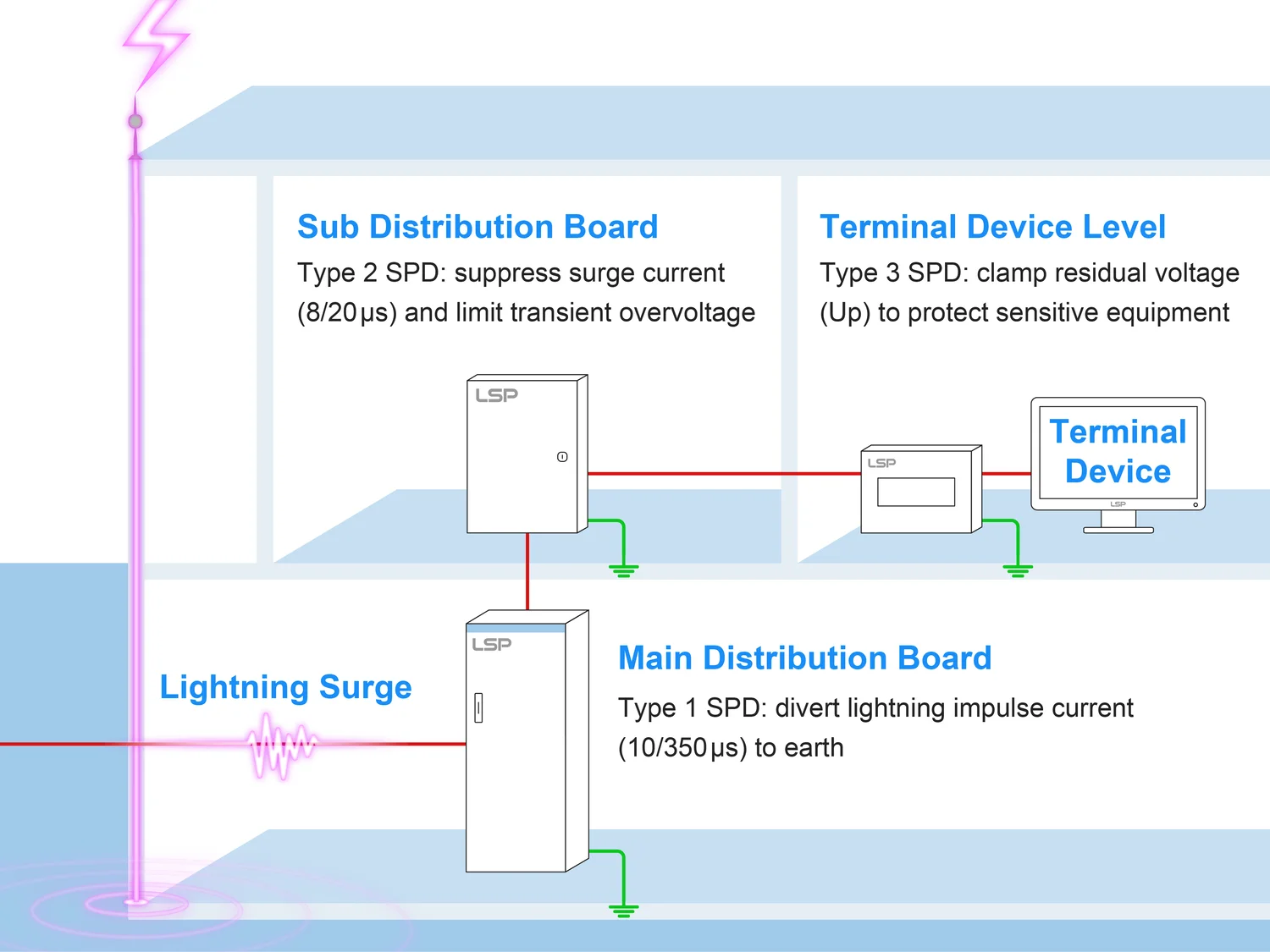
Credit: lsp.global
Surge Protectors And Their Role
Surge protectors play a crucial role in shielding your home electronics from sudden spikes in electrical power caused by lightning strikes. These devices act as gatekeepers, diverting excess voltage away from your valuable gadgets and preventing permanent damage. Understanding how surge protectors work can help you make smarter choices to keep your electronics safe during storms.
Choosing The Right Surge Protector
Not all surge protectors offer the same level of defense. Look for models with a high joule rating—this indicates how much energy the protector can absorb before failing. A joule rating of 1000 or more is ideal for protecting sensitive electronics like computers and TVs.
Also, check for a response time under one nanosecond. Faster response means quicker protection. Consider protectors with multiple outlets and USB ports if you want to safeguard several devices at once.
Installation Tips
Plug your surge protector directly into a wall outlet rather than an extension cord to ensure maximum protection. Position it as close as possible to the electronics you want to protect, minimizing the length of exposed cables.
Regularly inspect your surge protector for any signs of wear or damage. If the indicator light goes off or the device shows visible damage, replace it immediately. Have you ever ignored a warning light only to regret it later?
Limitations Of Surge Protectors
Surge protectors are not foolproof. A powerful lightning strike can overwhelm even the best models. They provide good defense against typical power surges but can fail during direct strikes.
Remember, surge protectors do not protect against power outages or voltage drops. For complete protection, consider combining them with other safety measures like whole-house surge arresters or unplugging devices during severe storms.
Unplugging Devices Safely
Unplugging your home electronics is one of the simplest yet most effective ways to shield them from lightning damage. It might seem obvious, but many overlook the importance of safely disconnecting devices during a storm. Knowing exactly when and how to unplug can save you from costly repairs and data loss.
When To Unplug Electronics
You should unplug electronics as soon as you hear thunder or see lightning nearby. Waiting until the storm is fully upon you increases the risk of a sudden surge damaging your devices. Even if the storm looks distant, electrical surges can travel far through power lines.
Think about the last time you left your computer plugged in during a storm. Did you notice any flicker or strange behavior afterward? That’s a sign your device might have been exposed to a surge without you realizing it.
Best Practices For Unplugging
- Turn off devices first:Power down your electronics before unplugging to avoid electrical sparks.
- Grip the plug, not the cord:Pulling the cord can damage wiring and increase the risk of shock.
- Use surge protectors:While unplugging is best, surge protectors add an extra layer of safety.
- Unplug both power and data cables:Lightning surges can travel through phone lines, Ethernet cables, and coaxial cables.
These small habits make a big difference in protecting your devices and your safety. It’s easy to forget unplugging when you’re rushing, so consider setting a reminder when storms approach.
Protecting Devices During Storms
Unplugging is essential, but what if you’re not home when a storm hits? Smart plugs with remote controls or timers can help you disconnect devices from anywhere. This technology lets you react quickly even if you’re away.
For electronics that must stay plugged in, invest in high-quality surge protectors rated for your equipment. Remember, not all surge protectors offer the same protection—look for those with a high joule rating and fast response time.
Have you ever lost data or had to replace expensive electronics after a storm? Taking proactive steps to unplug safely could prevent that headache. What steps will you take the next time you see storm clouds gathering?

Credit: www.esfi.org
Whole-house Lightning Protection
Whole-house lightning protection offers a strong defense for your home electronics. It reduces the risk of damage from lightning strikes by directing electrical energy safely into the ground. This protection covers the entire house, not just individual devices.
Installing a whole-house system involves specialized equipment and careful design. It ensures your electronics remain safe during storms. Proper protection can prevent costly repairs and data loss.
Lightning Rods And Grounding Systems
Lightning rods are metal rods placed on the roof or highest points of a building. They attract lightning strikes and provide a path to the ground. This path prevents the electricity from passing through your home’s wiring.
Grounding systems connect the lightning rods to the earth. They use thick wires and grounding rods buried in the soil. This setup safely absorbs the electrical charge and stops it from causing harm.
Professional Installation Considerations
Lightning protection systems require expert installation. A professional assesses your home’s layout and selects the best locations for rods and wires. Proper installation ensures the system works efficiently and meets safety codes.
Experts use high-quality materials designed for durability and conductivity. They also check nearby structures and electrical systems to avoid interference. A correctly installed system lowers the chance of lightning damage significantly.
Maintenance And Inspection
Regular maintenance keeps the lightning protection system effective. Inspect rods and grounding wires for corrosion or damage. Look for loose connections or missing components.
Schedule inspections at least once a year. After storms, check the system for signs of wear. Timely repairs maintain safety and extend the life of the system.
Additional Safety Measures
Protecting home electronics from lightning requires more than just basic surge protectors. Additional safety measures help reduce damage risks and keep devices safe during storms. These steps create extra layers of defense and improve overall home safety.
Using Ups Systems
Uninterruptible Power Supply (UPS) systems provide backup power during outages. They also regulate voltage and filter power surges caused by lightning strikes. A UPS keeps electronics running smoothly and prevents sudden shutdowns that can cause damage.
Choose UPS models with surge protection features. Connect critical devices like computers and routers to these systems. This setup ensures continuous power and shields sensitive electronics from spikes.
Avoiding Water And Metal Contact
Water and metal conduct electricity, increasing lightning damage risks. Keep electronics away from sinks, bathtubs, and metal pipes. Moisture can cause short circuits and permanent damage.
Store devices in dry areas and use waterproof covers if needed. Avoid touching electronics with wet hands during storms. These simple steps lower the chance of electric shock and device failure.
Educating Household Members
Everyone in the home should know how to protect electronics during storms. Teach family members to unplug devices before a storm starts. Explain the dangers of using electronics during lightning strikes.
Encourage safe habits like avoiding metal objects and water near devices. Awareness reduces accidents and helps protect valuable electronics. Regular reminders keep safety a priority for all.
Frequently Asked Questions
How Can I Protect Electronics From Lightning Surges?
Use surge protectors specifically rated for lightning. Unplug devices during storms to avoid damage from power surges. Whole-house surge protectors add an extra safety layer.
Are Surge Protectors Enough To Prevent Lightning Damage?
Surge protectors reduce risk but can fail during strong strikes. Combining them with proper grounding and unplugging devices offers better protection.
Should I Unplug Electronics During A Thunderstorm?
Yes, unplugging electronics prevents damage from sudden power surges caused by lightning. It’s the safest option when storms approach.
How Does Grounding Protect Home Electronics From Lightning?
Grounding directs excess electrical energy safely into the earth. Proper grounding reduces the chance of surge damage to your electronic devices.
Conclusion
Protecting your home electronics from lightning saves money and stress. Use surge protectors for all important devices. Unplug gadgets during storms for extra safety. Ground your electrical system properly to reduce risk. Stay aware of weather alerts to act quickly.
Small steps make a big difference in damage prevention. Keep your electronics safe and enjoy peace of mind. Taking these actions helps protect your home from lightning harm.
Leave a Reply