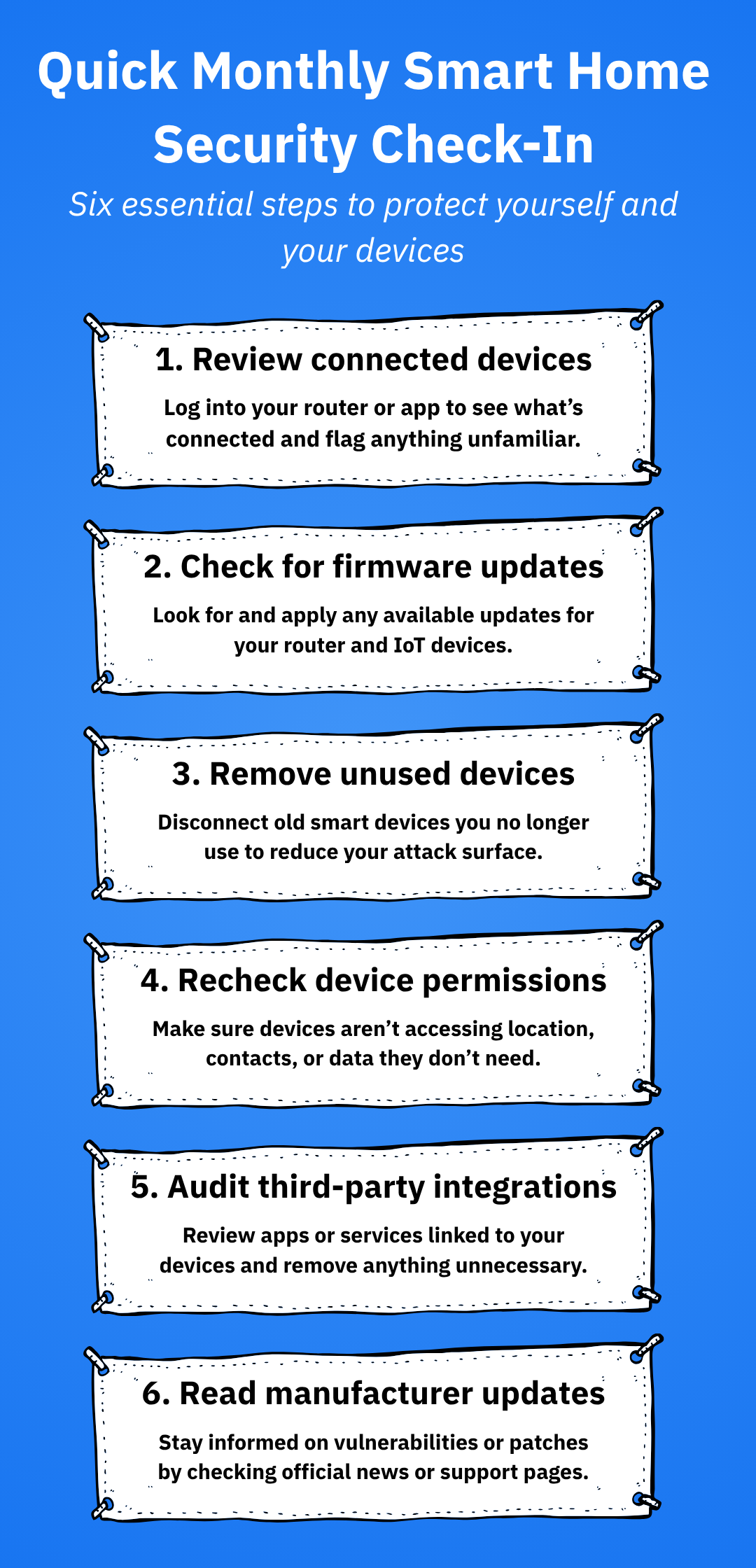
Are you worried about the safety of your smart devices? With the increasing number of gadgets connected to the internet, protecting them has become more crucial than ever.
Imagine the peace of mind you’ll feel knowing your personal information and devices are secure from cyber threats. In this guide, you’ll discover practical and straightforward steps to safeguard your smart devices. These tips are designed to be easy to follow, even if you’re not tech-savvy.
By the end of this article, you’ll not only feel more confident but also empowered to take control of your digital safety. Ready to ensure your devices are secure? Let’s dive in!
Common Threats To Smart Devices
Smart devices face many risks daily. These threats can harm your data and privacy. Knowing these dangers helps you protect your devices better.
Malware And Viruses
Malware and viruses are harmful programs made to damage devices. They can steal data, slow down your device, or cause it to crash. Sometimes, malware arrives through unsafe apps or infected files.
Protect your device by avoiding unknown downloads and keeping software updated.
Phishing Attacks
Phishing tricks users into giving away personal information. Attackers use fake emails or messages that look real. They ask for passwords, credit card numbers, or other private data.
Always verify the sender and avoid clicking suspicious links or attachments.
Unauthorized Access
Unauthorized access happens when someone enters your device without permission. Weak passwords or no security locks make this easier. Hackers can control your device or steal sensitive information.
Use strong passwords and enable two-factor authentication for safety.
Data Interception
Data interception occurs when hackers capture data sent over networks. Public Wi-Fi networks are common places for this. They can steal your login details or personal messages.
Use secure networks and virtual private networks (VPNs) to keep data safe.
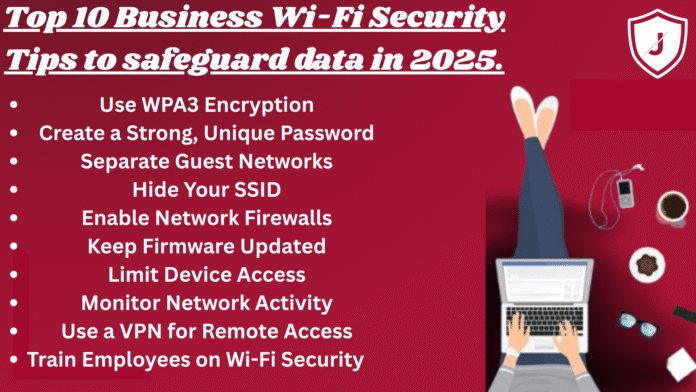
Credit: blog.jazzcybershield.com
Securing Your Network
Securing your network is the first and most crucial step to protect your smart devices from unauthorized access and cyber threats. Your Wi-Fi network acts as the gateway for all connected devices, so any vulnerability here can expose your entire digital ecosystem. Taking control of your network settings can significantly reduce risks and keep your devices safe.
Setting Strong Wi-fi Passwords
Many people use simple or default passwords, which hackers can easily guess or crack. A strong Wi-Fi password should be long, combining uppercase and lowercase letters, numbers, and special characters.
Think about how you create passwords for your email or social accounts and apply the same care here. Avoid common words or easily found personal information like birthdays. Remember, a strong password is your first defense against unwanted access to your network.
Using A Virtual Private Network
A Virtual Private Network (VPN) encrypts your internet connection, hiding your data from prying eyes. This is especially important if you access your smart devices remotely or use public Wi-Fi networks.
VPNs add an extra layer of security by masking your IP address and location. Have you ever wondered how safe your data is when you connect outside your home? Using a VPN can give you peace of mind by securing your traffic from potential hackers.
Regular Router Firmware Updates
Your router’s firmware controls how it operates and protects your network. Manufacturers release updates to fix security vulnerabilities and improve performance.
Ignoring these updates is like leaving your front door unlocked. Set a reminder to check for firmware updates regularly or enable automatic updates if your router supports it. This simple step can prevent many common attacks.
Guest Network Setup
Sharing your Wi-Fi password with guests can expose your primary network to risks. Setting up a separate guest network isolates their devices from your smart home devices.
This limits what guests can access and keeps your main network more secure. Many modern routers make it easy to create a guest network—just name it clearly and set a different password. Why give full access when you don’t have to?
Device Configuration Tips
Configuring your smart devices properly is key to keeping them safe. Simple changes can block many security risks. Adjust settings carefully to stop hackers from accessing your device. Focus on strong passwords, extra verification, and turning off features you don’t use. Stay updated to fix any security holes. These steps build a strong defense for your devices.
Changing Default Passwords
Default passwords are easy targets for hackers. Change them right away after setup. Use strong passwords with a mix of letters, numbers, and symbols. Avoid common words or simple patterns. A unique password for each device adds extra protection. Remember to store passwords securely and never share them.
Enabling Two-factor Authentication
Two-factor authentication adds a second layer of security. It asks for a code sent to your phone or email. Even if someone gets your password, they cannot log in without this code. Turn on two-factor authentication in your device’s security settings. It makes unauthorized access much harder.
Disabling Unnecessary Features
Many smart devices come with extra features you may not need. Disable these to reduce risk. Turn off remote access if you don’t use it. Disable voice control or data sharing if you prefer privacy. Fewer active features mean fewer ways for hackers to break in.
Regular Software Updates
Updates fix security flaws and improve device performance. Check for updates often and install them promptly. Some devices update automatically; enable this option if possible. Outdated software leaves your device open to attacks. Keep your device current to stay protected.

Credit: www.youtube.com
Best Practices For App Security
Securing your apps is a crucial part of protecting your smart devices. Apps often serve as gateways to your personal data, so maintaining strong app security helps prevent unauthorized access and data leaks. Simple habits can make a big difference in keeping your device safe.
Installing Trusted Apps Only
Always download apps from official sources like Google Play Store or Apple’s App Store. These platforms have security checks that reduce the chances of malicious software slipping through.
Pay attention to app ratings and read user reviews before installing. If an app looks suspicious or has very few downloads, it’s better to avoid it.
Reviewing App Permissions
Apps often ask for access to your camera, contacts, location, and other data. Don’t grant permissions blindly—ask yourself if the app really needs that access to function properly.
For instance, a simple flashlight app doesn’t need access to your contacts. Regularly check permissions in your device settings and revoke any that seem unnecessary.
Avoiding Suspicious Links
Clicking on unknown links can install harmful apps or malware on your device without you realizing it. Be cautious when you receive links via email, text, or social media, especially from unknown senders.
Verify the link’s source and hover over it to see the actual URL before clicking. If a link seems odd or too good to be true, it probably is.
Regularly Cleaning Unused Apps
Unused apps can become security risks because they might not receive updates or patches. Removing apps you no longer use reduces potential vulnerabilities on your device.
Take time every month to review your installed apps and delete any that you don’t actively use. This keeps your device running smoothly and securely.
Physical Security Measures
Protecting your smart devices goes beyond software updates and passwords. Physical security measures play a crucial role in keeping your gadgets safe from theft, damage, or unauthorized access. Simple habits and awareness can significantly reduce risks you might not have considered before.
Keeping Devices In Safe Places
Where you place your devices matters more than you might think. Avoid leaving your phone or tablet unattended in visible areas like café tables or car dashboards. I once lost a smartwatch because it was left on a gym bench, making it an easy target for someone passing by.
Choose secure spots such as locked drawers or bags with zippers. At home, keep devices away from edges where they can easily fall and break. Always ask yourself, “Is this spot safe enough if someone else walks by?”
Using Screen Locks
Screen locks are your first line of defense against unauthorized access. Set up PINs, patterns, fingerprints, or facial recognition to secure your device instantly. I’ve seen friends skip this step, only to have their personal information exposed after a lost phone incident.
Make sure your lock is not easy to guess—avoid birthdays or simple sequences. Also, enable auto-lock features that activate after short inactivity. This way, your device stays protected even if you forget to lock it manually.
Avoiding Public Charging Stations
Public charging stations might seem convenient, but they pose hidden risks. These ports can be modified to steal your data or install malware without your knowledge. Once, a colleague’s phone was compromised after charging at an airport kiosk.
Carry your own charger and plug into trusted power outlets. If you must use public stations, consider using a USB data blocker—a small device that prevents data transfer while charging. This simple tool can save you from a lot of trouble.
Credit: acera.ca
Backup And Recovery Strategies
Protecting your smart devices goes beyond just installing antivirus software or using strong passwords. One crucial aspect is having solid backup and recovery strategies. These strategies ensure that your important data stays safe and accessible, even if your device gets lost, damaged, or hacked.
Regular Data Backups
Backing up your data regularly is your first line of defense against unexpected data loss. Set a schedule that fits your usage—daily or weekly backups work well for most people.
Use external hard drives or USB sticks to save copies of your photos, documents, and app data. I once lost a phone without a backup and had to start from scratch, which taught me how vital regular backups are.
Don’t forget to check your backups occasionally to confirm they’re complete and accessible. Would you want to find out too late that your backup files are corrupted or missing?
Using Cloud Services Securely
Cloud storage offers convenience, but it also needs careful handling to protect your data. Choose reputable cloud providers with strong encryption and security policies.
Enable two-factor authentication (2FA) on your cloud accounts to add an extra layer of protection. Avoid using simple, repeated passwords across multiple platforms.
Consider which data you really want in the cloud. Sensitive files might be better off encrypted locally before uploading. How comfortable are you sharing your data with a cloud provider?
Setting Up Recovery Options
Recovery options give you a way back into your device or accounts if you forget your password or lose access. Add trusted phone numbers or email addresses for account recovery.
Write down recovery codes and keep them somewhere safe but accessible. These codes can be lifesavers when other recovery methods fail.
Review and update your recovery information regularly to avoid surprises. Have you checked your recovery options lately to make sure they still work?
Frequently Asked Questions
How Can I Secure My Smart Devices From Hackers?
Use strong, unique passwords and enable two-factor authentication. Keep device software updated regularly to patch security flaws. Avoid connecting to public Wi-Fi without a VPN to prevent unauthorized access.
What Are The Best Practices For Updating Smart Devices?
Always install updates promptly to fix security vulnerabilities. Enable automatic updates if available. Verify updates come from official sources to avoid malware risks and ensure optimal device performance.
How Do I Protect My Smart Home Network Effectively?
Change default router credentials and use WPA3 encryption. Segment your smart devices on a separate network. Regularly monitor connected devices and disable unused features to reduce attack surfaces.
Why Should I Limit Data Sharing On Smart Devices?
Limiting data sharing reduces privacy risks and potential breaches. Review app permissions and disable unnecessary access. Only share essential information to maintain control over your personal data.
Conclusion
Protecting your smart devices keeps your data and privacy safe. Use strong passwords and update software often. Avoid public Wi-Fi for sensitive tasks. Turn off devices when not in use. Regularly check device settings for security options. Small actions can stop big problems.
Stay aware and act quickly on alerts. Your smart devices deserve simple, steady protection every day.
Leave a Reply