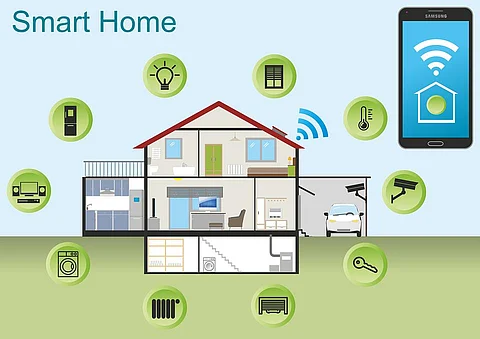
Are you tired of your regular devices not keeping up with the fast-paced digital world? Imagine being able to transform your everyday gadgets into smart devices that make life easier, more efficient, and downright fun.
The good news is, you can do just that! This guide will show you how to inject intelligence into your devices, turning them into helpful companions. You’ll discover simple steps and tools that anyone can use, regardless of their tech expertise.
Stick around, because by the end of this article, you’ll know exactly how to make your devices smarter and your life simpler. Let’s dive in and explore how you can harness the power of technology to create a seamless, smart environment in your home or office.
Benefits Of Smart Devices
Smart devices bring many benefits that improve daily life. They make tasks easier and save time. These devices also help reduce energy use and keep homes safer. Understanding these benefits shows why smart devices are popular today.
Increased Convenience
Smart devices allow control from anywhere using a smartphone. Scheduling tasks happens automatically without manual effort. Voice commands simplify operations, making devices easy to use. These features reduce daily stress and save time.
Energy Efficiency
Smart devices adjust energy use based on real-time needs. Lights, heating, and cooling operate only when necessary. This reduces electricity bills and lowers environmental impact. Energy monitoring helps users track and manage consumption effectively.
Enhanced Security
Smart security devices provide real-time alerts for unusual activity. Cameras and sensors allow remote monitoring of homes. Automated locks and alarms increase protection against intruders. These features give peace of mind and improve safety.

Credit: srituhobby.com
Choosing The Right Device
Choosing the right device is crucial when you want to make your home or workspace smarter. The device you pick will shape your entire smart setup. It’s not just about fancy features but how well it fits your existing gadgets and lifestyle.
Assessing Compatibility
Check if the smart device works smoothly with what you already own. Some devices only connect with certain brands or platforms, like Apple HomeKit, Google Assistant, or Amazon Alexa. Imagine buying a smart light bulb that can’t link to your current system—it becomes more of a decoration than a smart tool.
Think about your smartphone, Wi-Fi network, and other smart devices. Will the new device integrate without constant troubleshooting? Compatibility saves you time and frustration, so don’t ignore this step.
Budget Considerations
Smart devices come in all price ranges, so decide how much you want to spend before shopping. Higher price tags often mean more features, but sometimes basic models cover your needs perfectly. You don’t have to buy the most expensive option to get smart functionality.
Also, consider extra costs like subscription fees or accessories that might be needed. Setting a clear budget helps avoid surprises and keeps your smart project manageable.
Popular Smart Device Types
Knowing the types of smart devices can guide your choice. Here are a few common categories:
- Smart Speakers:Devices like Amazon Echo or Google Nest that respond to voice commands and control other gadgets.
- Smart Lights:Bulbs you can dim, change colors, or schedule using an app.
- Smart Thermostats:Help save energy by adjusting temperature based on your habits.
- Security Cameras:Offer real-time monitoring and alerts for your home’s safety.
Which device fits your daily routine best? Choosing something that solves a real problem or adds convenience will keep you motivated to use it regularly.
Essential Smart Features
Smart devices make life easier and more efficient. They respond to your needs quickly and save time. Certain features stand out as essential. These features improve convenience and control. They turn ordinary devices into smart helpers.
Voice Control
Voice control lets you operate devices without using your hands. Speak simple commands to play music, turn on lights, or check the weather. It uses smart assistants like Alexa, Google Assistant, or Siri. Voice control makes devices user-friendly and accessible for everyone.
Remote Access
Remote access allows you to control devices from anywhere using your smartphone or computer. Check security cameras, adjust the thermostat, or switch appliances on and off. This feature keeps you connected and in charge, even when you are away from home.
Automation And Scheduling
Automation lets devices perform tasks automatically based on set rules. Schedule lights to turn on at sunset or the coffee maker to start in the morning. Automation reduces manual work and helps save energy. Scheduling ensures devices work exactly when you want.

Credit: www.youtube.com
Step-by-step Upgrade Process
Making a device smart involves a clear and simple process. Follow this step-by-step upgrade process to transform your regular device into a smart one. Each step ensures that the device will work smoothly and connect easily to your home network.
Gathering Necessary Tools
Start by collecting all tools needed for the upgrade. Basic tools include screwdrivers, wire cutters, and a small flashlight. You will also need smart components like sensors, smart chips, or Wi-Fi modules. Have a stable internet connection ready for testing later.
Installing Smart Components
Carefully open the device casing using the screwdriver. Find the correct spot to place the smart components. Attach sensors or smart chips securely following the component instructions. Avoid touching sensitive parts to prevent damage. Close the casing firmly after installation.
Connecting To Wi-fi
Power on the device and access its network settings. Look for available Wi-Fi networks and select your home network. Enter the Wi-Fi password carefully and confirm the connection. Wait a few moments to ensure the device connects successfully.
Configuring Device Settings
Open the device’s app or control panel on your phone or computer. Adjust basic settings like language, time, and notifications. Set up device preferences such as alerts or automation rules. Save all changes and test the device to confirm it works as expected.
Top Smart Device Brands
Choosing the right brand is key to making a device smart. Brands differ in quality, features, and price. Some focus on reliability, others on affordability or luxury. Knowing top smart device brands helps you pick the best fit for your needs.
Trusted Manufacturers
Trusted manufacturers have built a strong reputation over years. They offer devices with solid performance and regular updates. Brands like Samsung, Apple, and Google lead in smart technology. Their products often work well with many other devices.
- Samsung: Known for smart TVs and home appliances.
- Apple: Famous for iPhones, HomePods, and smart watches.
- Google: Offers smart speakers, displays, and Nest products.
Affordable Options
Affordable brands make smart devices accessible to more people. They provide good features without a high price tag. Brands such as Xiaomi, TP-Link, and Wyze offer budget-friendly smart solutions. These brands suit beginners or those on a tight budget.
- Xiaomi: Popular for smart bulbs and security cameras.
- TP-Link: Known for smart plugs and Wi-Fi devices.
- Wyze: Offers cameras and sensors with great value.
High-end Choices
High-end brands focus on luxury and advanced features. They use premium materials and cutting-edge technology. Brands like Bose, Sonos, and Nest deliver superior sound and smart home integration. These choices fit users who want the best experience.
- Bose: Excels in smart speakers and headphones.
- Sonos: Known for multi-room audio systems.
- Nest: Offers smart thermostats and security solutions.
Troubleshooting Common Issues
Troubleshooting common issues is a crucial part of making your device smart. Problems can pop up unexpectedly, but most are easy to solve if you know where to look. Understanding these issues helps you keep your device running smoothly without frustration.
Connectivity Problems
Connectivity issues are one of the most frequent roadblocks. If your smart device won’t connect to Wi-Fi or Bluetooth, start by checking your network settings. Sometimes, simply restarting your router or device fixes the problem.
Have you ever tried moving your device closer to the router? Weak signals often cause connection drops. Also, ensure no other devices are hogging bandwidth, which can slow down or block connections.
App Compatibility
Your device’s smart features usually depend on a companion app. If the app doesn’t work properly, it can limit your control. Check if the app is compatible with your phone’s operating system and update it regularly.
Occasionally, uninstalling and reinstalling the app clears glitches. Have you noticed apps crashing after an update? Sometimes, waiting for the next patch or contacting support can solve these issues.
Firmware Updates
Firmware keeps your device’s software current and secure. Skipping updates can cause bugs and reduce functionality. Check for firmware updates frequently and install them as soon as they’re available.
Some devices update automatically, but others require manual action. If an update fails, try resetting your device or contacting customer support. Missing out on updates can leave you vulnerable to security risks and glitches—are you keeping your device fully updated?
Tips For Maximizing Smart Device Use
Maximizing the use of your smart device ensures you get the most benefits. Proper care and smart connections boost performance and convenience. Following simple tips helps keep devices running smoothly and safely.
Regular Maintenance
Keep your smart device updated with the latest software. Updates fix bugs and improve features. Clean the device regularly to avoid dust and dirt buildup. Restart devices occasionally to refresh system performance. Check for app updates and remove unused apps to save space.
Integrating With Other Devices
Connect your smart device with other gadgets to enhance functionality. Use compatible apps for seamless control across devices. Set up routines to automate tasks, like turning off lights at night. Ensure devices are on the same network for better communication. Combine devices for a smarter home or office setup.
Security Best Practices
Change default passwords to strong, unique ones for each device. Enable two-factor authentication for extra protection. Avoid using public Wi-Fi when controlling smart devices. Regularly review device permissions and remove those not needed. Keep backup copies of important data in case of issues.

Credit: www.maramani.com
Frequently Asked Questions
What Devices Can Be Made Smart Easily?
Most household devices like lights, thermostats, and speakers can be upgraded with smart technology. Adding Wi-Fi or Bluetooth modules enables remote control and automation, enhancing convenience and energy efficiency.
How Do I Connect A Device To Wi-fi?
To connect, access the device’s settings or app, select your Wi-Fi network, and enter the password. This allows remote control and integration with smart home systems.
What Components Are Needed To Make A Device Smart?
Key components include sensors, microcontrollers, Wi-Fi or Bluetooth modules, and software for control. These parts enable data collection, communication, and automation of tasks.
Can I Make Any Device Voice-controlled?
Yes, by integrating voice assistants like Alexa or Google Assistant through compatible modules or apps, you can enable voice commands for many devices.
Conclusion
Making a device smart can be simple and fun. Start with basic tools and follow clear steps. You can control devices with your phone or voice. This saves time and adds comfort to life. Small changes create big improvements at home or work.
Experiment with different features to see what fits best. Stay patient and enjoy learning as you go. Smart devices bring convenience and new possibilities to everyday tasks. Keep exploring to make your devices work smarter for you.
Leave a Reply