Looking to boost your business security without breaking the bank? You’re in the right place.
Installing electronic entry door locks yourself can save you money and give you full control over who accesses your space. But how do you get started? This guide will walk you through simple, step-by-step instructions to create a reliable, DIY electronic lock system tailored for your business.
By the end, you’ll feel confident securing your doors with technology that’s both smart and affordable. Keep reading to unlock the secrets to protecting your business like a pro.

Credit: www.reddit.com
Benefits Of Electronic Entry Locks
Electronic entry locks bring many benefits to businesses. They improve safety, save time, and reduce costs. These locks offer more than just keyless access. They provide advanced control over who enters your premises. This section explains the main advantages of installing electronic entry door locks in your business.
Enhanced Security Features
Electronic locks use codes, cards, or biometrics for entry. This stops unauthorized people from entering. You can change access codes anytime without changing locks. Some models send alerts if someone tries to break in. Many systems keep logs showing who entered and when. This helps monitor and prevent theft or vandalism.
Convenience For Businesses
Staff no longer need physical keys that can be lost. Access can be granted or removed instantly. Employees can enter quickly without fumbling for keys. You can set different access levels for different people. Entry codes can be shared easily with temporary workers. These locks often integrate with other systems like alarms.
Cost Savings Over Time
Fewer locksmith visits are needed since keys are not lost. Replacing locks is less frequent and less costly. Energy savings can be achieved with smart lock features. Reduced theft lowers insurance premiums in some cases. Managing access digitally saves time and labor expenses. The long-term savings make electronic locks a smart investment.
Choosing The Right Lock System
Choosing the right electronic entry door lock is crucial for your business’s security and daily operations. The right system should fit your specific needs, work seamlessly with your existing doors, and stay within your budget. Let’s break down what you need to consider before making this important decision.
Types Of Electronic Locks
There are several types of electronic locks, each offering different features and levels of security. Keypad locks require a code to enter, making them easy to use and change codes when needed. Card readers use access cards or fobs, ideal for controlling who enters specific areas.
Biometric locks scan fingerprints or facial features, providing high security but at a higher cost. Smart locks connect to your phone or network, letting you monitor access remotely. Think about which type fits your daily use and security needs best.
Compatibility With Doors
Not every electronic lock works with every door. Check the material and thickness of your doors before buying a lock. For example, metal doors might need stronger locks than wooden ones.
Also, consider the door’s existing hardware like handles and frames. If your door has unusual sizes or designs, you might need a custom solution. Have you measured your doors carefully to avoid surprises during installation?
Budget Considerations
Electronic locks come in a wide price range, from affordable keypad models to expensive biometric systems. Decide what features are essential and what you can do without to keep costs manageable.
Remember to budget for installation, maintenance, and possible upgrades. Sometimes spending a bit more upfront can save money and headaches in the long run. What’s your budget limit, and are you ready to invest in long-term security?
Required Tools And Materials
Creating a DIY electronic entry door lock for your business needs precise tools and materials. Having the right items ready makes installation easier and safer. This section outlines the essential tools, electronic parts, and safety gear required for the project.
Basic Tools Checklist
- Screwdrivers (Phillips and flathead)
- Drill with drill bits
- Wire cutters and strippers
- Measuring tape
- Multimeter for testing circuits
- Pliers
- Level tool
- Small hammer
- Marker or pencil
Electronic Components Needed
- Electronic lock mechanism
- Keypad or card reader
- Power supply unit (usually 12V DC)
- Wires for connections
- Relay switches
- Control board or microcontroller
- Backup battery (optional but recommended)
- Mounting brackets and screws
Safety Equipment
- Safety glasses to protect eyes
- Insulated gloves for electrical work
- Dust mask to avoid inhaling particles
- Ear protection during drilling
- First aid kit nearby for emergencies

Credit: www.angi.com
Preparing Your Door For Installation
Preparing your door for the installation of an electronic entry lock is a crucial step that sets the foundation for a smooth and successful project. Proper preparation helps avoid common issues such as misalignment or compatibility problems that can cause frustration later on. Taking time at this stage saves you effort and ensures your new lock works perfectly from day one.
Measuring And Marking
Start by measuring the door carefully to know exactly where the new lock will sit. Use a tape measure to check the backset—the distance from the edge of the door to the center of the lock hole. Mark these points clearly with a pencil to guide your drilling and installation.
Double-check your measurements before you begin cutting or drilling. A slight miscalculation can cause the lock to fit poorly or not at all. Have you ever installed something only to realize the holes were off by a few millimeters? Avoid that hassle by measuring twice and marking once.
Removing Old Locks
Take out the existing lock carefully to avoid damaging the door. Unscrew all visible screws and gently pull the lock components apart. Keep the screws in a small container—they might come in handy if your new lock requires similar fittings.
If the old lock is stuck or painted over, use a lubricant or a thin putty knife to loosen it gently. Rushing this step can damage the door surface or frame, leading to costly repairs. Patience here pays off.
Ensuring Door Compatibility
Not every door works with every electronic lock. Check the door’s thickness and material before buying your lock. Most electronic locks fit doors between 1 3/8 inches and 2 inches thick.
Also, consider the door material—wood, metal, or glass doors each have different installation needs. For example, metal doors might require special drill bits. Ask yourself: does your door match the lock’s specifications? This question can save you from purchasing the wrong product.
Step-by-step Installation Process
Installing an electronic entry door lock can seem tricky at first, but breaking it down into clear steps makes the process manageable. You’ll save both time and money by doing it yourself, and gain peace of mind knowing your business is secure with a lock you installed correctly. Let’s walk through the key stages of installation that anyone with basic tools can handle.
Mounting The Lock Hardware
Start by removing your existing door lock if there is one. Carefully measure the door’s thickness and backset to ensure the new lock will fit perfectly. Align the lock’s faceplate with the door edge and mark the screw holes with a pencil.
Drill pilot holes to avoid splitting the wood, then attach the lock hardware using the screws provided. Don’t rush this step—make sure the lock is flush against the door and firmly secured. If the lock feels loose, it won’t function properly and can compromise your security.
Wiring The Electronic Components
Next, it’s time to connect the electronic parts. Check your lock’s wiring diagram carefully before starting. Use a voltage tester to ensure no live wires are active if you’re integrating with existing electrical systems.
Route the wires through the door frame and connect them according to the instructions. Secure the connections with wire nuts or terminal blocks to prevent loose contacts. If you’re unfamiliar with electrical work, consulting a professional here can save you headaches and ensure safety.
Testing The Lock Functionality
Once everything is mounted and wired, test the lock thoroughly. Enter your code or use your key card to check if the mechanism responds instantly. Try locking and unlocking several times to confirm consistent performance.
If the lock doesn’t engage smoothly, revisit your mounting and wiring steps. Sometimes a slight adjustment to the strike plate or tightening a screw solves the issue. Would you trust your business security to a lock that jams or delays? Testing now avoids costly problems later.
Programming And Setting Access Codes
Programming and setting access codes is key for securing your business with electronic locks. This process lets you control who enters and when. It also helps track access to sensitive areas.
Proper configuration ensures smooth operation and prevents unauthorized entry. Understanding how to set user codes and manage permissions keeps your system flexible and safe.
Configuring User Codes
Start by accessing the lock’s programming mode. Use the master code provided in the manual. Enter new user codes carefully to avoid errors.
- Choose unique codes that are easy to remember but hard to guess.
- Set code length according to the lock’s requirements, often 4 to 6 digits.
- Test each code to confirm it works before assigning it to users.
Label user codes clearly for easy tracking. Update or delete codes when needed to maintain security.
Managing Access Permissions
Control who can enter and at what times. Many locks allow time-based access for different users.
- Assign permissions based on roles or schedules.
- Limit access during certain hours or days.
- Use groups to simplify managing multiple users.
Regularly review permissions to ensure they match your business needs. Adjust settings to prevent unauthorized entry.
Troubleshooting Programming Issues
Errors may occur during setup. Common problems include incorrect codes and failed programming attempts.
- Double-check the master code and user entries.
- Reset the lock if it becomes unresponsive.
- Consult the manual for specific error codes and solutions.
Keep the lock’s firmware updated for best performance. Contact support if problems persist after troubleshooting.
Maintenance Tips For Longevity
Maintaining electronic entry door locks ensures they work smoothly for years. Regular care prevents malfunctions and keeps security tight. Simple maintenance tasks save money on repairs and replacements. Focus on cleaning, battery care, and software updates. These steps help your locks stay reliable and efficient.
Regular Cleaning And Inspection
Dust and dirt can block sensors and moving parts. Clean the lock surface with a soft cloth. Avoid harsh chemicals that damage the finish. Check for loose screws or worn parts. Test the lock’s response to your keycard or code. Early spotting of issues stops bigger problems.
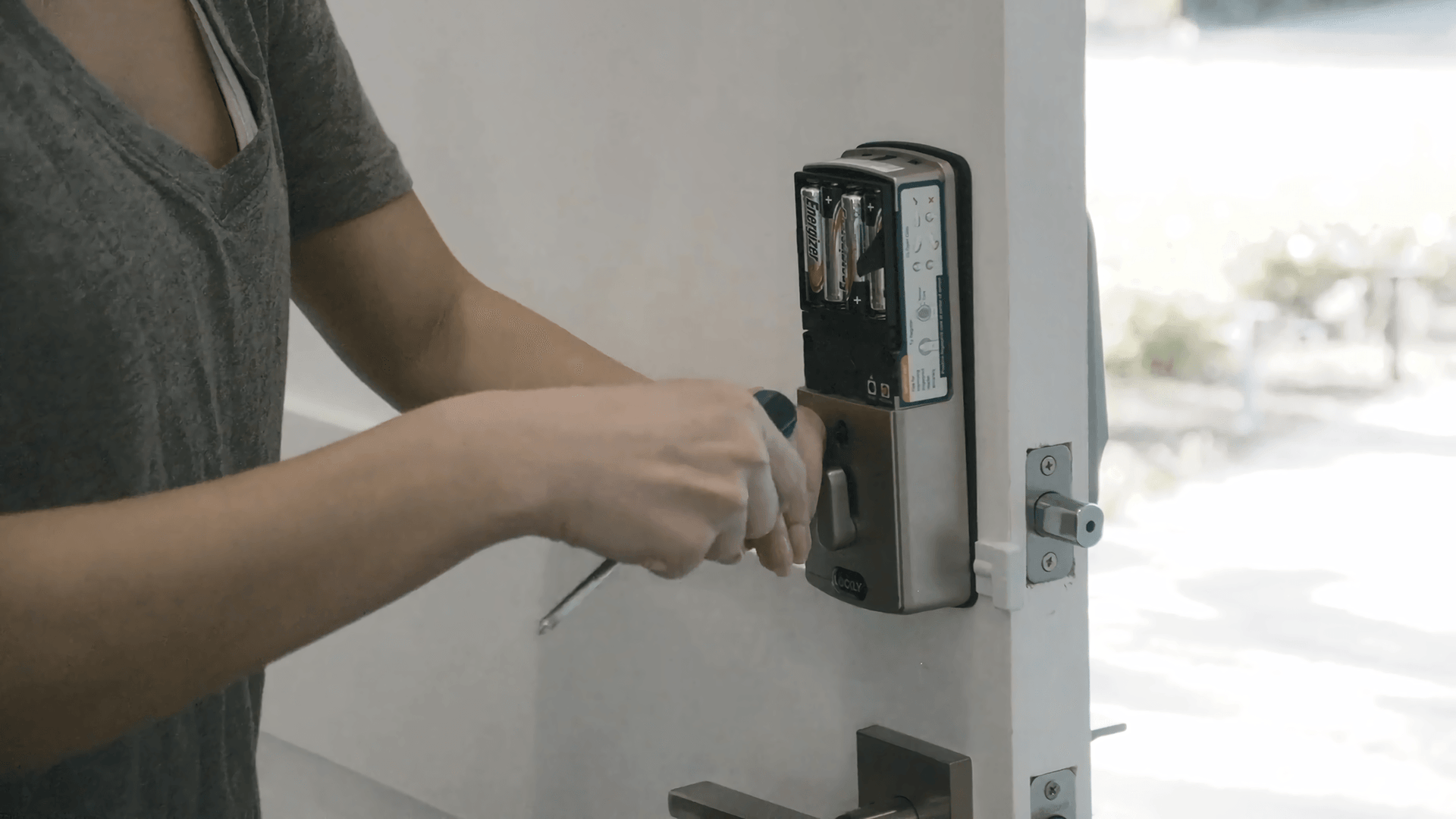
Battery Replacement Guidelines
Electronic locks depend on good batteries. Replace batteries before they run out. Use the type recommended by the manufacturer. Keep spare batteries handy for quick swaps. Low power can cause delays or lockouts. Mark calendar dates to track battery changes.
Software Updates
Lock software controls security features and bug fixes. Check for updates regularly through the manufacturer’s app or website. Updated software protects against new security threats. Follow update instructions carefully to avoid errors. Keep your lock’s software current to ensure safety.
Credit: lockly.com
Common Issues And Fixes
Electronic entry door locks are convenient but can face common issues. These problems can disrupt business access and security. Knowing how to fix these issues saves time and money.
Below are frequent problems and simple fixes for DIY electronic door locks.
Lock Not Responding
A lock that does not respond may have power or hardware problems. Check if the lock’s battery is dead or weak. Replace batteries with fresh ones.
Inspect wiring connections for any loose or damaged parts. Tighten or replace wires as needed. Reset the lock by pressing the reset button or disconnecting power for a few seconds.
Test the lock again after these steps. If it still does not respond, the lock mechanism may need professional repair.
Power Failures
Power issues often cause the lock to stop working. Verify the power source is active. Check the power adapter and outlet for faults.
Use a multimeter to test voltage levels. Replace faulty adapters or batteries. Consider installing a backup power supply like a rechargeable battery pack.
Keep the lock clean and dry to avoid electrical shorts. Avoid exposing it to harsh weather or moisture.
Access Code Errors
Access code errors can lock out users or allow unauthorized entry. Ensure users enter the correct code carefully. Check the lock’s manual for code format rules.
Reset the access code through the control panel or keypad. Use simple codes that are easy to remember but hard to guess.
Update the lock’s firmware if available. This can fix bugs related to code recognition. Regularly audit and change access codes for security.
Frequently Asked Questions
What Tools Are Needed For Diy Electronic Locks?
To DIY electronic entry door locks, gather a screwdriver, drill, measuring tape, and a pencil. You may also need a voltage tester. These tools will help you install the lock correctly and ensure it’s functioning properly. Always follow the manufacturer’s instructions for best results.
Are Electronic Door Locks Secure For Businesses?
Yes, electronic door locks offer enhanced security for businesses. They provide keyless entry, reducing the risk of unauthorized access. Most models have features like audit trails and remote management. These features make it easier to monitor and control access, enhancing overall security for your business premises.
How Do You Install Electronic Door Locks?
To install electronic door locks, start by removing the existing lock. Align the new lock with the door’s holes, then secure it with screws. Connect the electronic components following the manufacturer’s instructions. Test the lock to ensure it functions properly before completing the installation.
Can Electronic Locks Be Hacked Easily?
Electronic locks are generally designed with robust security measures to prevent hacking. They use encryption and advanced technologies to protect against unauthorized access. However, no system is entirely foolproof. Regular updates and strong passwords can enhance security and reduce the risk of hacking attempts.
Conclusion
DIY electronic entry door locks offer a smart way to boost business security. You save money by installing them yourself. These locks provide easy access control and track entries. Follow clear steps for a smooth installation process. Choose the right materials and tools before starting.
Testing the lock ensures it works correctly every time. Stay safe by keeping your business protected 24/7. Simple changes can make a big difference in security. Take control of your business safety today.
Leave a Reply