Are you tired of fumbling with keys every time you need to unlock your door? Imagine a life where you can enter your home effortlessly and securely with just a few taps.
That’s the magic of electronic deadbolts, and you’ve got the power to make it happen. In this guide, we’ll dive into the world of Better Home Products electronic deadbolts and show you exactly how to program them for maximum convenience and safety.
You deserve a home that feels both welcoming and secure, and programming your electronic deadbolt is the key to achieving that balance. Whether you’re tech-savvy or a complete beginner, you’ll find our step-by-step instructions easy to follow. By the end of this article, you’ll have the confidence to customize your door lock to fit your lifestyle perfectly. Ready to transform your home security and make your life a little easier? Keep reading, and let’s unlock the secrets to programming your electronic deadbolt together.

Credit: www.familyhandyman.com
Choosing The Right Electronic Deadbolt
Choosing the right electronic deadbolt ensures better security and ease of use. It affects how you control access and manage your home’s safety. Understanding different types and features helps you pick the best fit. Compatibility with your existing home system is crucial for smooth operation.
Types Of Electronic Deadbolts
Electronic deadbolts come in several forms to match different needs. Keypad locks use a code for entry without a key. Bluetooth deadbolts connect with your phone for keyless control. Wi-Fi deadbolts allow remote access and notifications. Some models combine features for added flexibility.
Key Features To Consider
- Battery life: Long-lasting batteries reduce maintenance.
- Locking mechanism: Choose single or double cylinder based on door type.
- Security level: Look for ANSI or UL ratings for reliability.
- Ease of use: Simple programming and clear instructions matter.
- Backup options: Physical keys or emergency power help in failures.
Compatibility With Home Systems
Check if the deadbolt works with your smart home setup. It should integrate with hubs like Alexa, Google Home, or Apple HomeKit. Compatibility allows voice control and automation routines. Verify app support for your smartphone’s operating system. Confirm connection types, such as Wi-Fi or Bluetooth, for seamless use.
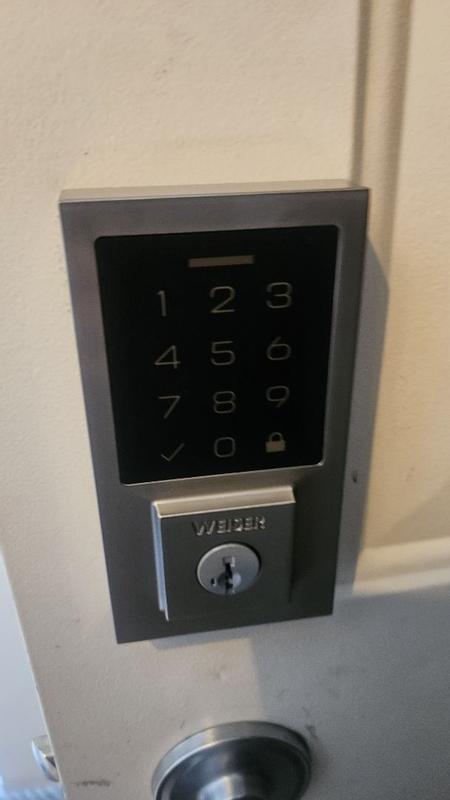
Credit: ca.weiserlock.com
Preparing For Installation
Preparing to install your new electronic deadbolt is key to a smooth setup and reliable security. Taking time to gather the right tools, verify your door’s compatibility, and prioritize safety can save you frustration and extra trips to the hardware store. Let’s break down what you need to get started with confidence.
Tools You’ll Need
Having the right tools on hand makes programming and installing your electronic deadbolt much easier. Here’s a simple list to keep handy:
- Screwdriver (usually Phillips and flathead)
- Drill with bits (if new holes are required)
- Measuring tape or ruler
- Level tool to ensure proper alignment
- Pencil or marker for marking holes
- Battery (check the type specified for your deadbolt)
Before starting, double-check your product manual for any unique tools. I once skipped verifying the battery type and had to pause installation to buy the right one—don’t make that mistake!
Checking Door Specifications
Not all doors are created equal. The thickness and material of your door affect which deadbolt models fit and function properly.
- Measure your door’s thickness—most electronic deadbolts fit doors 1 3/8” to 2” thick.
- Check the backset, which is the distance from the edge of the door to the center of the borehole; it’s usually 2 3/8” or 2 3/4”.
- Inspect the door material—metal, wood, or fiberglass—to ensure compatibility.
Getting these details wrong can cause your new lock to jam or not secure properly. Have you measured your door recently? It’s worth confirming before you drill or program anything.
Safety Precautions
Safety should be at the front of your mind during installation. Even though installing a deadbolt might seem straightforward, power tools and sharp edges pose risks.
- Wear protective eyewear to guard against flying debris if drilling is required.
- Turn off any alarm systems or smart home devices linked to your door to avoid false alerts.
- Keep children and pets away from the work area.
I once underestimated how slippery door edges can be when handling a new lock, resulting in a minor cut. Simple gloves can prevent this. What safety steps will you take before you start?
Installing The Deadbolt
Installing a new electronic deadbolt improves your home’s security and convenience. The process requires careful attention to ensure the lock fits perfectly and works smoothly. Follow these steps to replace your old lock with a modern electronic deadbolt, making your home safer and smarter.
Removing The Old Lock
Start by opening the door and locating the screws on the old lock. Use a screwdriver to remove these screws from the interior side. Take out the interior and exterior parts of the lock carefully. Remove the latch from the edge of the door by unscrewing it. Keep all screws and parts aside in case you need them later.
Mounting The New Deadbolt
Check the new deadbolt parts and compare them with the door holes. Insert the new latch into the door’s edge. Align the exterior keypad or thumb turn with the holes on the door. Attach the interior assembly by connecting it to the exterior part through the door. Secure all screws tightly but avoid over-tightening to prevent damage.
Testing Mechanical Fit
Close the door gently and turn the lock manually to test the fit. The bolt should slide smoothly into the strike plate on the frame. If it sticks or resists, loosen screws slightly and realign parts. Test locking and unlocking from both sides multiple times. Ensure the deadbolt moves without force before proceeding to program the electronic features.

Credit: ca.weiserlock.com
Programming Your Electronic Deadbolt
Programming your electronic deadbolt transforms a simple lock into a smart security companion tailored to your lifestyle. This process lets you control who enters your home and when, offering convenience and peace of mind. You hold the power to customize settings that suit your daily routine and unexpected needs.
Setting Up User Codes
Start by adding unique user codes for everyone in your household. Assigning individual codes helps you track who enters and when, enhancing security.
Most deadbolts let you add codes easily through a keypad or an app. Make sure each code is distinct and not easily guessable—avoid birthdays or simple sequences.
Have you ever thought about how many people actually need permanent access? Limiting user codes to essential users reduces the risk of unauthorized entry.
Configuring Auto-lock Features
The auto-lock feature automatically secures your door after a set time, so you don’t have to remember to lock it yourself. This is especially useful if you’re often in a rush or forgetful.
You can usually set the lock to engage anywhere from 10 seconds to several minutes after the door closes. Choose a delay that fits your lifestyle—too quick might be annoying, too slow might be risky.
Think about your daily habits: do you often carry groceries or kids’ hands? Setting a slightly longer delay might prevent the door from locking too soon.
Managing Temporary Access
Temporary access codes are perfect for guests, cleaners, or delivery people. They let you grant entry without sharing your permanent codes.
Set start and end times for these codes to automatically expire, so you don’t have to remember to deactivate them later. This keeps your home secure without extra effort.
Have you tried giving a one-time code for a package delivery? It’s a smart way to avoid missed deliveries and package theft.
Troubleshooting Common Issues
Electronic deadbolts offer convenience and security, but like any tech, they can face hiccups. Troubleshooting common issues doesn’t have to be frustrating or complicated. Understanding simple fixes can save you time and keep your home safe without calling a technician.
Battery Replacement Tips
Low battery is a frequent cause of deadbolt malfunctions. Always keep spare batteries nearby to avoid lockouts. Use high-quality alkaline batteries to ensure steady power and longer life.
When replacing batteries, remove the old ones carefully to avoid corrosion. Clean the battery contacts with a dry cloth to improve connection. If your lock shows low battery warnings but still won’t work, try swapping the batteries completely instead of just topping them off.
Resolving Connection Problems
If your smart lock fails to connect with your phone or hub, start by checking the Bluetooth or Wi-Fi signal strength. Walls and metal objects can weaken signals, so try moving closer or removing obstacles.
Restart your phone or the smart home device controlling the lock. Sometimes, the app needs a fresh start to reestablish communication. Have you checked if your lock’s firmware is up to date? Outdated software often causes connection glitches.
Resetting The Lock
Resetting your electronic deadbolt can clear software errors but should be done cautiously. Before resetting, note your current programming to avoid losing important settings. The reset process varies by brand, so follow the manufacturer’s instructions carefully.
After reset, you will need to reprogram your codes and reconnect the lock to your devices. Think of it as giving your lock a fresh start, but only use this as a last resort if other fixes fail. Have you backed up your settings? This step can save you headaches later.
Maintaining Your Deadbolt
Maintaining your electronic deadbolt keeps it working smoothly and extends its life. Simple care can prevent many common problems. Regular attention helps avoid costly repairs and ensures your home stays secure. Follow these tips to keep your deadbolt in top condition.
Regular Cleaning
Clean the deadbolt surface to remove dust and dirt. Use a soft cloth with mild soap and water. Avoid harsh chemicals that can damage the finish. Clean the keypad gently to keep buttons responsive. Remove debris from the keyhole or battery compartment to prevent jams. Regular cleaning keeps the deadbolt looking good and working well.
Software Updates
Check for software updates often. Updates fix bugs and improve security. Connect your deadbolt to Wi-Fi or use the manufacturer’s app to update. Follow update instructions carefully to avoid errors. Keeping the software current protects your home from new threats. Updated software also adds new features and improves battery life.
Ensuring Longevity
Use the deadbolt as the manufacturer suggests. Avoid forcing the lock or keypad. Replace batteries before they run out to prevent shutdowns. Lubricate the mechanical parts once a year with a recommended product. Test your deadbolt regularly to confirm it locks and unlocks smoothly. Good habits will help your deadbolt last many years.
Frequently Asked Questions
How Do I Reset A Home Products Electronic Deadbolt?
To reset, locate the reset button on the lock’s interior. Press and hold it for 10 seconds. This clears all settings, returning the lock to factory defaults. Use this step if you forget your code or face programming issues.
Can I Program Multiple Access Codes On The Deadbolt?
Yes, most Home Products electronic deadbolts support multiple user codes. This allows different family members or guests to have unique codes. You can add, change, or delete codes easily via the lock’s keypad or app, enhancing security and convenience.
What Batteries Work Best For Home Products Deadbolts?
Use 4 AA alkaline batteries for optimal performance. Avoid rechargeable or low-quality batteries to prevent power issues. Replace batteries every 6-12 months or when the low battery indicator appears to ensure reliable lock operation.
How Do I Troubleshoot Programming Errors On The Deadbolt?
First, check battery levels and replace if low. Ensure you follow the programming steps exactly as per the manual. If errors persist, reset the lock to factory settings and reprogram from scratch. Contact customer support for persistent issues.
Conclusion
Programming your home electronic deadbolt is easier than it seems. Follow the steps carefully and take your time. Test the lock after programming to ensure it works well. Keep your codes private and change them regularly for safety. A well-set deadbolt adds security and peace of mind.
Practice makes perfect, so don’t worry if it takes a few tries. Enjoy the convenience of a smart, secure home entry. Simple actions can protect your home better every day.
Leave a Reply