Choosing the best electronics for drawings enhances creativity and improves workflow. Digital tools offer precision, ease, and convenience for artists at any skill level.
Digital drawing tablets and electronic notebooks have changed how artists create. These devices come with pressure-sensitive styluses that mimic real pencils and brushes. Brands like UGEE, HUION, XPPen, and Wacom offer tablets with various sizes and features. Some models include customizable hotkeys for quick access to tools, while others provide wireless options for flexibility.
Whether for sketching, designing, or note-taking, these electronics support multiple devices like PCs, Macs, and tablets. Lightweight and user-friendly, they suit beginners and professionals alike. Choosing the right drawing tablet depends on your specific needs, budget, and preferred software compatibility. This guide highlights top options to help you find the perfect drawing companion.
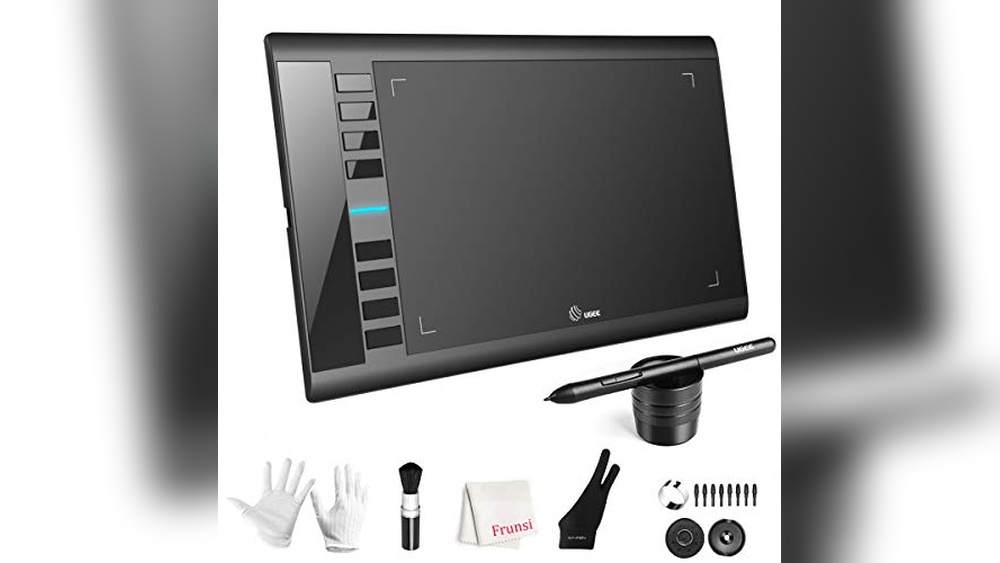
Ugee M708 Graphics Drawing Tablet

The UGEE M708 Graphics Drawing Tablet is ideal for digital artists, designers, and creative professionals who seek a reliable and responsive tool for their art creation and sketching needs. Whether you are a beginner or an experienced illustrator, this tablet offers an excellent balance of precision and convenience, making it perfect for those who want to enhance their digital workflow.
Pros:
- Large active area of 10 x 6 inches provides ample space for detailed drawing and design work.
- 8192 levels of pressure sensitivity ensure precise and natural pen strokes for a realistic drawing experience.
- 8 customizable hot keys boost productivity by allowing quick access to frequently used shortcuts.
- Comes with a passive stylus, which is battery-free and lightweight for comfortable long sessions.
- Sleek and durable black design with compact dimensions fits well in any workspace.
Cons:
- May require some initial setup and driver installation, which can be challenging for beginners.
- Lacks a built-in screen, so users need to look at their monitor while drawing.
- Limited to compatibility with certain operating systems; checking before purchase is advised.
The UGEE M708 features a large drawing surface of 10 by 6 inches, allowing artists to create detailed and expansive artwork without feeling constrained. Its highly sensitive 8192 pressure levels enable nuanced control over line thickness and opacity, which is essential for shading and fine detailing. The passive stylus is designed to be ergonomic and requires no batteries, reducing the hassle and weight during extended creative sessions. This combination of features makes it suitable for a wide range of digital art applications including painting, design, and sketching.
Additionally, the tablet includes 8 customizable hot keys that users can program to suit their workflow preferences. This enhances efficiency by minimizing the need to switch between tools or menus on the computer. The sleek black finish and slim profile of the tablet make it both aesthetically pleasing and practical for various work environments. Overall, the UGEE M708 is a versatile and cost-effective drawing tablet that delivers professional-grade features for digital artists looking to elevate their creative projects.
Huion Inspiroy H640p Drawing Tablet

The HUION Inspiroy H640P Drawing Tablet is ideal for digital artists, designers, students, and professionals who need a compact yet powerful tool for drawing, writing, and creative work. If you are looking for an affordable and reliable graphics tablet that works seamlessly with Mac, PC, and mobile devices, this tablet is designed for you.
Pros:
- Battery-free stylus with 8192 levels of pen pressure for precise and smooth drawing.
- Compact 6×4 inch active area perfect for portability and desk space saving.
- 6 customizable hot keys to boost productivity and workflow efficiency.
- Compatible with multiple operating systems including Mac, PC, and mobile devices.
- Lightweight design, weighing only 0.6 pounds, making it easy to carry.
Cons:
- The 6×4 inch drawing area might feel small for users accustomed to larger tablets.
- Limited color options, available only in black.
- Some users may experience a slight learning curve with the hot key customization.
The HUION Inspiroy H640P features a responsive battery-free stylus that provides an impressive 8192 levels of pen pressure sensitivity, allowing artists to create detailed and nuanced digital artwork with ease. Its compact 6×4 inch active area makes it highly portable, perfect for students or professionals who need to work on the go without sacrificing precision.
Equipped with 6 customizable hot keys, this graphics tablet enhances productivity by enabling quick access to frequently used shortcuts, which is especially beneficial during design or teaching sessions. The tablet’s compatibility with Mac, PC, and mobile devices ensures flexibility, making it a versatile tool for various creative and educational applications. Overall, the HUION Inspiroy H640P is an excellent choice for anyone seeking a reliable and efficient drawing tablet in a compact size.
Xppen Starg640 Drawing Tablet

The Drawing Tablet XPPen StarG640 is ideal for artists, designers, students, and remote workers seeking a compact and efficient digital drawing solution. If you want to enhance your creative projects, participate in e-learning, or improve your remote working setup on a budget, this tablet is a great choice. Its compatibility with Mac, Windows, and Chromebook makes it versatile for various users.
Pros:
- Compact 6×4 inch active area perfect for portability and ease of use
- Battery-free stylus pen offers a natural drawing experience without the need for charging
- Compatible with multiple operating systems including Mac, Windows, and Chromebook
- Lightweight design at approximately 0.37 pounds ideal for on-the-go use
- Affordable price point without compromising on essential features
Cons:
- Smaller active area may not suit professional artists needing larger workspace
- Lacks multi-touch gesture support found in higher-end tablets
- Basic build quality compared to premium models
The XPPen StarG640 offers a smooth drawing surface and responsive stylus performance, making it a fantastic tool for beginners and hobbyists. Its battery-free pen ensures uninterrupted creativity, and the compact size allows users to easily carry it anywhere. The tablet’s compatibility with popular operating systems guarantees flexibility, whether you use it for digital art, note-taking, or remote work tasks.
With its slim profile and lightweight design, the StarG640 fits comfortably on any desk or workspace. This makes it especially useful for students participating in e-learning or professionals engaging in virtual meetings who need to annotate or sketch quickly. While it may not have advanced features, the tablet delivers excellent value, providing essential digital input capabilities for everyday creative and professional use.
Xppen Updated Deco 01 V3 Drawing Tablet

The XPPen Updated Deco 01 V3 Drawing Tablet is ideal for digital artists, graphic designers, educators, and gamers who seek a versatile and high-performance drawing pad. Whether you are a beginner looking to explore digital art or a professional wanting precise control and enhanced productivity, this tablet offers an excellent balance of features and affordability. Its compatibility with multiple operating systems makes it suitable for users on Windows, Mac, Android, and even Chrome platforms.
Pros:
- 16384 levels of pressure sensitivity for precise and natural drawing experience
- Battery-free stylus eliminates the need for charging and reduces interruptions
- Large 10×6 inch active area providing ample space for detailed artwork
- 8 customizable hotkeys for quick access to frequently used functions
- Lightweight and slim design enhances portability and comfort during long sessions
- Wide compatibility across PC, Mac, Android, and Chrome devices
Cons:
- May require driver installation and occasional updates for optimal performance
- Limited bundled software compared to some competing tablets
The XPPen Deco 01 V3 boasts a remarkable 16384 levels of pressure sensitivity which allows artists to create highly detailed and nuanced strokes, closely mimicking traditional media. The battery-free stylus is a standout feature, providing uninterrupted workflow without the hassle of charging. Its large 10×6 inch active drawing area offers ample space for creativity, making it easier to produce precise lines and smooth shading. Additionally, the tablet’s slim and lightweight design ensures it is both portable and comfortable to use for extended periods.
Another significant benefit is the inclusion of 8 customizable hotkeys, which streamline the creative process by enabling quick access to essential commands and shortcuts. This feature is particularly valuable for digital artists and educators who need to switch tools rapidly during work or lessons. Furthermore, the tablet’s broad compatibility with PC, Mac, Android, and Chrome devices ensures flexibility, allowing users to seamlessly integrate the tablet into their preferred operating environment without limitations.
Huion Note 2-in-1 Digital Notebook Drawing Tablet

The HUION Note 2-in-1 Digital Notebook Drawing Tablet is ideal for artists, students, and professionals who seek a versatile, portable device for note-taking, digital art, and meetings. If you want a seamless transition between traditional handwriting and digital creativity with a lightweight and compact design, this tablet is perfect for you.
Pros:
- Battery-free pen offers uninterrupted use without the need for charging.
- Bluetooth wireless connectivity ensures easy and clutter-free pairing with devices.
- Refillable A5 notepad allows for continuous use of physical paper alongside digital features.
- Compact 9.5×7 inch size makes it highly portable and convenient for on-the-go use.
- Lightweight design (under 1 pound) enhances mobility without compromising functionality.
Cons:
- Limited to A5 size, which might be restrictive for users needing larger drawing space.
- Orange color may not appeal to all users preferring more neutral tones.
- Requires pairing with compatible devices to fully utilize Bluetooth features.
The HUION Note 2-in-1 Digital Notebook Drawing Tablet combines traditional handwriting with advanced digital capabilities, making it a unique tool for note-taking and creative tasks. Its battery-free pen ensures a smooth drawing or writing experience without interruptions, while the Bluetooth wireless connection provides flexibility and convenience for syncing with various digital devices. This tablet supports a refillable A5 notepad, allowing users to keep the tactile feel of paper while enjoying digital backup and editing options.
With its sleek and lightweight design, measuring just 9.5 by 7 inches and weighing less than a pound, the device is ideal for professionals and students who need to carry their digital workspace anywhere. The integration of digital art tools and note-taking features makes it suitable for meetings, lectures, and creative projects alike. Whether you are sketching, annotating, or brainstorming, the HUION Note tablet enhances productivity and creativity in a compact form factor.
Xppen Artist13.3 Pro

The XPPen Drawing Tablet with Screen Full-Laminated Graphics Drawing Monitor Artist13.3 Pro is ideal for digital artists, graphic designers, and illustrators seeking a professional-grade tool that combines precision and convenience. This tablet is perfect for those who want to enhance their creativity with a responsive pen and vibrant display, especially suitable for both beginners and experienced users looking to upgrade their digital workspace.
Pros:
- 8192 levels pen pressure for highly accurate and sensitive drawing experience
- Full-laminated screen reduces parallax and improves pen-to-screen alignment
- Adjustable stand offers ergonomic comfort during long drawing sessions
- 8 customizable shortcut keys to streamline workflow and increase productivity
- 123% sRGB color gamut provides vivid and true-to-life colors for detailed artwork
- Lightweight and slim design for easy portability
Cons:
- Limited screen size may feel restrictive for users accustomed to larger displays
- Requires connection to a computer, so not fully standalone
- Some users may need time to adjust to the pen sensitivity and shortcut key placement
The XPPen Artist13.3 Pro boasts a full-laminated screen that significantly reduces the gap between the pen tip and the cursor, providing a more natural and precise drawing experience. With an impressive 8192 levels of pen pressure sensitivity, artists can easily create varied strokes, from thin lines to bold shading, enhancing their creative expression. The tablet’s adjustable stand ensures users can work comfortably for extended periods, reducing strain and fatigue.
Equipped with 8 customizable shortcut keys, the device allows for quick access to frequently used functions, streamlining the creative process and boosting efficiency. Additionally, the 123% sRGB color gamut delivers vibrant and accurate colors, making this tablet ideal for detailed color work and professional-grade artwork. Its sleek and lightweight design also makes it easy to carry, enabling artists to work wherever inspiration strikes.
Drawing Tablet Xppen G430s

The Drawing Tablet XPPen G430S OSU is ideal for digital artists, students, and gamers who seek a compact and responsive tool for creative work and gameplay. Those involved in online teaching or OSU game enthusiasts will find this tablet particularly useful due to its precision and ease of use across Windows and Mac platforms. Its ultrathin design and battery-free stylus make it perfect for users who need portability without sacrificing performance.
Pros:
- Highly sensitive 8192 levels pressure battery-free stylus for precise drawing and control
- Compact 4 x 3 inch active area, making it ultrathin and easy to carry
- Compatible with both Windows and Mac operating systems
- Lightweight design at only 0.55 pounds ensures comfortable use for extended periods
- Excellent for OSU game players due to its accuracy and responsiveness
Cons:
- Smaller active area may not be suitable for professional artists who require larger canvases
- Lack of customizable shortcut buttons might limit workflow efficiency
The XPPen G430S features a highly responsive stylus with 8192 levels of pressure sensitivity, allowing users to create detailed and nuanced artwork. This level of sensitivity ensures smooth strokes whether you are sketching, shading, or playing precision-based games like OSU. Its battery-free stylus removes the hassle of recharging, making it convenient for long sessions without interruption. The tablet’s compact size and ultrathin profile make it an excellent choice for users who need a portable device that fits easily into a backpack or workspace.
In addition to its portability, the tablet supports both Windows and Mac, providing versatile compatibility for a broad user base. This makes it an ideal tool not only for digital artists and gamers but also for educators conducting online teaching sessions, allowing for easy annotation and interaction. Although the active area is smaller than some professional tablets, it is perfectly designed for detailed tasks, gaming precision, and efficient note-taking, making the XPPen G430S a balanced choice for beginners and intermediate users.
Wacom Intuos Small Graphics Drawing Tablet

The Wacom Intuos Small Graphics Drawing Tablet is ideal for artists, designers, educators, and photo/video editors who seek a compact and versatile tool to enhance their digital creativity. Whether you are a beginner or an experienced user, this tablet offers seamless compatibility with Chromebook, Mac, Android, and Windows devices, making it perfect for students, hobbyists, and professionals looking for an intuitive and portable drawing solution.
Pros:
- Includes training and software to get started quickly
- Features 4 customizable ExpressKeys for efficient workflow
- Compatible with multiple platforms: Chromebook, Mac, Android & Windows
- Lightweight and compact design (7.87 x 6.3 inches and 0.5 pounds) for easy portability
- Ideal for photo/video editing, design, and education
Cons:
- Small active area may not suit users requiring larger workspace
- Limited pressure sensitivity compared to higher-end models
- Does not include a screen display, requiring connection to a separate monitor
The Wacom Intuos Small Graphics Drawing Tablet boasts a sleek and slim profile with a height of just 0.1 inches, making it incredibly portable without sacrificing functionality. Its four customizable ExpressKeys allow users to personalize shortcuts for common tasks, significantly improving productivity and workflow efficiency. The tablet’s compatibility across multiple operating systems means users can switch devices without compatibility concerns, enhancing its versatility for various creative and educational applications.
With included training and software, beginners can quickly learn the essentials of digital drawing and editing, while professionals benefit from the precision and control offered by Wacom’s renowned technology. The tablet’s lightweight design ensures comfort during extended use, making it an excellent choice for students, educators, designers, and content creators who need a reliable and efficient digital drawing tool for their photo, video, and design projects.
8.5 Inch Colourful Lcd Writing Tablet
![[2 Pack] 8.5 Inch Colourful LCD Writing Tablet, TIQUS Digital Ewriter with Erase Lock Switch, Electronic Graphics Drawing Board, Portable Handwriting Doodle Pad Office Checklist Home Learning Black](https://m.media-amazon.com/images/I/51sI70CRC8L._SL500_.jpg)
The [2 Pack] 8.5 Inch Colourful LCD Writing Tablet by TIQUS is ideal for students, professionals, and creative individuals who want a portable and eco-friendly alternative to paper for note-taking, drawing, and list-making. This device is perfect for anyone seeking a convenient, lightweight, and reusable writing solution for home, office, or school use.
Pros:
- Compact and lightweight design for easy portability and storage.
- Colourful LCD screen enhances creativity and visual appeal.
- Erase lock switch prevents accidental deletion of important notes or drawings.
- Environmentally friendly alternative to paper, reducing waste.
- Comes in a convenient 2-pack, offering great value.
Cons:
- Screen size of 8.5 inches may be small for extensive note-taking.
- Limited to basic handwriting and drawing functions without advanced features.
- Black color design may not appeal to users preferring more vibrant styles.
The TIQUS Digital Ewriter features an 8.5 inch colourful LCD screen that allows users to create vibrant notes and drawings, making it easier to organize and prioritize tasks visually. Its slim and lightweight dimensions make it highly portable, ideal for carrying around in backpacks or briefcases. The device’s erase lock switch is a thoughtful addition that safeguards your work, ensuring that important reminders or creative ideas are not accidentally erased.
This electronic graphics drawing board is designed with user convenience in mind, offering a simple and intuitive way to jot down ideas, make checklists, or doodle without the need for paper. Its eco-friendly nature promotes sustainability by reducing paper usage, making it a smart choice for environmentally conscious users. Whether used at home, school, or office, the TIQUS writing tablet combines functionality with portability to enhance productivity and creativity.
Ugee Drawing Tablet

The UGEE Drawing Tablet Graphics Tablets, M708 V2 Upgrade is ideal for digital artists, designers, and creative professionals looking for a reliable and versatile tool for their work. Whether you are a beginner or an experienced user, this tablet suits those who want a large, responsive surface compatible with both PC and Android devices for seamless creative expression.
Pros:
- 10×6 inch ultra-thin large digital graphic area providing ample space for detailed work
- Supports 8192 levels of pressure sensitivity for precise control
- Battery-free stylus that offers a natural drawing experience without charging
- Equipped with 8 customizable hot keys to improve workflow efficiency
- Compatible with both PC and Android devices, enhancing versatility
- Lightweight and portable with only 1.45 pounds
Cons:
- May require initial driver installation and setup
- Limited to black color option
The UGEE M708 V2 Drawing Tablet features a large 10×6 inch ultra-thin surface that offers a comfortable and expansive workspace for all types of digital art and design projects. This spacious area allows artists to create with precision and freedom, reducing the need for constant zooming and panning. Additionally, the tablet’s slim design and lightweight build make it highly portable, perfect for users who are frequently on the go.
Equipped with an 8192-level battery-free stylus, the tablet ensures sensitive and accurate pressure detection that mimics traditional drawing tools. This advanced pressure sensitivity enhances the natural feel of sketching, shading, and painting, giving artists full control over their strokes. The inclusion of 8 customizable hot keys further boosts productivity by allowing users to assign frequently used commands, streamlining the creative process across both PC and Android platforms.
Frequently Asked Questions
What Is The Best Drawing Tablet For Beginners?
The HUION Inspiroy H640P is ideal for beginners. It offers 8192 pressure levels, a battery-free stylus, and six hotkeys for easy use. Compatible with Mac, PC, and mobile, it provides excellent value and performance for new digital artists.
How Important Is Pen Pressure Sensitivity?
Pen pressure sensitivity is crucial for detailed art. Higher levels, like 8192 or 16384, allow precise control over line thickness and shading. Tablets like the XPPen Deco 01 V3 offer 16384 levels, enhancing your drawing experience with natural, smooth strokes.
Can Drawing Tablets Work With Mobile Devices?
Yes, many tablets support mobile use. The UGEE M708 V2 Upgrade and HUION Inspiroy H640P work with Android devices. Ensure your device supports OTG or Bluetooth connection for seamless drawing on the go.
Do Drawing Tablets Have Customizable Hotkeys?
Most tablets include customizable hotkeys for efficiency. For example, the UGEE M708 has 8 hotkeys, letting you set shortcuts for tools and commands. This speeds up your workflow and improves productivity during design and art creation.
Are Screen Tablets Better Than Non-screen Tablets?
Screen tablets like XPPen Artist 13. 3 Pro display your work directly on the tablet. This provides a natural drawing experience. Non-screen tablets, such as UGEE M708, require looking at a separate monitor but are more affordable and portable options.
What Is The Benefit Of A Battery-free Stylus?
Battery-free styluses are lightweight and hassle-free. They don’t need charging, ensuring uninterrupted drawing sessions. Tablets like HUION Inspiroy H640P and XPPen G430S include battery-free pens, offering convenience and longer usability for artists.
Conclusion
Choosing the right electronics for drawing can greatly improve your art experience. Tablets like UGEE M708 and HUION Inspiroy H640P offer great pressure sensitivity and easy controls. Devices such as XPPen Deco 01 V3 and Wacom Intuos provide smooth lines and multiple shortcut keys for faster work.
For those who prefer writing and sketching on paper, the HUION Note 2-in-1 Digital Notebook is a smart choice. Smaller options like XPPen G430S and colorful LCD writing tablets are perfect for quick sketches or learning. Each product suits different needs and budgets, so consider what fits your style best.
Whether you are a beginner or more advanced, these drawing tools make creativity simpler and more enjoyable. Explore these options to find a device that helps bring your ideas to life with ease and precision. Drawing has never been more accessible or fun.