Have you ever wondered what makes up an email address? Understanding the parts of an email address can help you communicate more confidently and avoid common mistakes.
Whether you’re setting up a new account or simply curious, knowing how an email address is structured gives you an edge in managing your online presence. Keep reading, and you’ll discover exactly what each part means and why it matters to you.
Credit: www.brevo.com
Email Address Basics
An email address has two main parts: the username and the domain. The username identifies the user, while the domain shows the email provider. A symbol “@” separates these two sections in every email address.
Understanding the basics of an email address is essential in today’s digital age. Whether you’re signing up for newsletters, connecting with colleagues, or registering on websites, a well-crafted email address can make a significant difference. Let’s dive into the essential components that make up an email address and how they impact your online communication. The local part of an email address is everything that comes before the ‘@’ symbol. It often includes your name or a username. For example, in “john.doe@example.com,” “john.doe” is the local part. You can use letters, numbers, and some special characters like dots or underscores. However, avoid using spaces or symbols like exclamation marks as they can cause issues. Choose something memorable and professional for personal or work-related emails.Domain
The domain follows the ‘@’ symbol and indicates the email service provider. It’s like the neighborhood where your email address lives. In “john.doe@example.com,” “example.com” is the domain. Domains often reflect the organization or service provider. For instance, Google uses “gmail.com” and Microsoft uses “outlook.com.” Make sure to use a domain that matches your needs, whether it’s for personal use or professional branding.Top-level Domain (tld)
A TLD is the extension at the end of the domain, such as “.com”, “.org”, or “.edu”. It helps identify the type or location of the domain. For instance, “.com” is for commercial entities, while “.edu” is for educational institutions. Choosing the right TLD can enhance your email’s credibility. For a personal touch, “.me” is popular, while businesses often prefer “.com”. Which TLD best suits your purpose?Subdomain (optional)
Not all email addresses include a subdomain, but some organizations use them for specific purposes. A subdomain is an additional part of the domain that comes before the main domain name. For example, in “support.mail.example.com,” “support.mail” is the subdomain. It can help in organizing email systems within large companies or for specialized services like customer support. Consider if a subdomain is necessary for your email setup. Understanding these components will empower you to create email addresses that serve your needs efficiently. Whether you’re choosing a personal email or setting up a business account, every part plays a crucial role. How will you design your next email address?Local Part
The local part of an email address is the section before the “@” symbol. It identifies the user or mailbox on the mail server. This part plays a key role in directing emails to the right recipient. Understanding its structure helps in creating valid and functional email addresses.
Username
The local part is often called the username. It can be a name, a number, or a mix of both. Users usually choose it to represent their identity or organization. For example, in “john.doe@example.com,” “john.doe” is the username.
Allowed Characters
The local part can include letters, numbers, and some special characters. Common symbols allowed are:
- Periods (.)
- Underscores (_)
- Hyphens (-)
- Plus signs (+)
Spaces and some symbols are not permitted. Special characters must follow specific rules to be valid.
Case Sensitivity
The local part is usually case sensitive. This means “John.Doe” and “john.doe” could be different addresses. However, most email providers treat them as the same. It is safer to use lowercase letters to avoid confusion.
The At Symbol (@)
The at symbol (@) is a key part of every email address. It acts as a separator between the user’s name and the email server. Without this symbol, the email system cannot identify where the message should go. The @ symbol is simple but very important in digital communication.
The Origin Of The At Symbol (@)
The @ symbol was first used in commerce to mean “at the rate of.” It became popular in email addresses in the 1970s. Ray Tomlinson chose it to separate the user and host names in email addresses. This choice made email addressing easy and clear.
The Role Of The At Symbol In An Email Address
The @ symbol divides the email into two parts:
- The part before @ is the username.
- The part after @ is the domain name.
This separation helps email servers know which user on which server should receive the email.
Why The At Symbol Is Essential
Every valid email address must have one @ symbol. It ensures the email system functions properly. Without it, messages cannot be delivered correctly. The symbol makes it easy to distinguish user names from domain names.
Credit: planlea.edu.do
Domain Part
The domain part of an email address identifies the mail server that receives the message. It appears after the “@” symbol. This part plays a key role in directing your email to the right destination. Understanding its components helps you know more about how emails work.
Domain Name
The domain name is the main part of the domain section. It usually represents a company, organization, or service. For example, in “user@example.com,” “example” is the domain name. It helps identify the owner of the email address.
Top-level Domain (tld)
The top-level domain (TLD) is the extension at the end of the domain. Common TLDs include “.com,” “.org,” and “.net.” Each TLD indicates the type or origin of the domain. Some TLDs show country codes, like “.uk” for the United Kingdom.
Subdomains
Subdomains are optional parts before the main domain name. They help organize different sections of a website or email system. For example, in “mail.example.com,” “mail” is a subdomain. Subdomains can separate services or departments within an organization.
Special Cases
Special cases in email addresses can change how you manage your inbox and communicate online. These variations offer flexibility and extra control over your email, helping you organize messages or even protect your privacy. Understanding these can make your email experience smoother and more efficient.
Email Aliases
Email aliases let you create alternative addresses linked to your main email account. You don’t need a new inbox; emails sent to an alias show up in your primary mailbox. This is useful if you want to separate work and personal emails without juggling multiple accounts.
For example, you might have john.doe@example.comas your main email and use sales@example.comas an alias for business inquiries. It keeps things organized and helps you track where emails come from.
Plus Addressing
Plus addressing allows you to add tags to your email address by inserting a “+” sign followed by a keyword. For instance, john.doe+shopping@example.comwill still reach your main inbox but helps you identify emails related to shopping.
This technique is handy for filtering newsletters, registrations, or tracking how your email is shared. Have you ever wondered how marketers get your email? Plus addressing can help you spot leaks and manage unwanted messages better.
Internationalized Domain Names
Internationalized Domain Names (IDNs) let email addresses include characters from different alphabets, such as accents, Cyrillic, or Chinese characters. This makes email addresses more accessible and personalized for people worldwide.
For example, someone could have an address like müller@exámple.comusing special characters. But not all email systems support IDNs fully, so compatibility might sometimes be an issue.
Common Mistakes
Making mistakes when entering an email address can cause frustration for both you and the person trying to reach you. These errors often lead to bounced emails or missed communications. Understanding the common pitfalls can help you avoid them and ensure your messages get delivered smoothly.
Invalid Characters
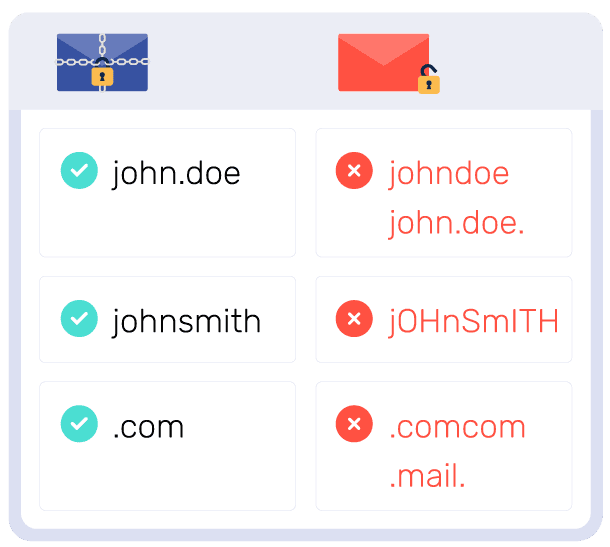
Not all characters are allowed in an email address. Using spaces, commas, or special symbols like , $, or % can cause your email to be rejected.
Think about the last time you typed your email quickly—did you accidentally add an extra dot or a weird symbol? These small slips can make a big difference.
Stick to letters, numbers, dots, hyphens, and underscores in the correct places to keep your email valid.
Missing Parts
Every email address needs certain parts to work properly: the username, the “@” symbol, and the domain.
Have you ever sent an email without the “@domain.com” part? That’s a common mistake that stops the message from reaching its destination.
Always double-check that your email includes all these elements before sharing or submitting it.
Typographical Errors
Typos can sneak in easily, especially on mobile devices or when in a hurry.
You might confuse similar letters like “l” and “1” or misspell domain names like “gmial” instead of “gmail.”
Try reading your email address out loud or use copy-paste carefully to avoid these errors.
Credit: www.ionos.es
Frequently Asked Questions
What Are The Main Parts Of An Email Address?
An email address has three main parts: the local part, the “@” symbol, and the domain. The local part identifies the user, while the domain specifies the mail server.
Why Is The “@” Symbol Important In An Email?
The “@” symbol separates the user’s name from the domain. It is essential for routing emails to the correct server and user.
How Does The Domain Part Affect Email Delivery?
The domain indicates the mail server hosting the email account. It ensures the message reaches the recipient’s correct email provider.
Can An Email Address Have Special Characters?
Yes, some special characters like dots, underscores, and hyphens are allowed in the local part. However, spaces and some symbols are not permitted.
Conclusion
Understanding the parts of an email address helps in sending emails correctly. Every email has a username, the “@” symbol, and a domain name. These parts work together to deliver messages to the right place. Knowing this makes using email easier and less confusing.
Remembering the structure can improve your communication online. Now, you can recognize each part and use email with confidence. Simple, clear, and helpful.
Leave a Reply