Are you thinking about using a liquid cooling system for your computer or device? You might be wondering if these systems need maintenance and how often.
Understanding this can save you time, money, and frustration. You’ll discover exactly what it takes to keep your liquid cooling system running smoothly. By the end, you’ll know how to protect your investment and keep your device cool without any hassle.
Ready to find out what maintenance really means for your liquid cooling setup? Keep reading!

Credit: www.tongyucooler.com
Basics Of Liquid Cooling Systems
Liquid cooling systems keep computers cool by moving heat away from key parts. They use liquid instead of air to carry heat. This method often cools better and quieter than fans. Understanding the basics helps in maintaining these systems properly.
Components Overview
- Water Block:Sits on the CPU or GPU to absorb heat.
- Pump:Moves the liquid through the system.
- Radiator:Releases heat from the liquid into the air.
- Reservoir:Holds extra liquid and helps remove air bubbles.
- Tubing:Connects all parts and transports the liquid.
How They Work
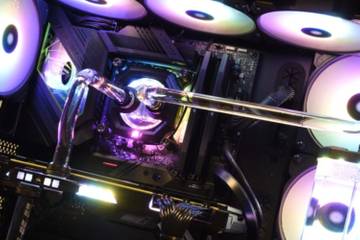
The pump pushes the liquid through the water block. The liquid soaks up heat from the CPU or GPU. Then, the hot liquid moves to the radiator. The radiator cools the liquid with the help of fans. Finally, the cooled liquid returns to the water block. This cycle keeps repeating to maintain low temperatures.
Credit: www.thegamer.com
Importance Of Maintenance
Maintaining a liquid cooling system is essential for keeping your computer running smoothly. Regular care ensures the cooling system works efficiently. Neglecting maintenance can cause serious problems, including hardware damage.
Preventing Overheating
Overheating can damage your computer’s components. Dust and debris in the cooling system reduce its performance. Cleaning the radiator and fans helps keep temperatures low. Checking coolant levels prevents the system from drying out. Proper maintenance avoids sudden shutdowns caused by heat.
Enhancing System Longevity
Liquid cooling parts last longer with regular checks. Replacing old coolant stops corrosion inside the tubes. Tightening fittings prevents leaks that can harm hardware. Monitoring the pump ensures it keeps working well. A well-maintained system saves money on repairs and replacements.
Common Maintenance Tasks
Maintaining a liquid cooling system is crucial for its performance and longevity. Regular checks help prevent issues that could harm your computer. The tasks are simple and don’t take much time.
These common maintenance tasks keep the system running smoothly and efficiently. They involve checking fluid levels, spotting leaks, and cleaning the system to avoid blockages.
Checking Coolant Levels
Coolant keeps your system cool and prevents overheating. It’s important to check the level often. Low coolant can cause poor cooling and damage the hardware.
- Look at the reservoir to see the fluid level.
- Top up with the recommended coolant if it is low.
- Use the right type of coolant to avoid corrosion.
Inspecting For Leaks
Leaks can cause serious damage to your components. Regular inspection helps find leaks early. Check all tubes, fittings, and the reservoir for damp spots or stains.
- Look under the PC case for any drops of liquid.
- Feel around tubes and connections for moisture.
- Replace or tighten parts if you find leaks.
Cleaning And Flushing
Over time, dirt and debris build up inside the cooling system. Cleaning keeps the coolant flowing freely. Flushing removes old coolant and contaminants.
- Drain the old coolant completely.
- Use distilled water or a cleaning solution to flush the system.
- Refill with fresh coolant after cleaning.
Credit: www.datacenterfrontier.com
Frequency Of Maintenance
Liquid cooling systems need regular care to work well and last longer. The frequency of maintenance depends on the system type and usage. Small checks happen often, while deeper care happens less often. This balance keeps the system safe and efficient.
Routine Checks
Perform quick checks every few weeks or monthly. Look for leaks around tubes and fittings. Check coolant levels and top up if needed. Listen for strange noises from the pump. Make sure fans and radiators are clean and free of dust. These small steps help spot problems early.
Seasonal Or Annual Tasks
Every few months or once a year, do a full system check. Drain and replace the coolant to avoid buildup. Clean the entire loop, including blocks and reservoirs. Inspect tubes for wear or discoloration. Test pump speed and performance. These tasks keep the system running at peak condition and prevent damage.
Tools And Supplies Needed
Maintaining a liquid cooling system isn’t just about keeping your PC running cool; it also requires the right set of tools and supplies. Without the proper equipment, you risk damaging components or not performing the maintenance correctly. Having everything ready before you start can save you time and frustration.
Essential Equipment
Some tools are must-haves for any liquid cooling system maintenance. You’ll need a set of screwdrivers, preferably magnetic ones, to remove and reattach components securely. A pair of soft, lint-free cloths helps you wipe down parts without scratching delicate surfaces.
Don’t forget a funnel or a small syringe to add or drain coolant precisely without spills. Tubing cutters or scissors are useful if you need to replace or adjust the tubing length. A flashlight or headlamp can improve visibility inside your case, especially in tight spaces.
Recommended Coolants
Choosing the right coolant is crucial for system longevity and performance. Distilled water is a popular base because it prevents mineral build-up inside your loop. However, you should add biocides or corrosion inhibitors to keep algae and rust at bay.
Many manufacturers offer premixed coolants designed specifically for PCs, which can simplify maintenance for you. These often contain additives that protect your components and come in different colors if you want a custom look. Have you checked the coolant’s compatibility with your metals and plastics to avoid damage?
Troubleshooting Common Issues
Liquid cooling systems are highly effective but sometimes encounter issues that can affect performance. Knowing how to spot and fix these problems can save you time and prevent damage. Let’s focus on two common challenges: leaks and temperature spikes.
Identifying Leaks
Leaks are a primary concern with liquid cooling systems. You might notice a puddle under your PC or corrosion around fittings. Keep an eye out for damp spots on tubing or components.
Using a paper towel to wipe around connections can help reveal slow leaks. If you find any moisture, immediately power down your system. Leaks can cause short circuits and hardware failure, so addressing them quickly is crucial.
Regularly inspect your tubing and reservoirs for cracks or loose clamps. Replacing faulty parts early can prevent a major mess. Have you checked your cooling system thoroughly this week?
Addressing Temperature Spikes
Temperature spikes signal that your cooling system isn’t working efficiently. If your CPU or GPU temps suddenly jump, it’s time to investigate. Dust buildup on radiators or fans often causes airflow blockages.
Cleaning dust and debris can restore proper cooling. Also, verify the pump is running smoothly; a failing pump can cause irregular coolant flow. Monitor your system’s temperature trends to catch issues early.
Sometimes, old or degraded coolant reduces heat transfer. Flushing the loop and refilling with fresh coolant can bring temperatures back down. What steps do you take when your system overheats unexpectedly?
Professional Vs. Diy Maintenance
Deciding between professional and DIY maintenance for your liquid cooling system can impact its performance and lifespan. Both options have their place depending on your comfort level, tools, and the complexity of the task. Understanding when to call a pro and what you can handle yourself helps keep your system running smoothly without unnecessary costs or risks.
When To Hire A Professional
Some maintenance tasks require precision and experience that only a professional can provide. If you notice persistent leaks, unusual noises, or temperature spikes despite basic cleaning, it’s time to seek expert help.
Professionals have specialized tools to detect hidden issues and can safely handle coolant refills or component replacements. They also offer warranty protection, which DIY attempts might void.
Think about your confidence level—if you’re unsure about disassembling parts or handling sensitive components, a professional can save you from costly mistakes. Would you risk damaging expensive hardware just to save a few bucks?
Diy Tips And Tricks
Simple maintenance tasks like cleaning dust from radiators or checking tubing for cracks can be done at home with minimal tools. Use compressed air to blow out dust, and inspect your system regularly for discoloration or residue buildup.
Flushing and refilling the coolant can be a DIY project if you follow clear instructions and use the right fluids. Always work in a well-lit area and keep paper towels handy for spills.
- Wear gloves to avoid skin contact with coolant.
- Label your tubes before disassembly to avoid confusion.
- Keep a checklist to track maintenance schedules.
Have you checked your coolant levels and system temperature lately? Small, regular checks can prevent bigger problems and keep your liquid cooling system performing at its best.
Future Of Liquid Cooling Technology
The future of liquid cooling technology shows promising growth and exciting changes. This technology continues evolving to meet the needs of modern computers and servers. Advances focus on better cooling, easier maintenance, and eco-friendly designs.
Developers work on making liquid cooling more efficient and user-friendly. These improvements aim to help users maintain their systems with less effort. The technology also targets reducing energy use and noise levels.
Innovations In Design
New designs use smaller, quieter pumps to improve cooling. These pumps consume less power and last longer. Some systems use smart sensors to monitor temperature and liquid levels automatically.
Manufacturers experiment with new materials for tubing and blocks. These materials resist corrosion and reduce leaks. Modular designs allow easier upgrades and repairs, saving time and cost.
Trends To Watch
- Integration of AI for predictive maintenance and performance optimization
- Use of eco-friendly coolants that reduce environmental impact
- Hybrid cooling systems combining air and liquid for better results
- Wireless monitoring tools for real-time system health checks
- Compact all-in-one units designed for smaller spaces
These trends aim to make liquid cooling more accessible and reliable. They focus on enhancing user experience and system longevity.
Frequently Asked Questions
Do Liquid Cooling Systems Need Regular Maintenance?
Yes, liquid cooling systems require regular maintenance to ensure optimal performance. Checking coolant levels and cleaning components prevents overheating and damage. Proper upkeep extends system lifespan and maintains efficient cooling.
How Often Should Liquid Cooling Systems Be Serviced?
Liquid cooling systems should be serviced every 6 to 12 months. Regular checks include inspecting for leaks, coolant quality, and cleaning radiators. Timely servicing avoids system failure and keeps cooling effective.
What Maintenance Tasks Are Essential For Liquid Cooling?
Essential tasks include checking coolant levels, inspecting tubes for leaks, and cleaning radiators and fans. Flushing and replacing coolant annually also prevents buildup and corrosion. These steps ensure reliable and efficient cooling performance.
Can Neglecting Maintenance Harm Liquid Cooling Systems?
Yes, neglecting maintenance can cause blockages, leaks, and reduced cooling efficiency. Over time, this can lead to overheating and hardware damage. Proper care is crucial to avoid costly repairs and system downtime.
Conclusion
Liquid cooling systems do need regular care to work well. Cleaning and checking the liquid level keeps them safe. Without upkeep, parts can wear out or stop cooling properly. Simple checks save money and prevent damage later. Taking a little time now helps your system last longer.
Maintenance is not hard but very important. Keep your liquid cooler running smooth and cool. It pays off with better performance and less trouble.
Leave a Reply