How often should you perform system maintenance? It’s a question that can save you from unexpected crashes, slowdowns, and costly repairs.
Your computer or network is like a car – without regular check-ups, things can go wrong when you least expect it. But how do you know the right balance between too little and too much maintenance? You’ll discover simple, practical tips to keep your system running smoothly and avoid frustrating downtime.
Keep reading, and you’ll learn exactly when and how to take care of your technology, so it always works when you need it most.
Importance Of Regular System Maintenance
Regular system maintenance is crucial for keeping your devices running smoothly and securely. It helps prevent unexpected crashes and data loss, saving you time and frustration. Ignoring maintenance can lead to slower performance and increased vulnerability to cyber threats.
Improved Performance And Speed
Over time, systems accumulate unnecessary files and software clutter that slow down your device. Regular maintenance clears out junk files, updates software, and optimizes settings. Have you noticed your computer running slower after months without cleanup? Scheduling maintenance keeps your system fast and responsive.
Enhanced Security
Cyber threats evolve constantly, and outdated systems become easy targets. Performing regular maintenance ensures your security patches and antivirus software are up to date. This proactive approach reduces the risk of malware infections and data breaches.
Extended Hardware Lifespan
Systems under constant strain without care tend to wear out faster. Cleaning hardware components and checking for issues during maintenance helps prevent overheating and hardware failure. Taking care of your system regularly can delay costly replacements.
Preventing Costly Repairs
Small problems often go unnoticed until they cause major damage. Regular checkups can detect issues early, avoiding expensive repairs down the line. Would you rather invest a little time now or face a big repair bill later?
Better User Experience
Frequent maintenance keeps your system running smoothly, reducing freezes and errors. This means less frustration and more productivity in your daily tasks. How much more could you get done if your system worked flawlessly every day?
Credit: coboelectric.ca
Types Of System Maintenance
Understanding the different types of system maintenance can help you decide how often you should perform each. Each type serves a unique purpose and targets specific aspects of your system’s health and performance. Knowing these distinctions allows you to maintain your system more effectively and avoid unexpected breakdowns.
Preventive Maintenance
Preventive maintenance focuses on routine checks and updates to stop problems before they happen. This includes tasks like installing software updates, running antivirus scans, and cleaning hardware components. Think of it as regular health checkups for your system—simple actions can prevent costly downtime.
Corrective Maintenance
Corrective maintenance happens after a problem occurs and aims to fix it quickly. You might face situations like system crashes, bugs, or hardware failures that need immediate attention. Have you ever delayed fixing a small error only for it to cause bigger issues later? Addressing problems promptly saves time and frustration.
Adaptive Maintenance
Adaptive maintenance adjusts your system to work with new environments or technologies. For example, updating software to be compatible with a new operating system version or integrating new hardware. It’s about keeping your system relevant and functional as conditions change around it.
Perfective Maintenance
Perfective maintenance improves your system’s performance or usability based on user feedback or changing needs. This could mean adding new features, optimizing existing functions, or enhancing user interfaces. Are you gathering user feedback regularly? These insights can guide perfective maintenance to make your system better over time.
Factors Influencing Maintenance Frequency
Several factors determine how often you should perform system maintenance. These factors affect system health and performance. Understanding them helps set the right maintenance schedule. Below are key points to consider.
System Complexity
Complex systems need more frequent checks. More parts mean higher chances of problems. Simple systems require less maintenance. Complex software or hardware demands regular updates and fixes.
Usage Patterns
Systems used heavily need maintenance more often. Constant use causes wear and tear. Systems used occasionally can have longer intervals between checks. Usage type also matters—critical systems need closer attention.
Environmental Conditions
Harsh environments increase maintenance needs. Dust, heat, and moisture can damage parts. Clean, controlled spaces reduce maintenance frequency. Systems in tough conditions require more frequent care.
Regulatory Requirements
Some industries have strict maintenance rules. Regulations set minimum schedules for safety and compliance. Ignoring these can cause legal issues. Follow guidelines to keep your system compliant and safe.
Credit: us.norton.com
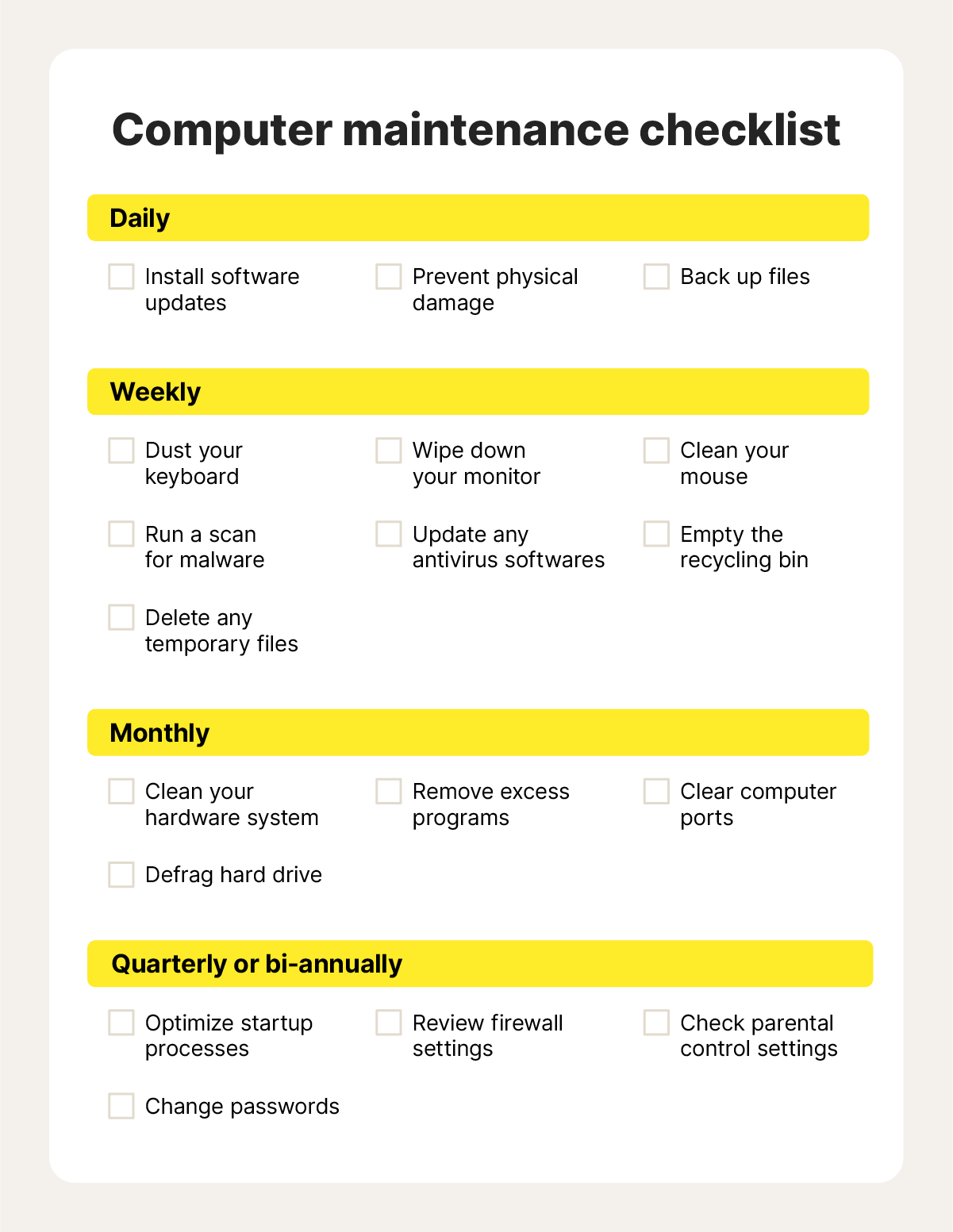
Recommended Maintenance Schedule
Maintaining your system regularly is key to avoiding unexpected breakdowns and keeping everything running smoothly. Setting up a clear maintenance schedule helps you tackle issues before they grow. It also saves you time and money in the long run by preventing costly repairs and data loss.
Daily Tasks
Check your system for any unusual activity or errors every day. Simple actions like clearing temporary files and verifying antivirus updates can prevent many common problems.
Think about how often you’ve faced slowdowns that could’ve been avoided by a quick daily check. Staying proactive here keeps your system responsive and secure.
Weekly Tasks
Perform a full virus scan and back up important files weekly. Review system logs for warnings or errors that might indicate early signs of trouble.
Updating software and drivers once a week ensures you benefit from the latest security patches and performance improvements. Have you ever delayed updates only to face bigger issues later?
Monthly Tasks
Run disk cleanup and defragmentation (if using HDDs) monthly to optimize performance. Check for updates to your operating system and critical applications.
Review user accounts and permissions regularly to avoid unauthorized access. This simple monthly habit strengthens your system’s defenses significantly.
Quarterly Tasks
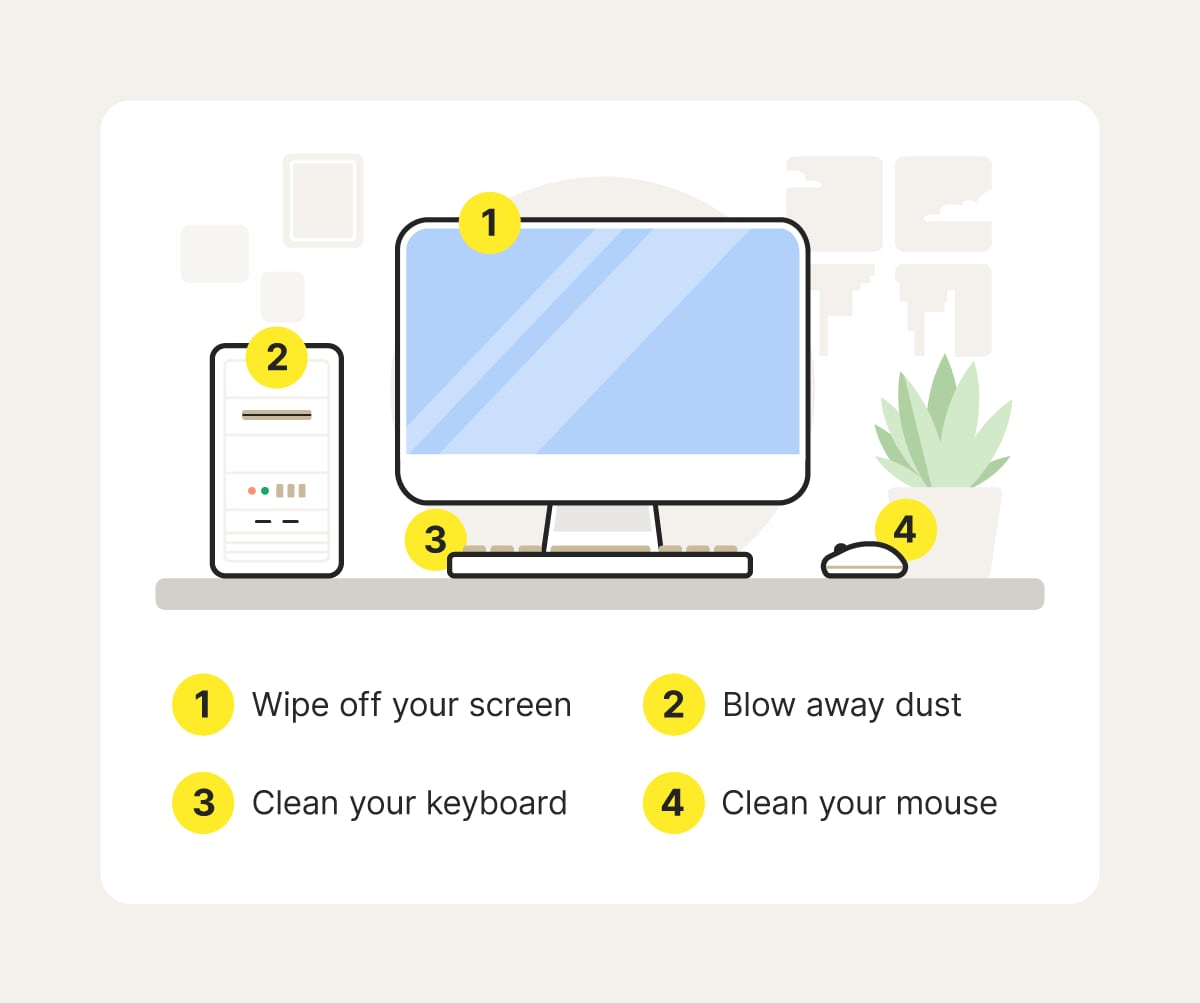
Inspect hardware components for dust buildup and physical wear every three months. Clean or replace filters and fans to avoid overheating.
Test your backup restoration process to ensure your data is safe and recoverable. How confident are you that your backups will work when you really need them?
Annual Tasks
Conduct a thorough system audit including security settings, software licenses, and hardware health once a year. Plan upgrades or replacements based on this review.
Review your overall maintenance strategy and adjust it based on new challenges or technology changes. Taking time each year to reflect helps you stay ahead of potential problems.
Tools And Techniques For Effective Maintenance
Effective system maintenance depends on using the right tools and techniques. These help keep your system running smoothly and prevent issues before they grow. Choosing the proper approach saves time and effort while improving system performance.
Automated Tools
Automated tools run checks and fixes without much effort. They can scan for viruses, clean junk files, and update software regularly. These tools work in the background, so you do not need to manage every detail. Automation helps maintain systems consistently and reduces the chance of human error.
Manual Checks
Manual checks involve inspecting system parts yourself. You can look for unusual noises, slow responses, or error messages. This hands-on approach finds problems that tools might miss. Regular manual checks keep you aware of your system’s health and catch small issues early.
Monitoring Software
Monitoring software tracks system activities and resource use. It shows real-time data on CPU, memory, and disk usage. This software alerts you to unusual spikes or drops in performance. Monitoring helps detect problems quickly and guides maintenance tasks effectively.
Professional Services
Professional services offer expert maintenance and support. They perform deep system analysis and repairs beyond basic checks. Hiring experts ensures complex issues get the right attention. Professionals also provide advice on upgrades and security improvements.

Credit: wheellifeblog.com
Common Maintenance Mistakes To Avoid
Performing system maintenance is crucial, but even the best intentions can go wrong if you make common mistakes. These errors can lead to wasted time, increased risks, and sometimes costly downtime. Identifying and avoiding these pitfalls ensures your system stays healthy and secure without unnecessary headaches.
Neglecting Updates
Failing to regularly update your software and hardware can leave your system vulnerable. Updates often include important bug fixes and performance improvements that keep everything running smoothly. Have you ever ignored a simple update, only to face unexpected crashes or slowdowns later?
Set reminders or automate updates wherever possible. This way, you won’t have to remember every detail, and your system will stay current without extra effort.
Ignoring Error Logs
Error logs are your system’s way of telling you something isn’t right. Overlooking them means missing early warning signs of bigger problems. Think about a time when you ignored a small error, which later caused significant issues—could that have been avoided?
Make it a habit to review logs regularly. Even a quick scan can reveal patterns that need attention before they escalate.
Overlooking Security Patches
Security patches close vulnerabilities that hackers might exploit. Skipping these updates can expose your data and systems to attacks. You don’t want to wait until after a breach to realize a patch was available.
Prioritize security patches as part of your maintenance routine. Treat them as urgent tasks, not optional extras.
Skipping Backups
Not backing up your data can turn a minor glitch into a disaster. Losing important files without a backup can cost you time, money, and peace of mind. Have you ever lost data unexpectedly and wished you had a backup ready?
Schedule regular backups and test them to ensure they work. This simple step can save you from a lot of trouble down the road.
Benefits Of Consistent System Maintenance
Keeping your system in top shape requires regular maintenance. The benefits of consistent system maintenance go beyond just fixing issues; they help your device run smoothly and securely over time. Have you noticed how a well-maintained system feels faster and more reliable? That’s no coincidence.
Enhanced Performance
Regular system checks clear out unnecessary files and optimize your device’s resources. This means faster startup times and smoother operation when you open programs or browse the internet. Imagine how much time you could save each day if your computer stopped lagging at crucial moments.
Increased Security
Updating software and running security scans regularly protect your system from viruses and hackers. Cyber threats evolve quickly, so staying on top of maintenance keeps your personal data safe. Would you risk losing important files just because you skipped a security update?
Prolonged System Life
Consistent maintenance prevents hardware from wearing out prematurely by reducing stress on components. Cleaning dust from fans or checking for system errors helps avoid costly breakdowns. Think about how much longer your device could last if you took care of it like a trusted tool.
Cost Savings
Fixing small problems early saves you from expensive repairs or replacements later. Regular maintenance also reduces energy consumption by keeping your system efficient. Have you ever faced a huge repair bill that could have been avoided with a little upkeep?
Frequently Asked Questions
How Often Should System Maintenance Be Performed?
System maintenance should be done monthly for optimal performance. Regular checks prevent issues and keep systems secure. Critical updates may require weekly attention. Following a consistent schedule reduces downtime and extends system lifespan.
What Are The Key Tasks In System Maintenance?
Key tasks include updating software, checking hardware, cleaning files, and monitoring security. Regular backups and performance tuning are essential. These steps ensure smooth operation and reduce risks from malware or failures.
Can Neglecting System Maintenance Cause Problems?
Yes, neglecting maintenance leads to slow performance, security vulnerabilities, and hardware failures. It increases downtime and repair costs. Regular upkeep helps avoid data loss and extends system reliability.
How Does System Maintenance Improve Security?
Maintenance installs updates and patches to fix security flaws. It removes malware and checks firewall settings. This reduces the risk of cyberattacks and protects sensitive data effectively.
Conclusion
Regular system maintenance keeps your devices running smoothly. It helps avoid slowdowns and unexpected crashes. Set a schedule based on your system’s use and needs. Simple tasks like updates and backups protect your data. Don’t wait for problems to start maintenance.
Small efforts now save big headaches later. Stay consistent, and your system will last longer. Maintenance is easy and worth the time. Keep your tech healthy with regular check-ups.
Leave a Reply