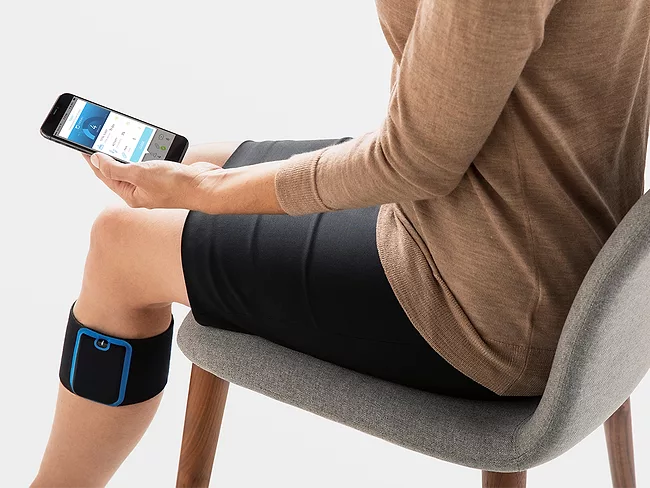
Are you curious about pain relief options that don’t require a smartphone? If you’re tired of always reaching for your phone to manage every aspect of your life, including pain management, you’re in the right place.
The Quell Pain Relief Device is here to offer you a seamless experience, even if you’re not tech-savvy or simply prefer to keep things simple. Imagine gaining control over your pain without the constant need for digital connectivity. This guide is crafted just for you, showing you how to effectively use the Quell device without a smartphone.
Dive in to discover a new level of convenience and freedom in pain management that could change the way you live your life.
Quell Device Basics
The Quell device offers a simple way to manage pain without complex tools. Understanding its basics helps users get started quickly. The device works on nerve stimulation to reduce pain sensations effectively. It does not always need a smartphone for operation. Here is a look at the core features and what comes with the Quell device.
Key Features
- Wireless design for easy wearing and movement
- Adjustable intensity levels to fit pain needs
- Long battery life for extended use
- Water-resistant for use during daily activities
- Comfortable and lightweight for all-day wear
- Simple controls on the device itself
- Automatic shut-off to save power
Components Included
- Quell main device unit
- Reusable electrode pads for skin contact
- Charging cable and power adapter
- Carrying case for protection and travel
- User manual with clear instructions
- Sample electrode pads for replacement
Setting Up Without A Phone
Setting up the Quell pain relief device without a smartphone is simple and straightforward. The device is designed for easy use, even without app control. Follow basic steps to get started quickly and benefit from its pain relief features.
Charging The Device
First, place the Quell device on its charging dock. Use the provided USB cable and adapter. Ensure the charging light turns on, indicating the device is charging. It takes about two hours for a full charge. Avoid using the device while charging for safety and best results.
Wearing The Device Correctly
Wear the device on your upper calf, just below the knee. Adjust the strap to fit snugly but comfortably. Make sure the electrode pads touch your skin directly. Clean and dry your skin before wearing for better contact. The device should not move during use. Proper placement improves pain relief effectiveness.
Operating Quell Manually
Operating the Quell pain relief device manually is simple and straightforward. You can control the device without a smartphone app. This makes it easy to use anytime and anywhere. Understanding the basic controls helps you get the most from Quell.
Powering On And Off
To turn Quell on, press and hold the main button for a few seconds. You will feel a short vibration indicating it is active. To power off, press and hold the same button until you feel another vibration. This lets you conserve battery when not in use.
Adjusting Intensity Levels
Quell allows you to change the stimulation intensity manually. Tap the main button briefly to increase the level. The device will cycle through different intensities. When you reach the highest level, it will loop back to the lowest. Choose the level that feels comfortable and effective for your pain relief.
Credit: apps.apple.com
Using Quell Without App
Using Quell without the app is straightforward and practical, especially if you prefer a simple setup or don’t have access to a smartphone. The device is designed to function effectively on its own, giving you control over your pain relief without relying on digital tracking. Let’s walk through how you can start and monitor your therapy sessions directly on the device.
Starting A Therapy Session
To begin a therapy session without the app, first ensure your Quell device is properly positioned on your leg and powered on. Press the main button once to start the therapy; you will feel a gentle pulse indicating the session has begun.
If you need to adjust the intensity, use the plus (+) and minus (-) buttons on the device itself. This manual control allows you to find the right level of comfort without opening an app.
Have you ever found it frustrating to rely on your phone when all you want is quick pain relief? Quell’s physical buttons give you that independence immediately.
Monitoring Therapy Time
Without the app, you won’t see detailed session data, but the Quell device has built-in indicators to help you track your therapy time. The LED lights on the device blink slowly during active therapy and stop when the session ends.
Each therapy session typically lasts about 60 minutes. You can keep track by noting when you start and watching the LED status to know when it’s done.
To make it easier, consider setting a timer on another device like a watch or clock. This simple habit ensures you get the full benefit of each session without needing app notifications.
Troubleshooting Tips
Using the Quell pain relief device without a smartphone can be straightforward, but sometimes issues arise that might leave you wondering what to do next. Troubleshooting these problems quickly can save you time and frustration. Here are practical tips to help you get your device working smoothly again.
Common Issues
One frequent issue is the device not turning on or responding. This often happens when the battery is low or not charged properly. Make sure the charging cable is firmly connected and that you use the original charger to avoid power problems.
Another common problem is the device not delivering pulses or pain relief as expected. This might be due to loose electrode placement or worn-out electrodes. Double-check that the electrodes are firmly attached to your skin and replace them if they look old or dry.
If your device seems stuck or unresponsive, it might be due to a software glitch. Even without a smartphone, you can try basic steps like turning the device off and on again to refresh its system. Have you noticed any patterns in when these issues occur? Identifying triggers can help prevent them in the future.
Resetting The Device
If simple fixes don’t work, resetting the Quell device often clears up persistent issues. To reset, press and hold the power button for about 10 seconds until the device turns off. Then, wait a few seconds and press the power button again to turn it back on.
Resetting can solve problems like freezing or poor response without needing a smartphone app. Keep in mind, a reset won’t erase your usage settings, so you won’t lose your pain relief preferences. If problems continue after resetting, inspecting the electrodes and battery condition is your next best step.
Credit: apps.apple.com
Maximizing Pain Relief
Maximizing pain relief with the Quell device without a smartphone requires careful attention. Proper use ensures the device works effectively. Small adjustments can lead to better comfort and results.
Optimal Placement
Place the Quell device on the upper calf. This area has many nerves that control pain signals. The device should sit snugly but not too tight. Avoid placing it on bones or joints. Adjust the strap to keep the device stable during movement. Proper placement helps the device send pulses to the right nerves.
Session Frequency
Use the device regularly for best results. Start with shorter sessions of about 30 minutes. Gradually increase to 1-2 hours per session. Avoid using it for more than 8 hours daily. Give your body time to rest between sessions. Consistent use helps reduce chronic pain effectively.

Credit: apps.apple.com
Frequently Asked Questions
How To Operate Quell Without A Smartphone App?
You can use Quell manually by pressing its power button to start pain relief. Adjust settings directly on the device without needing the app. Basic functions like intensity levels are accessible without a smartphone, making it convenient for users without app access.
Can Quell Store Settings Without A Phone?
Yes, Quell stores your last used settings internally. Once configured, it remembers intensity and mode even when powered off. This allows consistent pain relief without reconnecting to a smartphone every time you use it.
Is A Smartphone Necessary To Use Quell Effectively?
No, a smartphone is not mandatory for basic use. The device offers manual controls for essential functions. However, the app enhances customization, tracking, and advanced settings, but pain relief works well without it.
How To Adjust Quell Intensity Without Smartphone?
Use the device’s physical buttons to increase or decrease intensity. Press the intensity button to cycle through levels. This allows personalized pain control without needing the smartphone app.
Conclusion
Using the Quell pain relief device without a smartphone is simple and effective. The device works well on its own. You can control it with easy buttons. No need to worry about apps or updates. This makes it a good choice for anyone.
It helps reduce pain naturally and safely. Just follow the steps carefully. Enjoy relief without extra tech hassle. Stay comfortable and keep moving every day.
Leave a Reply