Have you ever wondered why your computer suddenly slows down or crashes at the worst moments? What if there was a simple way to keep your device running smoothly, saving you time and frustration?
That’s exactly what a computer maintenance system does for you. It works behind the scenes to protect your files, speed up your machine, and prevent annoying problems before they happen. Keep reading, and you’ll discover how this system can make your computer experience faster, safer, and hassle-free.
Credit: us.norton.com
Key Functions Of Computer Maintenance
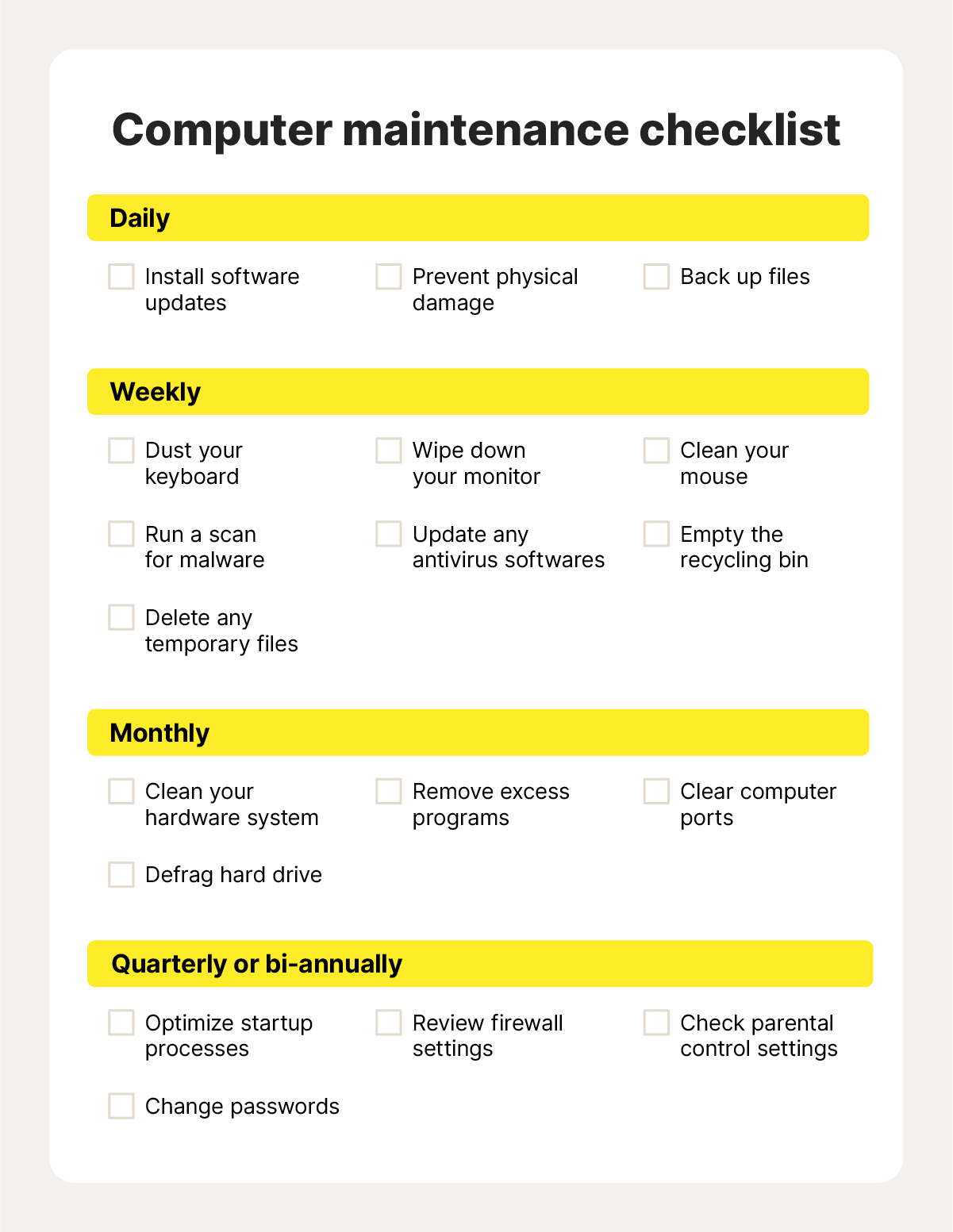
Keeping your computer in top condition requires regular maintenance. This ensures smooth performance and extends the device’s lifespan. Proper computer maintenance involves several key functions. Each function plays a crucial role in maintaining system health.
Cleaning Up Disk Space
Freeing up disk space is essential for optimal performance. Over time, files accumulate and slow down your system. Regularly delete unnecessary files and empty the recycle bin. Use disk cleanup tools to remove temporary files.
Removing Malware And Viruses
Malware and viruses can harm your computer and steal data. Protect your system by running antivirus software. Schedule regular scans to detect and remove threats. Keep your antivirus program updated for maximum protection.
Updating Software And Drivers
Software and driver updates improve functionality and security. Outdated software can cause compatibility issues. Regularly check for updates and install them promptly. This keeps your system running smoothly and securely.
Optimizing System Settings
Adjusting system settings enhances computer performance. Disable unnecessary startup programs to speed up boot time. Adjust power settings to balance performance and energy use. Customize display settings for optimal visual comfort.
How Maintenance Improves Speed
Computer maintenance plays a key role in making your system faster. It cleans up unnecessary files and fixes errors. This helps the computer work smoothly and respond quickly. Regular care keeps the system healthy and efficient.
Reducing Startup Time
Maintenance removes unwanted programs from starting automatically. This lowers the load on the system during boot-up. As a result, the computer starts faster. It spends less time loading apps and services.
Enhancing Ram Usage
Cleaning up background processes frees up RAM space. Better RAM management means the computer runs programs without lag. Memory optimization stops apps from using too much space. The system handles tasks more efficiently.
Speeding Up File Access
Defragmenting the hard drive organizes files better. Data is stored in a way that the system finds quickly. This reduces the time to open documents and programs. Accessing files becomes smooth and fast.
Preventing System Crashes
Regular updates and scans detect errors early. Fixing these issues stops crashes and freezes. A stable system avoids slowdowns caused by sudden interruptions. Maintenance keeps your computer reliable and quick.
Tools Used In Maintenance Systems
Computer maintenance systems rely on various tools to keep devices running smoothly. These tools help clean up space, protect against threats, and monitor system health. Using the right tools improves speed and prevents crashes.
Disk Cleanup Utilities
Disk cleanup utilities remove unnecessary files from your computer. They delete temporary files, system cache, and old logs. Clearing these files frees up storage space. It also helps your computer run faster and reduces clutter.
Antivirus Programs
Antivirus programs scan your system for harmful software. They detect viruses, malware, and spyware. These tools protect your data and privacy. Regular scans keep your computer safe from attacks.
Registry Cleaners
Registry cleaners fix errors in the Windows registry. They remove broken or invalid entries. This can improve system stability and reduce crashes. A clean registry helps your computer start and run smoothly.
Performance Monitoring Software
Performance monitoring software tracks your computer’s health. It shows CPU, memory, and disk usage in real time. This helps spot problems early. You can optimize settings based on the data to keep your system efficient.
Credit: medium.com
Best Practices For Fast Performance Boost
Fast computer performance depends on good maintenance habits. Simple actions keep your system running smoothly. Follow these practices to improve speed and avoid slowdowns.
Regular Maintenance Schedule
Set a routine to check your computer. Clean up files and folders often. Run disk cleanup and remove temporary files. Scan for viruses regularly. Update software and drivers to fix bugs. Regular care stops problems before they grow.
Backup Before Changes
Save your important data before making changes. Use external drives or cloud storage for backups. Backups protect your files from loss or damage. This step gives peace of mind when fixing or updating your system.
Avoiding Unnecessary Programs
Uninstall programs you do not use. Extra software can slow your computer down. Check startup programs and disable the ones not needed. Fewer programs mean more resources for your tasks.
Keeping Hardware Updated
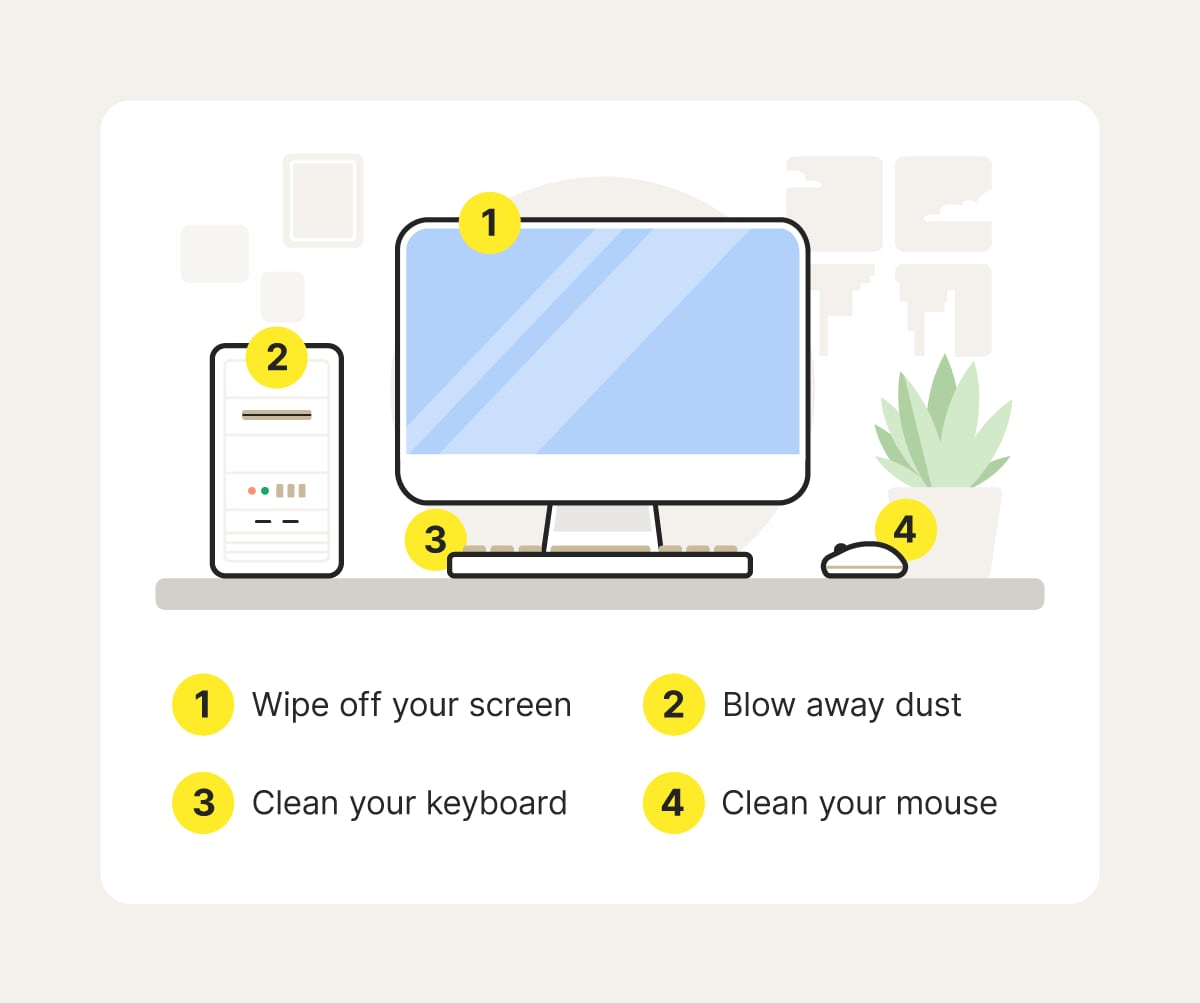
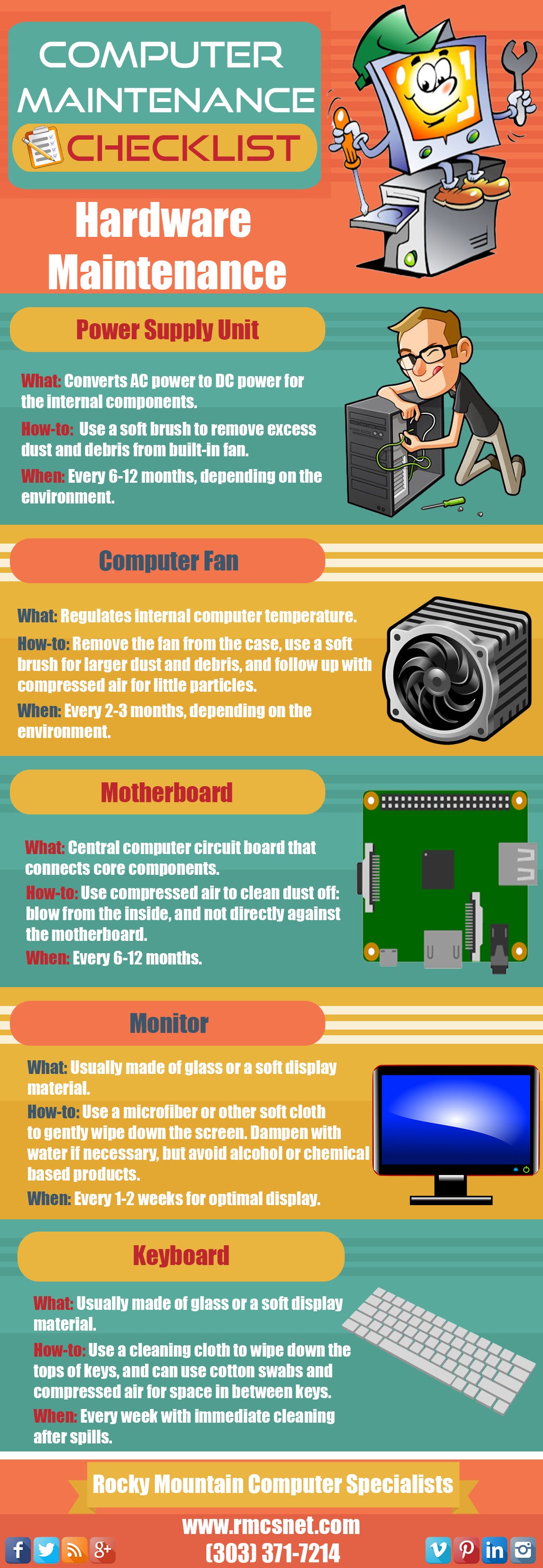
Old hardware can limit your computer’s speed. Upgrade RAM or replace hard drives with SSDs for better performance. Clean dust from fans and vents to prevent overheating. Updated hardware helps your system work at its best.
Common Issues Fixed By Maintenance
Computer maintenance tackles a variety of common issues that can slow down or disrupt your daily tasks. These problems often sneak up on you, gradually reducing your system’s efficiency. Knowing what maintenance can fix helps you keep your computer running smoothly and saves you from unexpected headaches.
Slow Boot Times
Have you ever felt frustrated waiting minutes for your computer to start? Slow boot times often result from too many programs launching at startup or outdated drivers. Regular maintenance cleans up unnecessary startup items and updates essential software, speeding up your system’s wake-up process.
Imagine your computer booting in seconds instead of dragging on—how much more could you get done with that extra time?
Frequent Freezes
Nothing kills productivity like a frozen screen. Freezes often happen because of overloaded memory, corrupted system files, or overheating components. Maintenance tools scan for and repair these issues, ensuring your system stays responsive when you need it most.
Have you noticed your computer freezing during critical moments? Fixing this can be as simple as clearing junk files or updating drivers.
Software Conflicts
Multiple programs running simultaneously sometimes clash, causing crashes or errors. Maintenance helps identify conflicting software and offers solutions like updates, patches, or uninstalling redundant apps. This keeps your system stable and reduces unexpected shutdowns.
Do you ever wonder why certain apps crash while others run smoothly? Regular maintenance can resolve these hidden software battles.
Storage Fragmentation
Storage fragmentation slows down data access, making your computer feel sluggish. Over time, files get scattered across the disk, increasing read and write times. Defragmentation during maintenance reorganizes these files, improving speed and efficiency.
Think about how much faster your computer could work if files were neatly arranged rather than scattered like puzzle pieces. Maintenance makes that happen.
Credit: us.norton.com
Frequently Asked Questions
What Is The Primary Function Of A Computer Maintenance System?
A computer maintenance system optimizes performance by cleaning junk files, updating software, and fixing errors. It prevents crashes and speeds up operations, ensuring smooth and reliable computer use.
How Does A Computer Maintenance System Improve Device Speed?
It removes unnecessary files, stops unwanted startup programs, and repairs registry errors. These actions free up resources, making the computer run faster and more efficiently.
Can A Computer Maintenance System Protect Against Malware?
Yes, many systems include malware scanning and removal tools. They detect harmful software early and keep your device safe from security threats.
How Often Should I Run A Computer Maintenance System?
Running maintenance weekly or monthly keeps your system healthy. Regular checks prevent slowdowns and avoid potential hardware or software issues.
Conclusion
A computer maintenance system helps keep your device running smoothly. It cleans junk files, updates software, and protects from viruses. Regular use prevents slowdowns and errors. It saves time and avoids costly repairs. Everyone can benefit from simple upkeep. Stay safe, fast, and efficient with basic care.
Small steps make a big difference. Your computer works better and lasts longer. Easy to use and worth the effort. Don’t wait for problems—maintain your system today.
Leave a Reply