Have you ever wondered what makes your computer come alive? What lies at the heart of your device, quietly working to process everything you do?
Understanding the central electronic components of a computer can give you a clearer picture of how your machine operates—and how powerful it truly is. You’ll discover exactly what these key parts are, how they connect, and why they matter to your everyday computing experience.
Keep reading, and you’ll gain insights that can make you smarter about the technology you use every day.
Central Processing Unit (cpu)
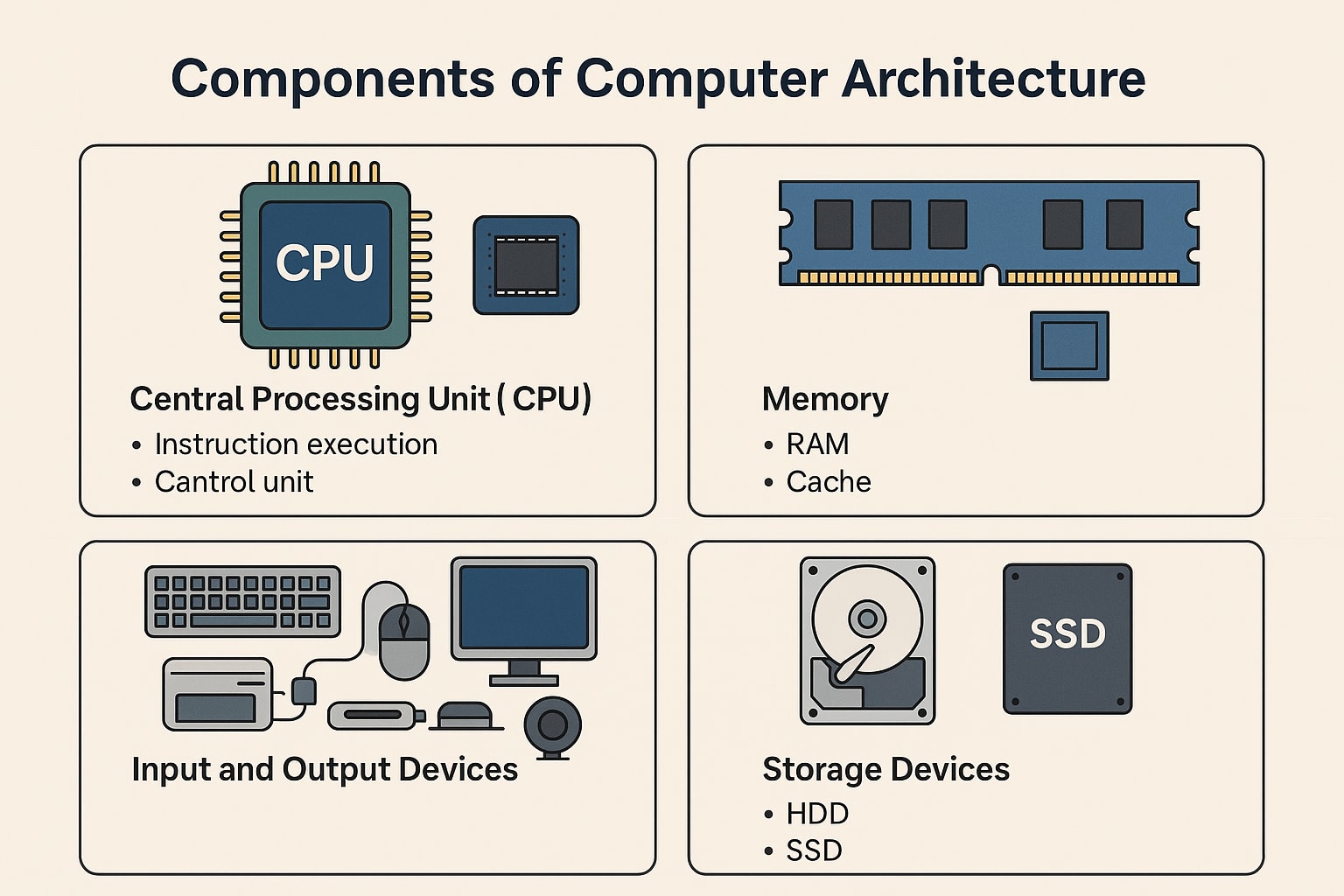
The Central Processing Unit (CPU) is the heart of a computer. It handles all instructions and controls how the system works. Without the CPU, a computer cannot function. It processes data and executes commands quickly. The CPU’s speed and efficiency affect the overall computer performance.
Role Of The Cpu
The CPU performs basic arithmetic, logic, and control tasks. It fetches instructions from memory, decodes them, and executes commands. The CPU directs data flow between different parts of the computer. It acts as the brain, making decisions and running programs. Every task on the computer relies on the CPU’s operation.
Key Components Of The Cpu
- Control Unit (CU):Manages the execution of instructions and coordinates other parts.
- Arithmetic Logic Unit (ALU):Performs math calculations and logical operations.
- Registers:Small storage areas for quick data access during processing.
- Cache:Fast memory that stores frequently used data to speed up processing.
Types Of Cpus
- Single-core CPUs:Contain one processing unit, suitable for basic tasks.
- Multi-core CPUs:Have multiple cores to handle many tasks at once.
- Mobile CPUs:Designed for laptops and smartphones, focusing on low power use.
- Server CPUs:Built for powerful performance and managing heavy workloads.
Credit: www.jaroeducation.com
Motherboard
The motherboard is the main circuit board inside a computer. It connects all parts and allows them to work together. Without the motherboard, the computer cannot function. It acts as a central hub for communication between the processor, memory, storage, and other components.
Purpose Of The Motherboard
The motherboard holds the CPU, memory, and other essential parts. It provides power to these components. It also allows data to move between the CPU and memory quickly. The motherboard manages communication between all devices inside the computer. It ensures everything works smoothly and efficiently.
Important Motherboard Components
- CPU Socket:The place where the processor is installed.
- RAM Slots:Holds the memory modules for fast data access.
- Chipset:Controls data flow between the CPU, memory, and peripherals.
- Expansion Slots:Allow adding extra cards like graphics or sound cards.
- Power Connectors:Supply electricity from the power supply unit to the board.
- Storage Connectors:Connect hard drives and SSDs to the system.
- Input/Output Ports:Connect external devices like keyboards and monitors.
Motherboard Form Factors
Form factor defines the size and shape of the motherboard. It also sets the location of mounting holes and ports. Common form factors include:
- ATX:Standard size with many slots and ports.
- Micro-ATX:Smaller than ATX but still offers good expansion.
- Mini-ITX:Compact size for small computers with limited slots.
The chosen form factor affects the computer case size and upgrade options.
Memory Components
Memory components form the heart of a computer’s electronic system. They store data and instructions for quick access by the processor. These components determine how fast and efficiently a computer works. Understanding their roles helps in grasping computer performance better.
Ram Functionality
RAM, or Random Access Memory, is a temporary storage space. It holds data that the CPU needs right now. This memory is volatile, which means it loses information when power is off. RAM allows quick reading and writing, helping programs run smoothly.
Types Of Ram
Several types of RAM exist, each with unique features:
- DRAM (Dynamic RAM):Common in most computers. It needs constant refreshing to keep data.
- SRAM (Static RAM):Faster and more reliable. Used in cache memory.
- DDR (Double Data Rate) RAM:The latest standard, faster than older RAM types.
Role Of Cache Memory
Cache memory is a small, fast type of RAM. It stores frequently used data close to the CPU. This reduces the time needed to access data from main memory. Cache improves overall system speed and efficiency by minimizing delays.

Credit: softwareg.com.au
Storage Devices
Storage devices are the backbone of your computer’s ability to save and retrieve data. They hold everything from your operating system to your favorite photos and documents. Understanding the different types can help you make better choices for speed, capacity, and reliability.
Hard Disk Drives (hdds)
Hard Disk Drives have been around for decades and are known for their large storage capacity at a low cost. They store data on spinning metal disks, which means they have moving parts. This makes them slower and more prone to damage from drops or bumps compared to newer technologies.
If you’ve ever experienced your computer freezing during a big file transfer, it might be due to the HDD struggling with read/write speeds. However, HDDs still offer great value for storing large amounts of data, especially if speed isn’t your top priority.
Solid State Drives (ssds)
Solid State Drives use flash memory instead of spinning disks, which means they are much faster and more durable. You’ll notice quicker boot times, faster application launches, and smoother multitasking with an SSD in your computer.
Switching from an HDD to an SSD can feel like giving your computer a serious performance boost. Think about the last time you waited minutes for a program to load—an SSD can cut that wait down to seconds, making your workflow more efficient.
Emerging Storage Technologies
New storage options are appearing that could change how we save data in the future. Technologies like NVMe SSDs offer even faster speeds by connecting directly to the motherboard, bypassing older interfaces.
Other innovations include 3D XPoint and storage-class memory, which aim to combine the speed of RAM with the permanence of traditional storage. Are you ready to rethink what storage speed and capacity mean for your next computer upgrade?
Graphics Processing Unit (gpu)
The Graphics Processing Unit (GPU) is a key part of a computer’s electronic system. It handles images and videos on your screen. The GPU helps display visuals smoothly and clearly. It also supports tasks like gaming, video editing, and 3D rendering. Understanding the GPU helps you choose the right computer for your needs.
Function Of The Gpu
The GPU processes and renders images and videos. It takes data from the CPU and converts it into pixels on the screen. This process reduces the workload on the CPU. The GPU excels at handling many tasks at once. This ability speeds up graphic-heavy applications and games. It also improves visual quality and frame rates.
Integrated Vs. Dedicated Gpus
Integrated GPUs are built into the computer’s CPU. They share memory with the CPU and use less power. Integrated GPUs are good for everyday tasks like browsing and watching videos. Dedicated GPUs are separate cards with their own memory. They provide higher performance for gaming and professional graphics work. Dedicated GPUs handle complex graphics faster and more efficiently.
Gpu Impact On Performance
The GPU directly affects a computer’s visual performance. A strong GPU delivers smooth graphics and faster rendering. It enhances video playback and supports high-resolution displays. Computers with powerful GPUs perform better in gaming and creative software. A weak GPU can cause slow graphics and poor image quality. Choosing the right GPU balances speed, quality, and power use.
Power Supply Unit (psu)
The Power Supply Unit (PSU) is a crucial component inside your computer. It converts the electricity from your wall outlet into usable power for all the other parts of your system. Without a reliable PSU, your computer won’t function properly, and you risk damaging sensitive components.
Importance Of The Psu
Your PSU ensures a steady flow of electricity to your CPU, GPU, motherboard, and storage devices. If the power supply is unstable or insufficient, your system may crash, freeze, or fail to start.
Think about a time when your PC suddenly shut down during an important task. Often, the culprit is a failing or underpowered PSU. This makes the PSU not just a background part but a key player in your computer’s health and performance.
Psu Specifications
When evaluating a PSU, several specifications matter. Wattage indicates how much power it can deliver; higher-end gaming or workstation PCs need more wattage.
- Wattage:Choose according to your components’ power needs—usually between 400W to 1000W.
- Efficiency Rating:Look for 80 PLUS certification, which means the PSU wastes less energy and produces less heat.
- Connectors:Ensure the PSU has all the necessary cables for your devices, like PCIe connectors for GPUs or SATA connectors for drives.
Choosing The Right Psu
Ask yourself: How powerful are your components, and do you plan to upgrade soon? Buy a PSU that not only meets your current needs but also has some headroom for future upgrades.
Quality matters more than just wattage. A cheap PSU might save money upfront but can cause system instability or damage. Trusted brands with good reviews often offer better protection and longer warranties.
Remember, a reliable PSU protects your investment and keeps your computer running smoothly. It’s worth spending a little extra for peace of mind.
Cooling Systems
Cooling systems are essential for protecting a computer’s central electronic components. These parts generate heat during operation. Without proper cooling, heat can cause damage or reduce performance. Cooling systems manage this heat to keep components safe and working well.
Types Of Cooling Systems
Several cooling systems help maintain ideal temperatures:
- Air Cooling: Uses fans to blow air over components.
- Liquid Cooling: Circulates liquid to absorb and remove heat.
- Passive Cooling: Relies on heat sinks to dissipate heat without moving parts.
- Thermoelectric Cooling: Uses electronic devices to transfer heat away.
Importance Of Thermal Management
Thermal management prevents overheating and hardware failure. It helps maintain system stability and improves lifespan. Proper cooling also supports better performance. Overheated parts can slow down or shut off. Good thermal design ensures continuous and reliable operation.
Innovations In Cooling Technology
New cooling solutions improve efficiency and reduce noise. Advances include smaller, quieter fans and better heat sink designs. Liquid cooling systems now use safer and more effective fluids. Some computers use hybrid cooling combining air and liquid methods. These innovations support powerful processors and compact designs.
Input And Output Interfaces
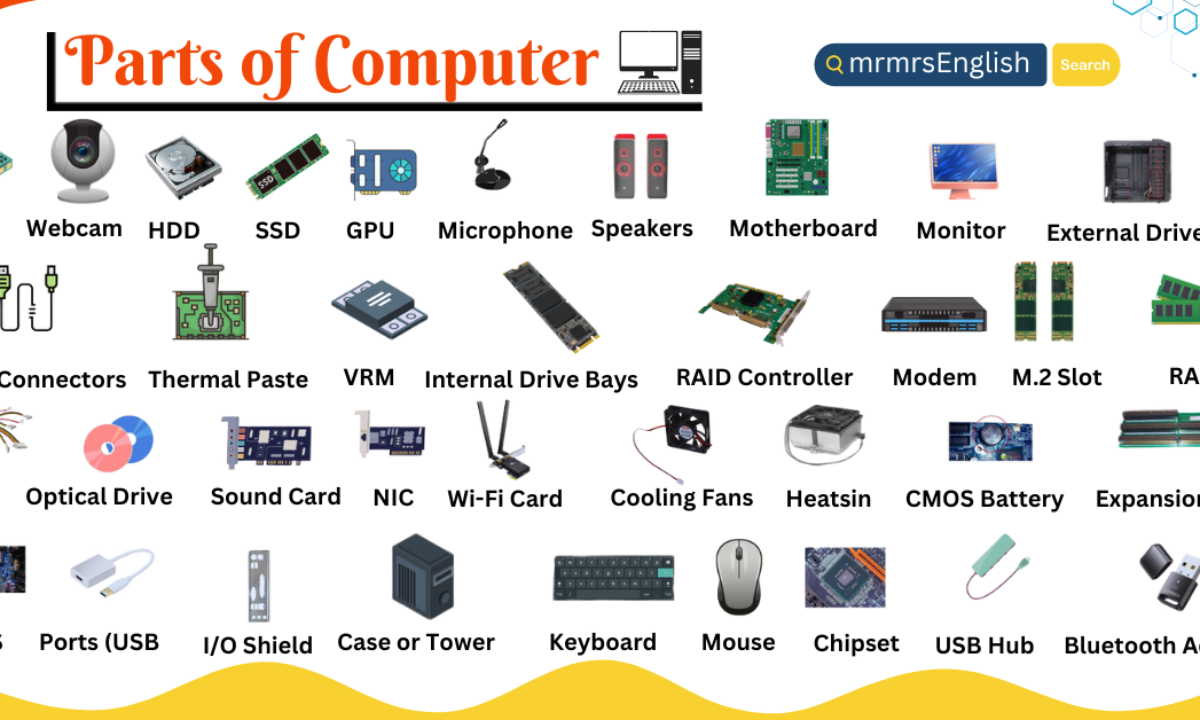
The input and output interfaces form the essential bridge between you and your computer’s core electronic components. They allow your device to receive commands and data, then respond with information you can see or hear. Understanding these interfaces helps you optimize how you interact with your computer every day.
Common Input Devices
Input devices let you communicate with your computer by sending data and instructions. The keyboard remains the most popular tool for typing, while the mouse offers precise control for selecting and navigating. Touchscreens add a layer of direct interaction, especially on laptops and tablets.
You might also use microphones for voice commands or webcams for video input. Each device converts your actions into electronic signals the computer can process immediately. Have you noticed how switching to a more ergonomic keyboard or mouse can improve your comfort and productivity?
Output Display Options
Output devices present the results of your computer’s processes. The most common output is the monitor, displaying images, videos, and text clearly. Monitors come in various types—LCD, LED, and OLED—each offering different brightness and color accuracy.
Printers provide physical copies of digital files, while speakers deliver audio output for music, alerts, or video soundtracks. Choosing the right output devices can significantly affect your experience, whether you’re working on detailed graphics or enjoying multimedia content.
Connectivity And Ports
Ports and connectors are the gateways that link input and output devices to your computer’s motherboard. USB ports remain the standard for many peripherals, supporting everything from flash drives to external hard drives. HDMI and DisplayPort connections handle high-definition video and audio signals to your monitors or TVs.
Ethernet ports ensure stable wired internet connections, while audio jacks connect headphones or microphones. Have you checked your computer’s ports lately to see if they support the devices you want to use? Keeping track of these connections can help you avoid compatibility issues and make smarter choices when upgrading.

Credit: mrmrsenglish.com
Frequently Asked Questions
What Are The Central Electronic Components Of A Computer?
The central electronic components include the CPU, RAM, motherboard, and power supply. These parts work together to process data and run programs efficiently.
How Does The Cpu Function As A Central Component?
The CPU processes instructions and performs calculations. It acts as the brain of the computer, controlling all operations and managing hardware resources.
Why Is The Motherboard Important In A Computer?
The motherboard connects all electronic components, allowing communication between the CPU, memory, and peripherals. It ensures smooth data flow and power distribution.
What Role Does Ram Play In Computer Electronics?
RAM temporarily stores data and programs in use. It enables quick access, improving multitasking and overall system speed during operation.
Conclusion
Central electronic components form the heart of every computer. They work together to process, store, and transfer data. The CPU acts as the brain, while memory stores information temporarily. The motherboard connects all parts to communicate smoothly. Power supply keeps the system running steadily.
Understanding these parts helps in knowing how computers function daily. Each component plays a key role in making computers fast and reliable. This knowledge can assist anyone curious about technology basics. Computers rely on these parts to perform many tasks efficiently.
Simple yet powerful—the core parts keep computers alive.
Leave a Reply