
Imagine driving down the road, your hands comfortably on the steering wheel, and everything you need at your fingertips. Sounds like a dream, doesn’t it?
That’s the magic of Mazda Smart Device Integration. This innovative feature is designed to make your drive smoother, safer, and more enjoyable. If you’re curious about how this technology can revolutionize your daily commute or enhance your weekend adventures, you’re in the right place.
We’ll explore what Mazda Smart Device Integration is all about and why it’s a game-changer for drivers like you. Get ready to discover how this smart system can transform your driving experience, keeping you connected and in control, every mile of the way.
Credit: www.sunridgemazda.com
Mazda Smart Device Integration Basics
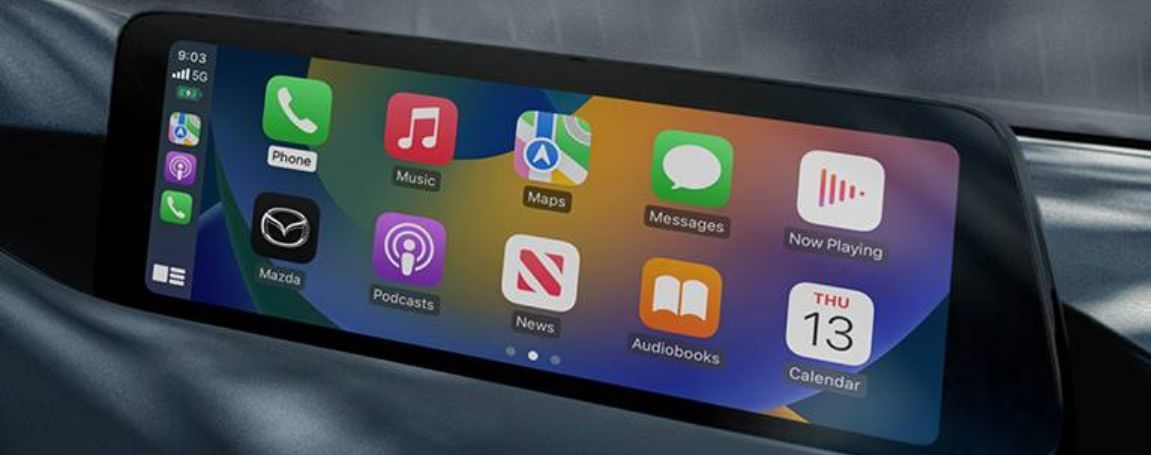
Mazda Smart Device Integration lets you connect your phone to your car’s infotainment system. This feature helps you use apps, make calls, and listen to music safely while driving. It creates a simple and smooth link between your smart device and your Mazda vehicle.
Understanding the basics of this integration helps you enjoy its full benefits. It works by syncing your phone with the car’s screen, giving you easy access to important functions. No need to touch your phone while driving.
Core Features
- Hands-free calling and messaging
- Access to navigation apps like Google Maps or Apple Maps
- Music and podcast streaming from your phone
- Voice control for safer interaction
- Display of important alerts and notifications
Compatible Devices
- Most Android smartphones with Android Auto support
- Apple iPhones with Apple CarPlay capability
- Devices running on recent versions of iOS or Android
- USB connection or wireless link depending on the vehicle model
Setup Process
Setting up Mazda Smart Device Integration is a straightforward process designed to get you connected quickly and safely. The key is to ensure your device and vehicle communicate smoothly so you can enjoy hands-free control, navigation, and entertainment without distraction. Let’s walk through the essential steps to get your device paired and ready for a seamless driving experience.
Connecting Your Device
Start by turning on your Mazda’s infotainment system and selecting the Smart Device Integration option from the main menu. Make sure your smartphone’s Bluetooth and Wi-Fi are enabled before proceeding.
- Use your phone to scan for available Bluetooth devices and select your Mazda vehicle from the list.
- Follow the prompts on both your car’s screen and your phone to confirm the connection.
- Once paired, your phone will ask for permission to share contacts, messages, and apps—granting access ensures full functionality.
Have you noticed how some cars make this step complicated? Mazda keeps it simple, so you spend less time fiddling and more time enjoying your drive.
Troubleshooting Tips
If your device doesn’t connect immediately, don’t worry. Sometimes the system needs a little nudge to sync up properly.
- Restart your phone and the car’s infotainment system to clear any temporary glitches.
- Check if your phone’s software and the Mazda system are updated to the latest versions—outdated software can cause connection issues.
- Forget the Mazda device from your phone’s Bluetooth list and re-pair it to reset the connection.
- Ensure no other devices are actively connected to your phone’s Bluetooth, as this can interfere with the pairing process.
Still stuck? Sometimes a quick look at the user manual or Mazda’s support website offers solutions tailored to your specific model. What’s the most unexpected issue you’ve faced while connecting a device to a car?
Key Benefits
Mazda Smart Device Integration offers several key benefits that improve the driving experience. It makes using your smartphone in the car easier and safer. Drivers can access apps, music, and navigation without distractions. This technology blends convenience with safety to support a smooth ride.
Enhanced User Experience
Mazda Smart Device Integration connects your phone directly to the car’s display. This lets you use familiar apps on a larger screen. The interface is simple and clear, reducing confusion. Voice commands allow hands-free control of calls, messages, and music. This keeps your focus on the road. The system supports both Android Auto and Apple CarPlay. This means most smartphones will work seamlessly. You get fast access to navigation apps, playlists, and contacts. The integration makes driving more enjoyable and less stressful.
Improved Safety Features
This integration helps keep your eyes on the road. It reduces the need to handle your phone while driving. Voice control lets you stay connected without distractions. Incoming calls and messages can be managed without touching the screen. Navigation apps provide clear directions with audible prompts. The system minimizes manual input, lowering the risk of accidents. Mazda’s design also integrates safety alerts and warnings into the display. This helps you respond quickly to road conditions. Overall, the integration supports safer driving habits.
Popular Apps And Functions
Mazda Smart Device Integration brings a range of popular apps and functions right to your car’s dashboard. These tools aim to make your drive safer, more enjoyable, and more connected. Whether you want to find the fastest route, listen to your favorite tunes, or stay in touch without taking your hands off the wheel, this system has you covered.
Navigation And Maps
Getting lost on the road is frustrating and time-consuming. Mazda Smart Device Integration offers seamless access to navigation apps like Google Maps and Waze. These apps provide real-time traffic updates, alternate routes, and voice-guided directions that help you avoid congestion and reach your destination faster.
Imagine driving through a busy city with constant traffic changes. The integration adjusts your route on the fly, saving you from unexpected delays. Have you ever had to fumble with your phone while driving? This system keeps your focus on the road by delivering clear directions through your car’s display.
Music And Entertainment
Long drives are much better with great music, podcasts, or audiobooks. Mazda Smart Device Integration connects you to popular apps such as Spotify, Apple Music, and Audible. You can easily browse playlists, change tracks, or pause your audio—all without touching your phone.
Think about the last time you wanted to switch songs but had to pull over because it was too distracting. With this integration, voice commands and steering wheel controls make it simple to manage your entertainment safely. What’s your go-to road trip playlist? Now, accessing it is just a tap or voice command away.
Communication Tools
Staying connected while driving is important, but safety should never take a backseat. Mazda Smart Device Integration supports hands-free calling, text messaging, and access to apps like WhatsApp. Incoming messages can be read aloud, and you can reply using voice commands.
This feature lets you respond to urgent calls or messages without glancing at your phone. Have you ever missed an important call because you couldn’t reach your device? Now, you can keep your conversations going without sacrificing your attention on the road.
Comparison With Other Systems
Mazda Smart Device Integration offers a unique way to connect your phone with your car. It competes with other popular systems like Apple CarPlay and Android Auto. Comparing these systems helps you understand which one fits your needs. Each system has its style and features.
Exploring their differences and advantages shows why Mazda’s system stands out. This comparison focuses on ease of use, compatibility, and safety features.
Differences From Competitors
- Mazda integrates with both Apple and Android devices directly.
- It offers a simpler interface designed for Mazda vehicles.
- Unlike some systems, Mazda’s integration uses the rotary dial for safer control.
- Many competitors rely heavily on touchscreen controls.
- Mazda’s system supports both wired and wireless connections in newer models.
- Other systems may limit app choices or have different voice command setups.
Unique Advantages
- Designed specifically for Mazda cars to enhance user experience.
- Allows safer use while driving through physical controls.
- Offers smooth transitions between apps without lag.
- Maintains clear and simple menus for quick access.
- Works well with Mazda’s other smart car features.
- Supports a wide range of popular apps for music, navigation, and messaging.
Credit: www.401dixiemazda.ca
Future Enhancements
The future of Mazda Smart Device Integration promises exciting updates. These enhancements will improve how drivers connect their devices with their vehicles. The focus is on making the experience smoother and more useful every day.
As technology advances, Mazda plans to add new features that increase convenience and safety. The goal is to keep drivers connected while minimizing distractions. This will help create a more enjoyable driving experience for everyone.
Upcoming Features
New features will expand the capabilities of Mazda Smart Device Integration. Expect faster device pairing and improved voice controls. There will be better support for popular apps, making it easier to access music, navigation, and messages.
Security updates will protect user data and prevent unauthorized access. Integration with new smartphone models will be seamless. Updates will also focus on reducing system lag and improving responsiveness.
Integration With Smart Home Devices
Mazda aims to connect cars with smart home devices soon. This will allow drivers to control home functions from the car. For example, turning on lights, adjusting thermostats, or checking security cameras before arriving.
This integration will use simple commands to manage smart home systems. It will add a new layer of convenience for busy drivers. The system will support popular smart home platforms to cover many devices.

Credit: www.barrhavenmazda.com
Frequently Asked Questions
What Is Mazda Smart Device Integration?
Mazda Smart Device Integration is a technology that connects your smartphone to your Mazda vehicle. It enables seamless use of apps, navigation, and music through the car’s infotainment system. This enhances safety and convenience by minimizing distractions while driving.
Which Smartphones Support Mazda Smart Device Integration?
Mazda Smart Device Integration supports both Apple iPhones and Android smartphones. Compatibility depends on the version of iOS or Android. Always check your vehicle’s manual or Mazda’s website for the latest supported devices and software updates.
How Does Mazda Smart Device Integration Improve Driving Safety?
By allowing voice commands and easy touchscreen controls, Mazda Smart Device Integration reduces the need to handle your phone. This keeps your focus on the road. It also supports hands-free calling, navigation, and messaging to enhance safe driving.
Can I Use Navigation Apps With Mazda Smart Device Integration?
Yes, you can use popular navigation apps like Apple Maps, Google Maps, and Waze. These apps display on your Mazda’s infotainment screen, providing real-time traffic updates and directions, making your journey smoother and safer.
Conclusion
Mazda Smart Device Integration makes driving easier and safer. It connects your phone to your car quickly. You can use apps, music, and maps on the car screen. This helps you stay focused on the road. It works with both Android and Apple phones.
Using this feature saves time and reduces distractions. Drivers enjoy a smoother, more connected experience. It is a useful tool for everyday travel. Try it to see how simple it is. A small step for big convenience.
Leave a Reply