Have you ever wondered why your computer or smartphone sometimes slows down or stops working properly? The key to keeping your devices running smoothly lies in something called system maintenance.
But what exactly is system maintenance, and why is it so important for your technology? Understanding the reasons behind system maintenance can save you time, money, and frustration. You’ll discover what system maintenance is and the top reasons why it’s essential to keep your systems healthy and efficient.
Keep reading to learn how simple maintenance steps can protect your devices and improve your daily digital experience.
Understanding System Maintenance
System maintenance is a key process for keeping computers and software running well. It involves regular checks and fixes to prevent problems. Proper maintenance helps systems work smoothly and last longer. It also reduces risks of data loss or security threats.
Understanding system maintenance means knowing what it includes and why it matters. It covers updates, cleaning, backups, and repairs. Maintenance is needed to keep systems fast, safe, and reliable. Without it, performance drops and errors increase.
What System Maintenance Entails
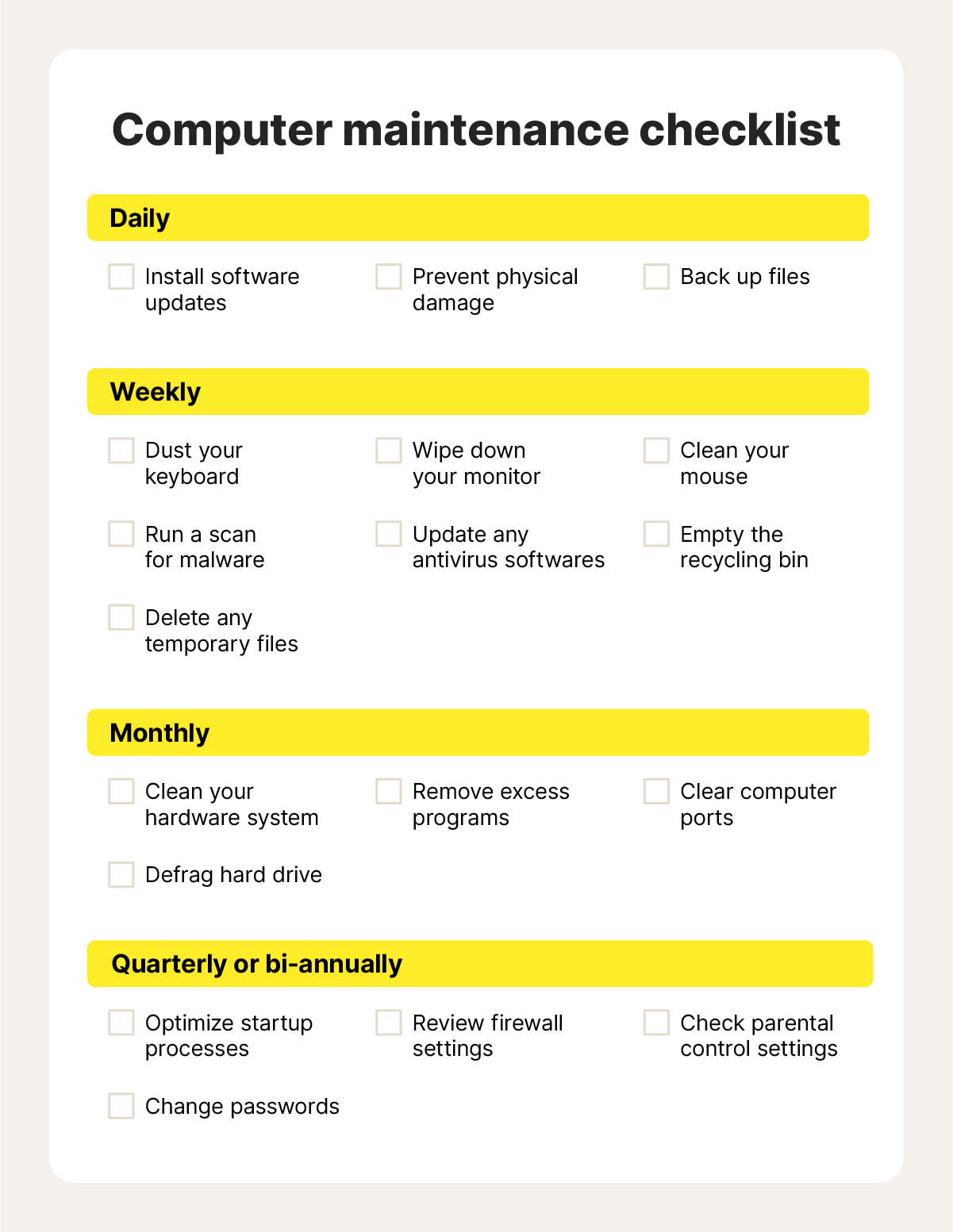
System maintenance includes tasks like software updates, hardware checks, and virus scans. It involves clearing junk files and optimizing settings. Backups of important data are also part of maintenance. These tasks keep the system healthy and prevent crashes.
- Prevent hardware failure and extend device life
- Fix bugs and improve software performance
- Protect against viruses and malware attacks
- Ensure data is backed up and recoverable
- Enhance security by applying patches and updates
- Maintain system speed and responsiveness
- Reduce downtime caused by unexpected errors
Benefits Of Regular System Maintenance
Regular maintenance leads to stable and efficient systems. It helps avoid costly repairs and data loss. Users experience fewer interruptions and faster operations. Security risks are minimized, protecting sensitive information.
Types Of System Maintenance
Understanding the different types of system maintenance helps you keep your software running smoothly and efficiently. Each type targets a specific area of improvement or repair. Knowing these can guide you in prioritizing your efforts and resources effectively.
Corrective Maintenance
This type of maintenance focuses on fixing errors and bugs after they appear in the system. Think of it as troubleshooting — addressing issues that disrupt normal operation. Have you ever ignored a small glitch only for it to cause bigger problems later? Corrective maintenance prevents that escalation.
Adaptive Maintenance
Systems need to evolve alongside changes in their environment. Adaptive maintenance adjusts your software to work with new hardware, operating systems, or regulations. If you’ve updated your device or platform, you know how crucial these updates are to keep everything compatible.
Perfective Maintenance
Even if a system works well, there’s always room for improvement. Perfective maintenance enhances performance, adds new features, or improves user experience based on feedback. Have you ever wished an app could do just one more thing? This type of maintenance makes that possible.
Preventive Maintenance
Preventive maintenance aims to stop problems before they start. It involves regular check-ups, updates, and optimizations to reduce the risk of future failures. Think of it as a health check for your system — a little effort now can save you from major headaches down the line.
Reasons For System Maintenance
System maintenance is crucial to keep devices and software running smoothly. It prevents issues that can cause downtime or data loss. Regular upkeep improves performance and keeps systems secure. Understanding the reasons for system maintenance highlights its importance in daily operations.
Ensuring System Efficiency
Maintenance helps systems work at their best speed and capacity. It removes unnecessary files and fixes bugs that slow down processes. Efficient systems save time and reduce frustration for users.
Enhancing Security Measures
Regular updates protect systems from viruses and hackers. Maintenance patches security gaps and strengthens defenses. This keeps sensitive information safe from unauthorized access.
Adapting To New Technologies
Technology changes fast. Maintenance allows systems to stay compatible with new software and hardware. It ensures smooth integration and better functionality over time.
Complying With Regulations
Many industries have strict rules about data and system use. Maintenance keeps systems up to date with these laws. Compliance avoids legal problems and penalties.
Extending System Lifespan
Regular care prevents wear and tear from causing damage. Maintenance fixes small issues before they grow bigger. This helps systems last longer, saving money on replacements.

Credit: medium.com
Essential Benefits Of System Maintenance
System maintenance plays a key role in keeping technology running smoothly. It helps avoid breakdowns and keeps systems up to date. Regular care improves overall system health and boosts productivity. The benefits of system maintenance reach every part of a business, from daily operations to long-term growth.
Improved Performance
Maintenance clears out clutter and fixes issues that slow systems down. It helps programs and hardware work faster and more efficiently. This means less waiting and smoother tasks for users.
Increased Reliability
Regular checks and updates reduce the chance of unexpected failures. Systems become more stable and dependable. This reliability builds trust among users and prevents downtime.
Cost Savings
Fixing small problems early avoids expensive repairs later. Well-maintained systems use energy better, lowering bills. Preventive care extends the life of equipment and software.
User Satisfaction
Fast, reliable systems create a better experience for everyone. Users face fewer errors and interruptions. Happy users are more productive and engaged.
Business Continuity
Maintenance helps protect important data and keeps operations running. It reduces risks from crashes and cyber threats. This support ensures the business stays active without costly delays.
Challenges In System Maintenance
System maintenance involves many challenges that affect its success. These obstacles can slow work, increase costs, and create risks. Understanding these challenges helps teams plan better and keep systems running smoothly.
Resource Allocation
Allocating the right resources for maintenance is difficult. Teams need skilled staff, time, and money. Limited budgets often force choices between urgent fixes and long-term updates. Without enough resources, system performance can suffer.
Downtime Management
Downtime during maintenance disrupts business operations. Planning maintenance without affecting users is tricky. Unexpected issues can extend downtime, causing frustration and loss. Managing downtime requires careful scheduling and quick problem solving.
Complexity Of Systems
Modern systems are complex with many parts working together. Changes in one area may cause issues elsewhere. Understanding system dependencies is essential but hard. Complexity raises the risk of errors during maintenance tasks.
Credit: us.norton.com
Best Practices For Effective Maintenance
Effective system maintenance keeps computers and networks running smoothly. It helps prevent errors, security risks, and downtime. Following best practices ensures systems stay reliable and efficient. Regular care extends the life of hardware and software alike.
Regular Updates And Patches
Systems need frequent updates to fix bugs and improve security. Software developers release patches to close vulnerabilities. Applying these updates quickly stops hackers from exploiting weaknesses. Updates also enhance system performance and add useful features. Set up automatic updates or schedule regular manual checks.
Scheduled Maintenance Windows
Plan specific times for maintenance to avoid disrupting users. Announce maintenance windows in advance so users can prepare. During these periods, perform tasks like backups, updates, and hardware checks. Scheduling helps balance system availability with necessary upkeep. It reduces surprises and keeps users informed.
Continuous Monitoring
Use monitoring tools to track system health all the time. These tools watch for unusual activity, errors, and performance drops. Early detection helps fix problems before they grow. Alerts notify the team about urgent issues. Continuous monitoring supports proactive maintenance and improves stability.
User Training And Support
Train users on safe system practices and basic troubleshooting. Educated users avoid common mistakes that cause system problems. Provide clear guides and quick support to solve user issues. Good training reduces helpdesk calls and speeds up problem resolution. Support builds confidence and encourages proper system use.
Credit: www.nextenergy.ai
Frequently Asked Questions
What Is System Maintenance In Simple Terms?
System maintenance refers to regular activities that keep computer systems running efficiently. It includes updates, repairs, and optimizations to prevent errors and improve performance.
Why Is System Maintenance Important For Businesses?
System maintenance ensures reliability, security, and optimal performance. It reduces downtime, protects data, and extends the lifespan of hardware and software in business environments.
What Are Common Reasons For System Maintenance?
Common reasons include fixing bugs, updating software, enhancing security, improving speed, and preventing system failures. Maintenance helps keep systems stable and secure.
How Often Should System Maintenance Be Performed?
System maintenance frequency depends on system type and usage. Typically, monthly or quarterly checks help identify and resolve issues early to avoid major problems.
Conclusion
System maintenance keeps computers and software running smoothly. It helps prevent errors and protects against security risks. Regular checks improve speed and fix bugs before they cause problems. Good maintenance saves time and money by avoiding big repairs. It also ensures data stays safe and systems work longer.
Simple steps taken often make a big difference. Keeping systems updated and clean keeps everything reliable. A well-maintained system supports daily tasks without interruptions. Maintenance is key to a healthy digital environment.
Leave a Reply