
Are you tired of juggling multiple remotes to control your TV and other devices? Imagine using just one remote to manage everything seamlessly.
That’s exactly what the Consumer Electronics Control (CEC) feature offers, and many Samsung TVs come equipped with it. But which Samsung models have this handy feature? If you want to simplify your entertainment setup and enjoy smoother control, keep reading.
We’ll break down everything you need to know about Samsung TVs with CEC and how it can make your viewing experience easier and more enjoyable.

Credit: www.amazon.ca
Consumer Electronics Control (cec) Basics
Consumer Electronics Control (CEC) is a feature that allows devices connected through HDMI to communicate. This means your TV and other gadgets can work together smoothly. Many Samsung TVs support CEC to make controlling multiple devices easier. Understanding the basics of CEC helps you use your Samsung TV more effectively.
Definition And Functionality
Consumer Electronics Control (CEC) is a protocol built into HDMI cables and devices. It lets devices send commands to each other using a single remote control. For example, turning on your Samsung TV can also turn on the connected soundbar automatically. CEC works by using one HDMI cable to carry both video and control signals. This reduces the need for multiple remotes and simplifies device management.
Benefits Of Cec
- Simplifies control by using one remote for many devices.
- Automatically powers on or off connected devices.
- Switches input sources without manual changes.
- Improves user experience by syncing device functions.
- Reduces clutter and confusion with fewer remotes.
Credit: koreabizwire.com
Samsung Tvs With Cec Feature
Samsung TVs with the Consumer Electronics Control (CEC) feature allow you to control multiple connected devices with a single remote. This simplifies your entertainment setup by letting your TV communicate seamlessly with other HDMI devices like soundbars, Blu-ray players, and gaming consoles. Understanding which Samsung models support CEC can help you enhance your viewing experience effortlessly.
Overview Of Compatible Models
Most Samsung smart TVs released in recent years come equipped with the CEC feature, often branded as Anynet+. This feature is available across various series, including the popular QLED, UHD, and Frame TV lines.
- QLED Series:These high-end models almost always include Anynet+ for smooth device control.
- UHD Series:Mid-range TVs in this category generally support CEC, making it accessible for many users.
- The Frame and Serif TVs:These lifestyle TVs also come with CEC to integrate well with other home electronics.
If you have a Samsung TV from the last five years, there’s a good chance it supports CEC. Still, double-checking your model’s specifications can save you time and frustration.
Year-wise Compatibility
| Year | Models Typically Supporting CEC (Anynet+) | Notes |
|---|---|---|
| 2024 | QLED, Neo QLED, UHD, The Frame | CEC is standard across most models |
| 2022-2023 | QLED, UHD, Lifestyle TVs | Improved CEC responsiveness and compatibility |
| 2018-2021 | QLED, UHD, Premium Smart TVs | CEC available but may require manual activation |
| Before 2018 | Limited models, mostly premium lines | CEC presence varies; check specific model details |
Have you ever struggled with juggling multiple remotes? Samsung’s CEC feature could be the answer you’ve been looking for. By knowing your TV’s compatibility, you can confidently set up your devices for a hassle-free entertainment experience.
Setting Up Cec On Samsung Tvs
Setting up Consumer Electronics Control (CEC) on your Samsung TV can simplify how you manage multiple devices with a single remote. CEC lets your TV communicate with other HDMI-connected gadgets like soundbars, Blu-ray players, or game consoles. This feature can save you time and reduce the clutter of multiple remotes.
Before you start, make sure your devices support CEC. Samsung calls this feature “Anynet+,” so you’ll be looking for that term in your TV’s settings. Ready to take control and make your entertainment setup smarter?
Step-by-step Configuration
- Turn on your Samsung TV.Grab your remote and press the Home button to access the main menu.
- Navigate to Settings.Scroll to “General” and select it.
- Find External Device Manager.Inside, look for the “Anynet+ (HDMI-CEC)” option.
- Enable Anynet+.Toggle it on to activate CEC functionality.
- Connect your HDMI devices.Make sure all devices you want to control are plugged into HDMI ports.
- Test the feature.Use your TV remote to control connected devices, such as adjusting volume on a soundbar or powering on a Blu-ray player.
If the devices respond, you’ve successfully set up CEC. If not, don’t worry; sometimes a few tweaks are needed.
Troubleshooting Common Issues
- Devices not responding?Double-check that all connected devices support CEC and that it’s enabled on them too.
- HDMI cables matter.Use high-quality HDMI cables, as cheap or damaged cables can block CEC signals.
- Try power cycling.Turn off all devices and unplug them for a minute, then plug back in and power up again.
- Firmware updates.Ensure your TV and connected devices have the latest firmware installed. Manufacturers often fix CEC bugs in updates.
- Conflicting settings.Some devices have separate CEC settings that might interfere. Check each device’s menu for CEC options.
Have you ever experienced your TV remote controlling unexpected devices? That’s a common CEC quirk. Adjusting the settings or unplugging unused HDMI devices can help keep control where you want it.
Enhancing Home Entertainment With Cec
Samsung TVs equipped with Consumer Electronics Control (CEC) offer a seamless way to enhance your home entertainment. CEC allows multiple devices connected through HDMI to communicate and work together using a single remote. This feature simplifies your setup and makes controlling your entertainment system effortless.
Integrating With Other Devices
With CEC, your Samsung TV can control compatible devices like Blu-ray players, soundbars, and gaming consoles. Imagine turning on your TV and having your soundbar automatically power up and switch to the correct input without pressing extra buttons.
This integration reduces remote clutter and streamlines your viewing experience. You can easily switch between devices using your TV remote, which means less fumbling in the dark for different controllers. Have you noticed how much easier it is when your devices just work together?
Maximizing User Experience
CEC also enables automatic input switching, so your TV detects when a new device is active and changes the source accordingly. This means you no longer need to manually select HDMI inputs every time you want to use a different device.
Some Samsung TVs even allow you to control the volume of connected audio devices through the TV remote, making adjustments simple and intuitive. This feature creates a more immersive and user-friendly setup, especially for those who prefer a minimalist entertainment area.
How much time could you save if your devices anticipated your needs and responded instantly? CEC helps you get there, making your TV setup more responsive and enjoyable.
Comparing Cec In Samsung Vs. Other Brands
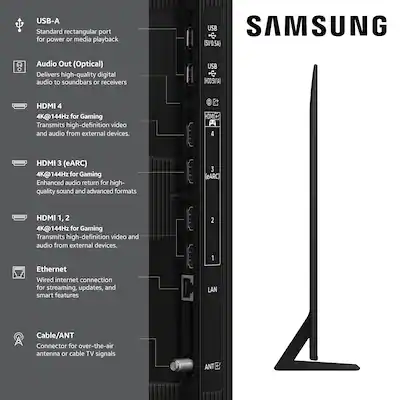
Consumer Electronics Control (CEC) allows devices connected via HDMI to control each other. Samsung TVs include this feature under the name Anynet+. Many brands support CEC but differ in how they implement and name it. This section compares CEC on Samsung TVs with other popular brands.
Feature Differences
Samsung’s Anynet+ lets users control multiple devices with one remote. It supports turning devices on or off and switching inputs automatically. Some brands offer limited CEC features, like only volume control or basic device switching.
Other brands use different names for CEC:
- LG calls it Simplink.
- Sony uses BRAVIA Sync.
- Panasonic names it VIERA Link.
Samsung often provides more reliable device recognition and fewer connection drops. Some brands may require manual setup for each device, unlike Samsung’s mostly automatic system.
User Feedback And Reviews
Many Samsung users praise Anynet+ for its ease of use and consistent performance. Reviews highlight smooth device control and quick response times. Some users mention occasional issues with older devices not syncing well.
Users of other brands report mixed experiences. Some find CEC features helpful but limited. Others face challenges with compatibility and device lag. Forums show Samsung generally scores higher in user satisfaction for CEC.
Overall, Samsung’s CEC feature stands out for simplicity and broad device support. This makes it a preferred choice for users wanting seamless control over their home entertainment systems.
Credit: www.bestbuy.com
Future Of Cec In Samsung Tvs
The future of Consumer Electronics Control (CEC) in Samsung TVs looks promising as technology continues to evolve. CEC allows you to control multiple devices connected via HDMI using a single remote, making your entertainment setup cleaner and easier to manage. Samsung is constantly working on improving this feature to enhance user experience and bring more convenience to your home theater.
Upcoming Technological Advancements
Samsung is exploring ways to make CEC more intelligent and responsive. One key area is better integration with smart home ecosystems, allowing your TV to communicate seamlessly with other devices like smart speakers and lighting systems.
Expect enhanced compatibility with a wider range of devices beyond just HDMI connections. This means controlling soundbars, gaming consoles, and even streaming devices could become more intuitive and automatic.
Imagine your TV recognizing when you switch on a game console and automatically adjusting picture and sound settings without any input from you. Such advancements aim to simplify your daily interactions with technology.
Potential Improvements And Innovations
- Improved Remote Control Synchronization:Samsung may introduce remotes that adapt their functions based on the active device, reducing the need to switch remotes.
- Energy Efficiency:Future CEC updates could optimize power usage by turning off connected devices when not in use, saving energy effortlessly.
- Customizable Control Settings:You might get options to customize how your devices respond to CEC commands, tailoring the experience to your preferences.
- Faster Device Recognition:Quick and reliable detection of connected devices will reduce setup time and prevent delays during use.
Have you ever wished your devices just worked together without constant manual adjustments? Samsung’s focus on these improvements could bring that wish closer to reality, making your home entertainment smoother and more enjoyable.
Frequently Asked Questions
What Is Consumer Electronics Control (cec) On Samsung Tvs?
Consumer Electronics Control (CEC) allows Samsung TVs to control connected devices with one remote. It simplifies managing multiple electronics. This feature enhances user convenience by linking TVs, soundbars, and Blu-ray players. Samsung brands this feature as Anynet+. Most newer Samsung TVs support CEC for seamless device interaction.
Which Samsung Tv Models Support The Cec Feature?
Most Samsung Smart TVs from 2015 onward support CEC, branded as Anynet+. This includes popular series like QLED, UHD, and Frame TVs. Models with HDMI ports typically enable CEC for better device control. Always check your TV’s manual or settings to confirm if Anynet+ is available.
How Does Samsung’s Anynet+ Improve Tv Usability?
Anynet+ lets users control multiple HDMI-connected devices with one remote. It reduces remote clutter and simplifies device switching. For example, turning on the TV can power on a connected soundbar automatically. This feature enhances user experience by creating a unified control system.
Can I Disable The Cec Feature On Samsung Tvs?
Yes, you can disable Anynet+ (CEC) on Samsung TVs anytime. Go to Settings > General > External Device Manager > Anynet+ (HDMI-CEC) and toggle it off. Disabling helps if you face device conflicts or prefer separate controls for each device.
Conclusion
Samsung TVs with Consumer Electronics Control (CEC) make using devices easier. You can control many gadgets with one remote. Most newer Samsung models support this feature. It helps connect your TV to other electronics simply. No need to juggle multiple remotes.
This feature saves time and reduces hassle. Check your TV’s settings to enable CEC. Enjoy smoother control of your home entertainment. Simple, smart, and user-friendly.
Leave a Reply