Have you ever wondered how you really connect with your smartwatch, fitness tracker, or smart glasses? Wearable technology is becoming a part of your daily life, but do you know the best ways to interact with it?
Understanding how to use these devices can make your experience smoother, more fun, and even more helpful. You’ll discover simple tips and tricks that put you in control of your wearable tech. Keep reading, and you’ll unlock the full potential of the gadgets you wear every day.
Credit: www.bgosoftware.com
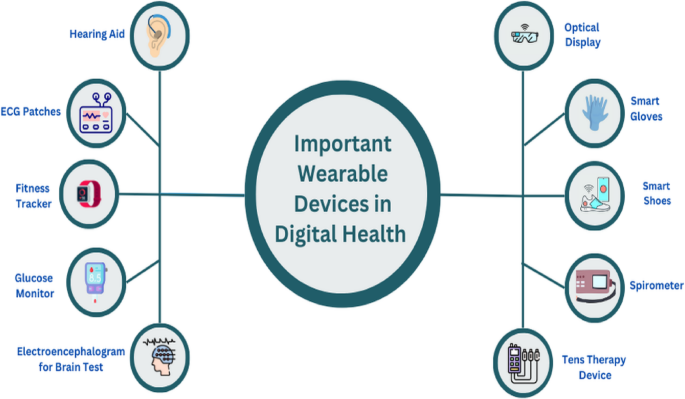
Types Of Wearable Technology
Wearable technology comes in many forms. Each type offers unique ways to interact and benefit daily life. Understanding these types helps to choose the right device for personal needs.
Smartwatches And Fitness Trackers
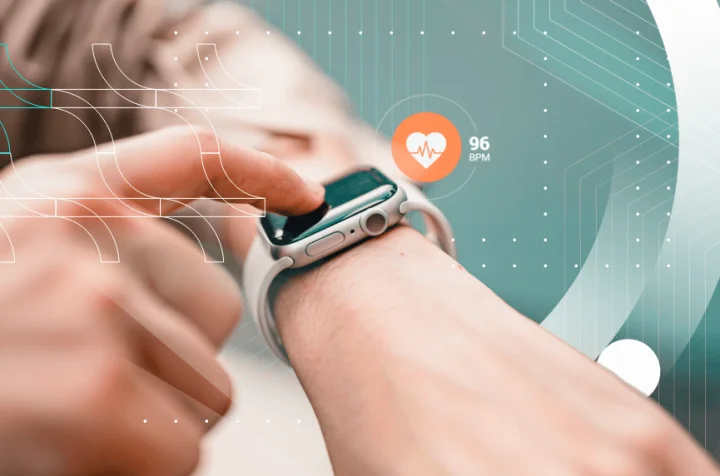
Smartwatches and fitness trackers monitor health and activity. They track steps, heart rate, and sleep patterns. Users control them through touchscreens and buttons. Notifications from phones appear on these devices. They offer convenience and motivate users to stay active.
Smart Glasses And Headsets
Smart glasses and headsets provide hands-free information. They display data directly in the user’s field of view. Voice commands often control these devices. Some models support augmented reality experiences. They are useful for work, navigation, and entertainment.
Wearable Medical Devices
Wearable medical devices track vital health signs continuously. Devices include glucose monitors and heart rate sensors. They help manage chronic conditions effectively. Alerts notify users and doctors of any issues. These wearables improve health safety and monitoring.
Smart Clothing And Accessories
Smart clothing and accessories embed sensors in fabrics or items. They measure movement, temperature, and posture. Some clothes adjust to body heat or pressure. Accessories like smart rings provide notifications and fitness tracking. They blend technology with everyday wear.
Basic Interaction Methods
Interacting with wearable technology has become intuitive and varied, offering multiple ways to control and receive information. These devices blend seamlessly into your daily life, thanks to their adaptable interaction methods. Understanding these basics helps you get the most from your wearable, whether it’s a smartwatch, fitness tracker, or smart glasses.
Touchscreens And Buttons
Touchscreens are the most common way to interact with wearables. You tap, swipe, or pinch the screen to navigate menus and apps. Some devices also include physical buttons to complement touch controls, offering quick access to key functions.
Buttons are especially helpful when your fingers are sweaty or you’re wearing gloves. Think about your experience trying to scroll through a fitness app on a cold morning—buttons can save you time and frustration. Combining touch and buttons ensures reliable control in various situations.
Voice Commands
Speaking to your wearable is often faster than tapping or typing. Voice commands let you set reminders, send messages, or get updates without lifting a finger. Devices with built-in assistants like Siri or Google Assistant make this interaction smooth and responsive.
Have you ever tried asking your smartwatch to start a workout while your hands were full? Voice control can make these moments easier. However, it works best in quiet environments where the device can accurately hear your commands.
Gesture Controls
Gesture controls use movements like wrist flicks or hand waves to trigger actions. This hands-free method is perfect when your other hand is busy or you want to avoid touching the screen. For example, raising your wrist to wake the screen or shaking it to dismiss notifications.
Try to notice how small gestures become second nature over time. They can speed up your interaction and reduce the need to look at the device constantly. Does your wearable support gestures? If not, it might be worth considering for convenience.
Haptic Feedback
Haptic feedback uses vibrations to communicate with you silently. Instead of looking at the screen, you feel alerts for messages, calls, or fitness milestones. This subtle interaction keeps you connected without distractions.
Imagine being in a meeting and getting a gentle buzz on your wrist instead of a loud notification. Haptic feedback helps you stay aware and discreet. Your wearable’s ability to customize vibration patterns can make this feature even more useful.
Setting Up Your Device
Setting up your wearable device is the first step to enjoying its features. This process connects your device to your smartphone and personalizes it to suit your needs. Following simple steps ensures smooth operation and better user experience.
Pairing With Smartphones
Turn on Bluetooth on your smartphone. Open the wearable device’s app or settings menu. Search for your device on the list of available connections. Select the device to pair. Confirm any prompts or codes that appear. This links your wearable to your phone for data sharing.
Configuring Settings
Adjust settings to match your preferences. Set up notifications to receive alerts for calls, messages, and apps. Choose display options like brightness and watch face style. Enable health tracking features such as heart rate or step counting. Customize sound and vibration for alerts.
Installing Apps And Updates
Download companion apps from your phone’s app store. These apps enhance device functions and add new features. Check for software updates regularly to improve performance and security. Follow on-screen instructions to complete installations. Keep your device updated for the best experience.
Using Wearables For Health And Fitness
Wearable technology helps people stay active and healthy every day. These devices provide real-time data and useful feedback. They make health and fitness goals easier to track and reach.
Wearing a fitness tracker or smartwatch turns your body into a source of valuable information. This information guides better decisions about exercise, rest, and overall well-being. Here are key ways people interact with wearables for health and fitness.
Tracking Activity And Workouts
Wearables count steps, distance, and calories burned. They track different types of workouts like running, cycling, or swimming. The data shows how active you are throughout the day.
Many devices display progress with clear charts and graphs. This helps understand patterns and improve fitness routines. Some wearables even suggest new exercises based on your activity.
Monitoring Heart Rate And Sleep
Wearables measure heart rate continuously during exercise and rest. They alert you if your heart rate is too high or low. This feature helps detect health issues early.
Sleep tracking shows total sleep time and sleep quality. You learn how much deep and light sleep you get each night. This information helps improve sleep habits for better recovery.
Setting Goals And Reminders
Wearables allow setting daily or weekly fitness goals. Goals can include steps, calories, or workout minutes. The device sends reminders to keep you motivated and active.
Reminders can prompt you to stand up, stretch, or drink water. These small nudges improve daily health habits. Staying consistent leads to better long-term results.
Enhancing Productivity
Wearable technology helps people stay productive by saving time and effort. It keeps important information close and ready. This means less distraction and faster responses. Users can handle tasks without pulling out their phones or computers. It fits well into busy schedules and helps manage work smoothly.
Notifications And Alerts
Wearables send quick notifications right to your wrist. You can see messages, emails, and reminders instantly. This avoids missing important updates. Alerts can be set for meetings, deadlines, or calls. They keep you on track without checking your phone often. Vibration or sound signals grab attention discreetly.
Voice Assistants On Wearables
Voice assistants on wearables allow hands-free control. Speak commands to set reminders, send texts, or check weather. This helps multitask while moving or working. Voice control speeds up simple actions. It reduces the need for typing on small screens. The assistant understands basic requests clearly and quickly.
Quick Replies And Shortcuts
Wearables offer quick replies to messages and calls. Pre-set responses save time typing on tiny keyboards. Shortcuts let users open apps or start tasks with a tap. This simplifies daily routines and reduces steps. Common actions become faster and easier. It creates a smooth workflow without interruptions.
Credit: journalofcloudcomputing.springeropen.com
Customization And Personalization
Customization and personalization are what make wearable technology truly your own. They turn a generic gadget into a tool that fits your lifestyle, preferences, and needs perfectly. By tailoring your device, you not only enhance its functionality but also create a more enjoyable and efficient user experience.
Watch Faces And Widgets
Choosing the right watch face can change how you interact with your device every day. You might prefer a minimalist design that shows just the time and date, or a data-rich face with health stats, weather updates, and calendar alerts.
Widgets add quick access to your most-used apps or information, saving you time. Think about which features you reach for most—is it your step count, heart rate, or upcoming meetings? Adding those widgets right to your watch face puts vital info at your fingertips.
Adjusting Display And Sounds
Display settings let you control brightness, text size, and screen timeout. Adjusting these can reduce eye strain and save battery life. If you’ve ever struggled to read your watch outdoors, tweaking brightness or switching to a high-contrast mode can make a big difference.
Sound settings are just as important. You can customize notification tones or set vibration patterns, making sure alerts catch your attention without disturbing others. Have you ever missed a call because your watch was on silent? Setting a gentle vibration might solve that.
Accessibility Features
Wearables offer accessibility options that help everyone use technology comfortably. Features like voice commands, screen readers, and haptic feedback make devices easier to navigate for those with visual or hearing challenges.
Even if you don’t need these features now, exploring them can reveal new ways to interact with your device. Could voice control help you stay hands-free during busy moments? Testing these options might uncover a new favorite way to use your wearable.
Troubleshooting Common Issues
Troubleshooting common issues with wearable technology can feel frustrating, but most problems have simple fixes. Understanding the typical hiccups helps you get back on track quickly. Let’s look at some common problems and how you can solve them without losing time or patience.
Connectivity Problems
Connectivity issues are the most frequent complaints with wearables. If your device isn’t syncing with your phone or app, start by checking Bluetooth settings. Turning Bluetooth off and on again often re-establishes the connection.
Ensure your wearable is within range, usually about 30 feet, and that no other devices are interfering. Sometimes, forgetting the device in your phone’s Bluetooth settings and pairing it again solves the problem.
Have you noticed certain apps causing disconnections? Try closing background apps or restarting both your wearable and phone. This refresh can clear temporary bugs affecting connectivity.
Battery Life Tips
Short battery life can ruin your experience. To extend it, reduce screen brightness and turn off always-on display features. These small adjustments make a big difference in power consumption.
Turn off unnecessary notifications and disable GPS when you don’t need it. Both features drain battery quickly, even if you don’t actively use them.
Charging your wearable overnight might seem convenient but can stress the battery. Instead, charge during shorter periods when you’re stationary, like while working at your desk. Have you tried these tweaks before noticing better battery performance?
Software Glitches
Software glitches often cause your wearable to freeze or behave unexpectedly. Restarting your device is a quick fix that clears out minor bugs.
Keep your wearable’s firmware updated. Updates not only add features but also patch bugs that cause glitches. Check the app regularly for notifications about new versions.
If problems persist, a factory reset can restore your device to its original settings. Back up your data first to avoid losing important information. Have you experienced a stubborn glitch that disappeared after an update?
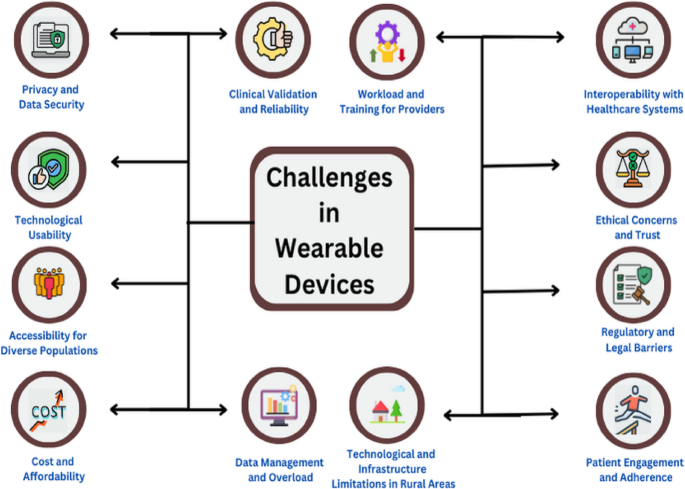
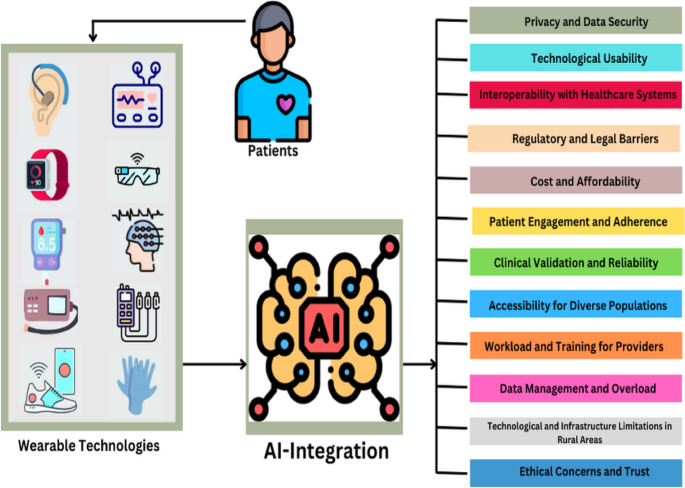
Privacy And Security Tips
Using wearable technology means sharing a lot of personal information. Protecting your data and privacy is crucial to avoid unwanted access or misuse. Here are some practical tips to help you stay secure while enjoying the benefits of your wearable devices.
Managing Permissions
Check the permissions your wearable apps request. Do they really need access to your location, contacts, or microphone? Deny any permissions that seem unnecessary.
Regularly review app permissions in your device settings. Sometimes apps update and ask for new permissions without clear reasons. Stay alert and adjust accordingly.
Ask yourself: Would you share this information with a stranger? If not, be cautious about granting permissions to apps on your wearable.
Data Encryption
Data encryption keeps your information safe by scrambling it so only authorized devices can read it. Make sure your wearable uses encryption when syncing data with your phone or cloud.
Look for devices that support end-to-end encryption, especially if you track sensitive health or location data. This reduces the risk of hackers intercepting your information.
Think about the last time you lost or misplaced your wearable. If your data was encrypted, unauthorized users wouldn’t easily access your personal info.
Safe Usage Practices
Always set a strong passcode or biometric lock on your wearable. This simple step can block others from quickly accessing your device.
Keep your device’s software up to date. Updates often include patches that fix security vulnerabilities discovered over time.
Be mindful about connecting your wearable to public Wi-Fi networks. These can be hotspots for attackers trying to steal your data.
Have you ever shared your wearable with a friend? Avoid doing so without wiping your personal data first to protect your privacy.
Credit: journalofcloudcomputing.springeropen.com
Frequently Asked Questions
How Do I Control Wearable Technology Devices?
You interact with wearable tech using touchscreens, voice commands, or physical buttons. Apps often sync with smartphones for easier control. Sensors track movements and gestures to enhance device responsiveness and user experience.
What Are Common Ways To Interact With Smartwatches?
Smartwatches respond to taps, swipes, and voice commands. You can also use physical buttons for shortcuts. Notifications and health tracking features provide interactive prompts to keep users engaged and informed.
Can Wearable Technology Respond To Voice Commands?
Yes, many wearable devices support voice control. This hands-free interaction improves convenience and accessibility. Voice assistants like Siri or Google Assistant help users perform tasks quickly and efficiently.
How Do Sensors Improve Wearable Interaction?
Sensors detect motion, heart rate, and environmental data. This allows wearables to provide real-time feedback and personalized insights. Sensors enhance accuracy in fitness tracking and health monitoring.
Conclusion
Wearable technology makes daily life easier and more connected. You control it by touch, voice, or simple gestures. Choose the way that feels natural and fits your needs. These devices help track health, stay organized, and communicate fast. Small steps lead to big changes in how you use tech.
Try different features and find what works best for you. Wearables bring technology closer to you, making tasks smooth and quick. Embrace this new way to interact and enjoy the benefits every day.
Leave a Reply