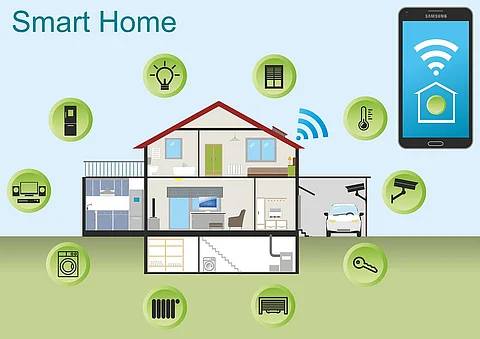
Imagine walking into your home and having the lights adjust to your preferred setting, the thermostat set to the perfect temperature, and your favorite music playing softly in the background—all without lifting a finger. This is the magic of smart home devices.
If you’ve ever wondered how you can transform your living space into a smart, efficient, and incredibly convenient environment, you’re in the right place. You might think that turning your home into a tech haven is complicated or expensive, but it doesn’t have to be.
In this guide, you’ll discover simple steps to choosing and installing the right smart devices for your needs and budget. Get ready to unlock the full potential of your home with technology that works for you. Keep reading to find out how you can make your everyday life easier and more enjoyable with the power of smart home devices.
Choosing The Right Smart Devices
Choosing the right smart devices can transform your home into a more comfortable and efficient space. The key is understanding what fits your lifestyle and your existing setup. Before you buy, consider what types of devices you really need, how well they will work in your home, and what fits your budget.
Popular Device Types
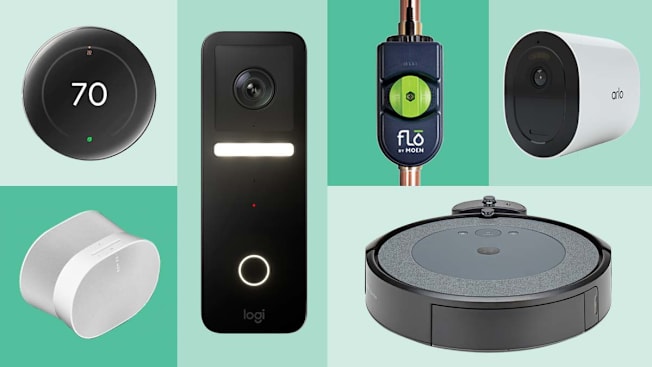
Smart home devices come in many forms. Some of the most common include:
- Smart speakers:Control your home with voice commands using devices like Amazon Echo or Google Nest.
- Smart lights:Adjust brightness and colors remotely or set schedules to save energy.
- Security cameras:Keep an eye on your property with real-time video feeds.
- Thermostats:Manage your heating and cooling for comfort and savings.
Think about which devices would make your daily routine easier. Have you ever wished you could turn off the lights without getting up? That’s where smart lights come in handy.
Compatibility With Your Home
Before buying, ask yourself how well the device will fit with your current setup. Does it work with your Wi-Fi system? Will it connect with other smart products you own?
Check if the device supports your preferred voice assistant like Alexa, Google Assistant, or Siri. If your smart thermostat doesn’t talk to your smart lights, you might miss out on automation benefits.
Also, consider your home’s layout. Devices that rely on Wi-Fi need good signal strength. If your signal is weak in certain areas, a mesh network might be necessary.
Budget Considerations
Smart devices come in a wide price range. Setting a budget helps you avoid overspending on features you don’t need.
Focus on what provides the best value for your money. Sometimes, a mid-range device offers all the functions you want without the extra cost of premium models.
Remember to factor in any subscription fees for services like cloud storage or security monitoring. Have you considered the total cost over time, not just the initial price?

Credit: www.vesternet.com
Preparing Your Home Network
Preparing your home network is vital before adding smart home devices. A strong, secure network ensures devices work smoothly. It also protects your personal data from threats. Taking time now helps avoid problems later.
Wi-fi Requirements
Smart home devices need stable Wi-Fi to function well. Check your router supports 2.4 GHz and 5 GHz bands. Many devices work best on 2.4 GHz for longer range. Place your router centrally to cover your entire home. Use a Wi-Fi speed test to verify signal strength in key areas.
Improving Network Security
Security keeps your smart home safe from hackers. Change your router’s default username and password. Use a strong Wi-Fi password with letters, numbers, and symbols. Enable WPA3 or WPA2 encryption for better protection. Turn off remote management unless necessary. Update your router firmware regularly to fix vulnerabilities.
Setting Up A Dedicated Network
Consider a separate Wi-Fi network for your smart devices. It isolates gadgets from your main computers and phones. This limits risks if one device is compromised. Most modern routers allow guest networks or VLANs for this purpose. Keep your smart network name and password different from the main one.
Buying Smart Devices
Buying smart home devices requires careful thought. These gadgets change how you live at home. Choosing the right ones means better comfort and security. It also saves money and avoids frustration.
Where To Shop
Smart devices are available in many places. Big stores offer a wide range of options. Online shops provide detailed product information. Local electronics stores let you see devices in person. Compare prices across different sellers. Check if the seller is trusted. Sometimes, special deals appear online or in stores.
Reading Reviews And Ratings
Reviews help understand device performance. Look for feedback from real users. Pay attention to both high and low ratings. Focus on comments about ease of use and reliability. Watch for common problems mentioned by many buyers. Ratings give a quick view of overall satisfaction. Use this info to avoid poor products.
Warranty And Return Policies
A strong warranty protects your purchase. Check how long the warranty lasts. Understand what the warranty covers. Return policies allow exchanges or refunds. Know the time limit for returns. Some sellers have free return shipping. Clear policies reduce risk when buying. Always keep receipts and warranty cards.
Step-by-step Device Setup
Setting up your smart home device can feel overwhelming at first. But breaking it down into clear steps helps you get started quickly and confidently. Let’s look at how to prepare your device, connect it to your network, and link it with your control system.
Unboxing And Initial Checks
Open the box carefully and check the contents against the manual. Look for the device, power adapter, cables, and any setup guides. Missing parts or damage can cause frustration later, so confirm everything is intact before proceeding.
Take a moment to read any quick start instructions included. Some devices require batteries to be inserted or charged before use. Have you ever skipped this step and then wondered why your device wouldn’t turn on?
Connecting To Wi-fi
Your smart device needs a strong Wi-Fi connection to work smoothly. Make sure your router is nearby and the signal is strong where you plan to place the device. A weak connection can cause delays or disconnections, which ruin the experience.
Use the device’s app or interface to select your Wi-Fi network and enter the password. If your device supports both 2.4 GHz and 5 GHz bands, try 2.4 GHz first for better range. Have you checked if your network settings allow new devices to connect?
Pairing With Smart Hubs Or Apps
Most smart devices require pairing with a hub or app to function fully. Open the app on your phone or tablet and follow the prompts to add a new device. Look out for a pairing code or button on the device to initiate connection.
Sometimes, you need to enable permissions like location or Bluetooth on your phone for the app to find the device. If the device doesn’t appear, restarting your phone or device often helps. What’s your go-to troubleshooting move when devices won’t pair?
Configuring Device Settings
Configuring your smart home devices helps personalize your experience. It ensures devices work just how you want. Proper settings can save time and increase comfort at home.
Customizing Preferences
Adjust device settings to fit your daily needs. Change brightness, volume, or temperature easily. Choose themes or voices for a personal touch. Save your favorites for quick access later. Custom settings make your smart home feel truly yours.
Setting Automation Rules
Create rules that let devices act on their own. For example, lights can turn on at sunset. Thermostats can adjust temperature when you leave. Use simple triggers like time, location, or sensor data. Automation makes your home smarter and more efficient.
Managing Notifications
Control alerts to avoid unnecessary interruptions. Choose which notifications matter most to you. Set quiet times when alerts are muted. Review notification history to stay informed. Proper management keeps you updated without feeling overwhelmed.

Credit: www.youtube.com
Troubleshooting Common Issues
Troubleshooting common issues with smart home devices helps keep your system running smoothly. Problems can happen anytime and may stop devices from working right. Knowing quick fixes saves time and frustration.
Connection Problems
Smart devices rely on a strong Wi-Fi connection. Check your router and make sure it is on and working. Move devices closer to the router if the signal is weak. Restart your router to refresh the connection. Confirm that your device is connected to the right network. Avoid interference from other electronics like microwaves and cordless phones.
Device Not Responding
Devices may freeze or stop responding. Try turning the device off and on again. Check the power source or batteries. Reset the device by following the manufacturer’s instructions. Ensure the device is within range of your smart home hub. Remove and reinstall the device in your app if it still does not respond.
Software Updates
Smart devices need regular software updates for best performance. Check your app or device settings for updates. Install updates as soon as they are available. Updates fix bugs and add new features. Keep your smartphone or tablet updated too, since it controls the devices. Set automatic updates if possible to avoid missing them.
Enhancing Your Smart Home Experience
Enhancing your smart home experience means making your devices work better together. It involves creating a seamless environment where technology simplifies daily tasks. Small adjustments can make your home more comfortable and efficient. The right setup helps your smart devices respond quickly and accurately. Understanding key areas can improve how you use your smart home products.
Integrating Voice Assistants
Voice assistants allow hands-free control of your smart devices. They respond to simple commands, making life easier. Popular assistants include Alexa, Google Assistant, and Siri. Choose one that fits your devices and preferences. Connect your voice assistant to lights, locks, and thermostats. This integration lets you control many devices with your voice alone.
Expanding Your Device Ecosystem
Adding more smart devices increases your home’s capabilities. Start with core devices like smart bulbs and plugs. Then add sensors, cameras, and smart appliances. Ensure devices are compatible with your main hub or voice assistant. A broad ecosystem offers more convenience and control. It also allows automation, like turning off lights when no one is home.
Ensuring Privacy And Security
Security is crucial in any smart home setup. Use strong, unique passwords for all devices. Regularly update your device software to fix vulnerabilities. Disable features you do not use to reduce risks. Consider network security, like a separate Wi-Fi for smart devices. Protecting your data keeps your smart home safe and private.
Credit: www.consumerreports.org
Frequently Asked Questions
What Are The Best Smart Home Devices To Buy First?
Start with smart speakers, smart bulbs, and smart plugs. These devices are affordable, easy to install, and improve home convenience. They also work with popular voice assistants, making your home smarter quickly and efficiently.
How Do I Choose Compatible Smart Home Devices?
Check device compatibility with your existing smart home ecosystem like Alexa, Google Home, or Apple HomeKit. Also, ensure they support your Wi-Fi standard and consider devices with open APIs for future upgrades.
Where Can I Buy Reliable Smart Home Devices?
Purchase from trusted retailers like Amazon, Best Buy, or official brand websites. Look for verified sellers, customer reviews, and warranty options to ensure device authenticity and quality.
How Much Does It Cost To Set Up A Smart Home?
Basic smart home setups start around $100 to $300. Costs vary based on device types, brand quality, and home size. Plan your budget according to desired features and upgrade gradually.
Conclusion
Smart home devices can make life easier and more fun. Start by choosing the right gadgets for your needs and budget. Check reviews and compare prices before buying. Setting up is simple with clear instructions and apps. Keep your devices updated for better security.
Enjoy the comfort and convenience these tools bring. Small steps lead to a smarter home. Try one device at a time and see the difference. Soon, your home will feel more connected and modern.
Leave a Reply