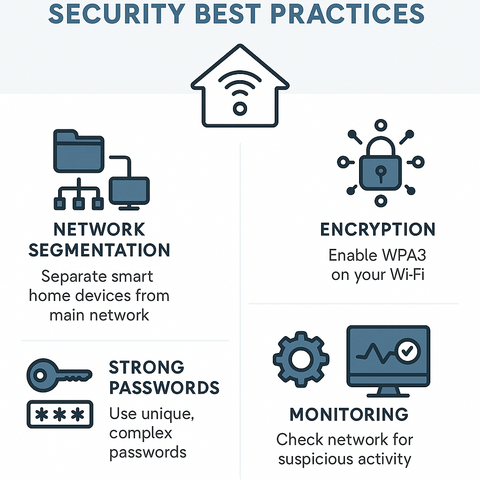
Imagine waking up to a world where your smart home devices are as secure as they are convenient. You rely on these gadgets every day—whether it’s your smart thermostat adjusting the temperature or your voice assistant reminding you of appointments.
But have you ever paused to wonder about the security of your network? If you’re like most people, you might not have considered the risks of connecting all your devices to the same network. But what if I told you that this could be putting your personal information at risk?
The idea of separating your smart devices onto a different network might sound complex, but it could be the key to safeguarding your digital life. Stick around to discover why this simple change could make a big difference in your home security.

Credit: www.reddit.com
Risks Of Connecting Smart Devices To Main Network
Connecting smart devices to your main network carries several risks. These devices often lack strong security features. A single weak device can expose your entire network to threats. Understanding these risks helps protect your personal data and maintain network speed.
Common Vulnerabilities In Smart Devices
Many smart devices have weak passwords by default. They may run outdated software with security holes. Hackers can exploit these flaws to gain access. Devices often lack regular security updates. This makes them easy targets for cyber attacks.
Potential Impact On Personal Data
Smart devices can collect sensitive information. This data might include your location, habits, or voice recordings. If hacked, attackers can steal or misuse this information. Your privacy becomes at risk. Personal details can be sold or used for identity theft.
Network Performance Issues
Smart devices can slow down your internet speed. They use bandwidth constantly, even when idle. Poorly secured devices might allow malware to spread. This can overload your network and cause crashes. Keeping devices separate helps maintain smooth performance.
Benefits Of A Separate Network For Smart Devices
Keeping smart devices on a separate network offers many benefits. It helps protect your main devices and data from risks. It also makes managing your home network easier. Below are key advantages of creating a dedicated network for smart gadgets.
Enhanced Security Measures
Smart devices often have weaker security than computers or phones. A separate network limits access to these devices. This reduces the chance of hackers reaching your important information. It also helps block unauthorized access to your main network.
Improved Network Management
A dedicated network simplifies control over smart devices. You can monitor their activity without interrupting other devices. It allows easier updates and troubleshooting. Managing bandwidth becomes straightforward, preventing slowdowns on your main network.
Isolation Of Threats
If a smart device gets infected by malware, a separate network isolates the problem. The threat stays contained and cannot spread to computers or smartphones. This isolation protects your sensitive data and keeps your main network stable.
Setting Up A Separate Network
Setting up a separate network for your smart devices is a practical way to boost your home’s security and improve device management. It helps keep your main network safe from potential vulnerabilities that smart gadgets might introduce. Creating this separation doesn’t have to be complicated, and with the right tools, you can tailor it to fit your needs perfectly.
Choosing The Right Router
Your router is the backbone of your home network, so picking the right one is crucial. Look for routers that support multiple SSIDs (network names) or have built-in features for network segmentation.
Higher-end routers often come with advanced security settings and easy-to-use interfaces. These features allow you to manage separate networks without needing technical skills. Investing in a router with robust firmware can save you headaches down the line, especially if you’re adding many smart devices.
Configuring Guest Networks
Most modern routers let you create a guest network, which is perfect for isolating your smart devices. This keeps them off your main network where your personal computers and phones connect.
Setting up a guest network is usually as simple as logging into your router’s dashboard and enabling the guest access option. You can customize settings like bandwidth limits and access times, which helps you control how your smart devices use the internet.
Using Vlans For Segmentation
VLANs (Virtual Local Area Networks) provide a more advanced way to separate your smart devices from other network traffic. They create isolated segments within the same physical network, offering better security and performance.
While VLAN setup might sound technical, many routers designed for prosumers or small businesses include VLAN support. You can assign smart devices to their own VLAN, ensuring they don’t interact directly with your main devices.
Have you considered what could happen if a smart device gets hacked? Using VLANs helps contain any potential breach, protecting your personal data on other devices.
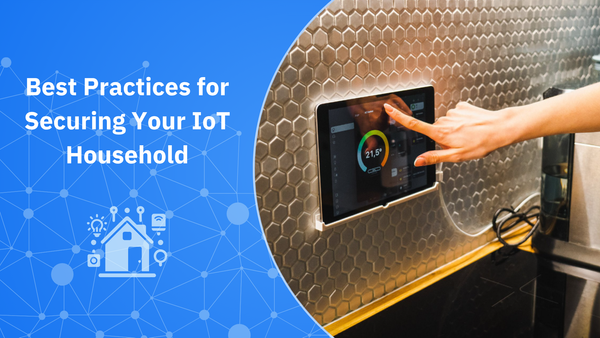
Credit: www.bitdefender.com
Additional Security Tips For Smart Devices
Securing smart devices goes beyond just placing them on a separate network. Extra precautions help keep your gadgets safe from threats. These simple tips boost your defenses and keep your data private. Follow these easy steps to protect your smart home better.
Regular Firmware Updates
Smart devices need updates to fix security holes. Manufacturers release new firmware to patch bugs and improve safety. Always check for updates and install them quickly. Automatic updates are best to avoid delays. Outdated software makes devices easy targets for hackers.
Strong Password Practices
Passwords protect your smart devices from unauthorized access. Use long, unique passwords for each device or account. Avoid common words or simple sequences. Change default passwords immediately after setup. Consider a password manager to keep track of strong passwords. This reduces the risk of hacking.
Disabling Unnecessary Features
Many smart devices come with extra features that you might not need. Turn off features like remote access or voice control if unused. This limits points of entry for cyber attacks. Review device settings regularly to disable unused functions. Less exposure means better security.
Monitoring And Maintaining Network Security
Keeping your smart devices on a separate network is a smart move, but it doesn’t end there. Monitoring and maintaining the security of that network is equally important. You need to stay alert and proactive to protect your data and privacy from potential threats.
Using Network Monitoring Tools
Network monitoring tools give you real-time insights into what’s happening on your network. They can track device behavior, data flow, and connection patterns. With tools like Fing or Wireshark, you can spot unknown devices or unusual spikes in traffic quickly.
These tools often send alerts when something looks off, helping you respond faster. Think of it as having a security camera for your digital space. Would you ignore a strange visitor in your home? The same goes for your network.
Recognizing Suspicious Activity
Knowing what suspicious activity looks like is key. Sudden slowdowns, unknown devices connecting, or unexpected data transfers could be signs of a problem. If your smart lights blink randomly or your thermostat settings change without your input, it’s worth investigating.
Don’t hesitate to disconnect devices or change passwords if you notice anything odd. Trust your instincts—if something feels wrong, it probably is. How often do you check your network for these signs?
Periodic Security Audits
Regular security audits help catch vulnerabilities before they become major issues. Set a schedule—monthly or quarterly—to review your network settings, update firmware, and test your defenses. This keeps your devices and data safer over time.
During an audit, consider these actions:
- Update all device passwords with strong, unique combinations
- Ensure your router firmware is current
- Review connected devices and remove any that are no longer in use
- Check for software updates on smart devices
How much time do you dedicate to maintaining your network’s security? Small, consistent efforts can prevent costly breaches and keep your smart home running smoothly.

Credit: www.reddit.com
Frequently Asked Questions
Why Separate Networks For Smart Devices Important?
Separate networks improve security by isolating smart devices from main devices. This limits hacking risks and protects personal data. It also reduces network congestion, ensuring better performance for both networks.
How Does Separate Network Enhance Smart Device Security?
It prevents hackers from accessing primary devices through smart gadgets. If one network is compromised, the other remains safe. This isolation helps contain malware and protects sensitive information.
Can Smart Devices Slow Down My Main Wi-fi?
Yes, many smart devices can consume bandwidth and slow your main network. Using a separate network avoids congestion and keeps your main Wi-Fi fast and reliable.
Is It Difficult To Set Up A Separate Smart Device Network?
No, most modern routers support multiple networks with simple setup steps. You can create a guest or IoT-specific network using your router’s admin panel. This setup enhances security without complexity.
Conclusion
Separating smart devices on their own network helps protect your main devices. It limits risks if a smart device gets hacked. Your personal data stays safer this way. Managing your home network becomes easier too. You can control traffic and avoid slowdowns.
It’s a smart choice for better security and peace of mind. Think about your home’s needs and decide what fits best. Keeping devices apart keeps your digital life safer and smoother. Simple steps can make a big difference.
Leave a Reply