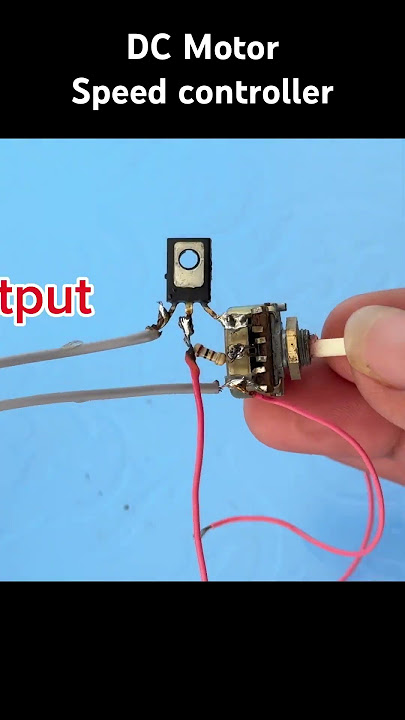
Ever wondered how you can craft your own electronic speed controller at home? You’re in the right place.
Whether you’re a hobbyist looking to refine your skills or just curious about the inner workings of electronics, building an electronic speed controller (ESC) can be a rewarding project. Imagine having the power to control the speed of a motor with precision, and the satisfaction of knowing you built it from scratch.
This guide will walk you through the process step-by-step, with simple language and clear instructions that you can easily follow. By the end of this article, you’ll not only understand the mechanics behind ESCs but also gain hands-on experience in creating one yourself. Ready to dive in and unlock your potential as a DIY electronics enthusiast? Keep reading to transform your ideas into reality.

Credit: www.youtube.com
Materials Needed
Gathering the right materials is the first key to building an electronic speed controller (ESC) at home. Your choices here will shape the performance and reliability of the final device. It’s not just about having components; it’s about having the right ones that suit your specific project needs.
Before you start, ask yourself: What type of motor will you control? This affects the kind of components you’ll need. Understanding this can save you time and frustration later on.
Essential Electronic Components
- Microcontroller:Acts as the brain of your ESC, managing speed and direction. Popular choices include Arduino or STM32 boards.
- Power MOSFETs:These transistors handle the high current to the motor. Make sure to pick ones with a low Rds(on) for better efficiency.
- Gate Driver IC:Needed to properly switch the MOSFETs at high speed, ensuring smooth motor control.
- Voltage Regulator:Keeps your microcontroller and sensors running at a safe, stable voltage.
- Capacitors and Resistors:Used for filtering noise and setting timing circuits, critical for stable ESC operation.
Tools And Equipment
- Soldering Iron:A reliable soldering tool is crucial for making strong, clean connections.
- Multimeter:Helps you test voltages and continuity to avoid mistakes that can damage your components.
- Oscilloscope:Optional but very useful to visualize signal waveforms and troubleshoot your ESC.
- PCB or Breadboard:For mounting and connecting your components securely.
Additional Materials For Assembly
- Heat Sink:Keeps your MOSFETs cool during operation, preventing overheating.
- Thermal Paste:Improves heat transfer between MOSFETs and heat sinks.
- Wires and Connectors:Use appropriately rated wires for current and reliable connectors for easy assembly and maintenance.
- Enclosure:Protects your ESC from dust and physical damage. You can repurpose a small project box or design a custom case.
When I first built an ESC, I underestimated the importance of a good heat sink and ended up with a burnt MOSFET. That mistake taught me to never skip on cooling components. What’s a small investment in materials compared to rebuilding your entire project?
Basic Esc Components
An Electronic Speed Controller (ESC) controls the speed of electric motors in devices like drones and RC cars. Knowing the basic components of an ESC helps in building one at home. Each part plays a specific role to manage power and speed efficiently. Understanding these components makes the assembly process easier and safer.
Power Transistors
Power transistors switch the motor’s power on and off rapidly. They control the voltage sent to the motor. Common types include MOSFETs and IGBTs, known for fast switching and low power loss. Good quality transistors improve ESC performance and reduce heat.
Microcontroller
The microcontroller acts as the brain of the ESC. It reads input signals and sends commands to the power transistors. It controls the speed and direction of the motor. Programming the microcontroller correctly is key for smooth motor operation.
Capacitors
Capacitors stabilize the power supply to the ESC. They reduce voltage spikes and filter electrical noise. This protects sensitive components and ensures steady motor performance. Electrolytic and ceramic capacitors are commonly used.
Voltage Regulator
The voltage regulator provides a steady voltage to the microcontroller and other low-power parts. It prevents damage caused by fluctuating battery voltage. A stable voltage supply ensures consistent ESC behavior.
Current Sensor
The current sensor monitors the amount of current flowing through the motor. It helps protect the ESC from overload and overheating. Some ESCs use shunt resistors or Hall effect sensors for this task.
Heat Sink
A heat sink absorbs and dissipates heat from power transistors. It prevents overheating during operation. Using a heat sink improves ESC reliability and extends its lifespan.
Circuit Design
Designing the circuit is the backbone of creating your own Electronic Speed Controller (ESC) at home. It determines how well your ESC will perform and how reliably it controls your motor. Paying close attention to the components and connections can save you hours of troubleshooting later.
Choosing The Microcontroller
Your ESC needs a brain to process signals and control the motor speed. A microcontroller like the Arduino Nano or STM32 is ideal because they offer enough processing power and PWM outputs for motor control.
Look for a microcontroller with built-in PWM channels and ADC inputs to monitor voltage or current. This will help you implement smooth speed adjustments and protect your motor from overheating.
Think about the programming environment too—are you comfortable with Arduino IDE or do you prefer something more advanced? Your choice will affect how quickly you can test and improve your ESC.
Power Supply Setup
The power supply must deliver steady voltage and current to both the microcontroller and the motor. Usually, a LiPo battery or DC power supply works well, but you need voltage regulators to protect sensitive components.
Use a buck converter to step down voltage if your motor supply exceeds the microcontroller’s limits. Adding capacitors near the motor terminals can reduce voltage spikes and noise, improving stability.
Have you considered adding a fuse or circuit breaker? These safety features prevent damage in case of short circuits or overloads, which are common during motor startup.
Motor Connections
Connecting the motor correctly is crucial to control its speed and direction. Brushless motors require three-phase wiring; make sure you label wires to avoid confusion when testing.
Use MOSFETs or ESC driver ICs to switch power to the motor phases efficiently. These components handle high current and ensure fast switching, which translates to smooth motor control.
Don’t forget to add feedback sensors like Hall effect sensors if your motor supports them. They provide precise rotor position data, improving your ESC’s responsiveness and accuracy.
Assembling The Esc
Assembling the Electronic Speed Controller (ESC) is where your project starts to take real shape. This stage requires precision and patience, as the connections you make here determine the ESC’s performance and reliability. You’ll handle small parts and delicate wiring, so a steady hand and clear focus are essential.
Soldering Tips
Soldering is the backbone of a solid ESC assembly. Use a soldering iron with a fine tip for better control, and keep the temperature around 350°C to avoid damaging components.
Clean your soldering tip frequently with a wet sponge. This prevents oxidation and ensures smooth, shiny joints. Avoid applying too much solder—just enough to cover the joint creates a strong connection without causing shorts.
If you’re new to soldering, practice on spare wires first. Notice how the solder flows and hardens quickly. This hands-on experience can save you from frustrating mistakes during the actual assembly.
Wiring The Components
Wiring the ESC correctly is crucial for its function and safety. Start by identifying each wire’s role—motor leads, battery connections, and signal wires must be connected without mixing.
Use heat shrink tubing to cover exposed wires and solder joints. This adds insulation and prevents accidental shorts. Organize wires neatly to avoid tangling and allow better airflow for cooling.
Check your wiring twice before powering the ESC. A wrong connection can fry your components instantly. Ask yourself: Have you connected the motor phases in the right order? Are the power wires secure and insulated?
Programming The Esc
Programming the Electronic Speed Controller (ESC) is where your project really starts to take shape. This step transforms your hardware into a smart device that responds to your commands with precision. Getting the code right is essential to control motor speed smoothly and efficiently.
Writing The Control Code
Begin by selecting a programming language compatible with your microcontroller, usually C or Arduino’s simplified C++. Your code should handle PWM (Pulse Width Modulation) signals to control the ESC’s power output.
Focus on these key tasks in your code:
- Initialize the PWM output pin connected to the ESC.
- Set up timing to generate accurate pulse widths (typically between 1ms and 2ms).
- Write functions to map throttle input values to PWM signals.
- Add safety checks to prevent sudden speed jumps or motor stalls.
Think about how you want to control the motor: Will it respond to a joystick, a sensor, or pre-set commands? Your code needs to translate those inputs into smooth speed changes.
Uploading To The Microcontroller
Once your code is ready, upload it to your microcontroller using a USB programmer or serial interface. Most microcontrollers have dedicated software like Arduino IDE or PlatformIO that simplifies this process.
Follow these tips to avoid common pitfalls:
- Ensure the microcontroller is properly connected and powered.
- Double-check the selected board and port settings in your IDE.
- Watch the output console for errors during upload.
After uploading, test the ESC response immediately. Does the motor speed change as expected? If not, review your code and wiring carefully. How often have you found a tiny typo or loose connection was the culprit?
Testing And Calibration
Testing and calibration are crucial after building your electronic speed controller (ESC). These steps ensure the ESC runs smoothly and controls motor speed accurately. Without proper testing, the ESC might cause motor issues or fail prematurely.
Start with careful checks to avoid damage. Testing verifies all wiring and components work correctly. Calibration fine-tunes the ESC to match your motor’s needs. This process improves performance and reliability.
Initial Power-on
Before connecting to a motor, inspect all connections again. Use a multimeter to check voltage and continuity. Power the ESC with a low voltage source to avoid sudden power surges.
Watch for any smoke, unusual heat, or strange noises. If any issue appears, disconnect immediately and find the problem. A smooth startup means your ESC is ready for calibration.
Adjusting Speed Settings
Connect the ESC to your motor and power supply. Slowly increase the throttle input to observe motor response. Note any delays or irregular speed changes.
Adjust the ESC’s speed control parameters using its programming interface or manual controls. Focus on:
- Minimum throttle to prevent motor stalling
- Maximum throttle for full speed
- Acceleration curves for smooth speed changes
Test these settings multiple times to confirm consistent performance. Proper calibration helps your ESC deliver precise speed control and extends motor life.
Troubleshooting Common Issues
Troubleshooting your homemade Electronic Speed Controller (ESC) can feel frustrating, but it’s a crucial part of the process. Many issues arise not from major faults but from small, overlooked details. Getting familiar with common problems and how to fix them will save you time and prevent unnecessary replacements.
Checking Power Supply And Connections
One of the first things to verify is your power source. Is the battery fully charged and delivering the correct voltage? Loose or corroded connections often cause erratic ESC behavior, so inspect all solder joints and connectors carefully.
Have you ever found a tiny wire just barely touching a wrong spot and causing a short? It’s surprising how often simple contact problems create big headaches.
Ensuring Correct Signal Input
Your ESC expects precise signals from the controller. If your motor isn’t responding, check that the input signal wires are properly connected and sending the right pulse width modulation (PWM) signals.
Use a multimeter or oscilloscope if you have one. It’s a quick way to confirm if the ESC receives the correct commands. If signals are off, recalibrate your transmitter or adjust your microcontroller code.
Preventing Overheating And Damage
Overheating is a common cause of ESC failure. Make sure your ESC has adequate cooling, either through heatsinks or airflow. Running your ESC near its limits without proper heat dissipation can cause it to shut down or permanently damage components.
Have you noticed your ESC feels hot after a short run? That’s a warning sign to improve cooling or reduce load before permanent damage occurs.
Identifying Motor And Esc Compatibility Issues
Not all motors and ESCs work well together. Check the voltage and current ratings of both components to avoid mismatches. Using an ESC with too low a current rating for your motor can cause the ESC to fail quickly.
Try swapping in a different motor or ESC if you suspect compatibility problems. It’s a straightforward way to isolate the issue without guesswork.
Testing Firmware And Software Settings
If your ESC uses programmable firmware, incorrect settings can cause erratic motor behavior. Verify parameters like acceleration, braking, and cutoff voltage match your hardware specifications.
Sometimes, updating the firmware or restoring default settings fixes strange issues. Have you tried resetting your ESC to factory defaults before diving into hardware troubleshooting?

Credit: www.youtube.com
Safety Precautions
Building an Electronic Speed Controller (ESC) at home involves working with electrical components and circuits. Safety is key to avoid injuries and equipment damage. Following strict safety measures protects you and your tools.
Always prepare your workspace before starting. A clean, dry area reduces risks. Organize tools and parts for easy access. This prevents accidents caused by clutter or misplaced items.
Use Protective Gear
Wear safety glasses to protect your eyes from sparks or debris. Use gloves to avoid cuts and electric shocks. Avoid loose clothing that can catch on wires or components.
Check Power Sources
Use a low voltage power supply to test your circuit first. Never work on live circuits without disconnecting power. Double-check connections before powering the ESC to prevent short circuits.
Handle Components Carefully
Some parts can get hot during use. Allow them to cool before touching. Avoid static electricity by grounding yourself. Use anti-static mats or wrist straps when handling sensitive chips.
Work In A Well-ventilated Area
Soldering releases fumes that can harm your lungs. Open windows or use a fan to keep air flowing. Consider using a fume extractor or mask for extra protection.
Keep Fire Safety Measures
Have a fire extinguisher nearby. Use one rated for electrical fires. Never use water on electrical fires to avoid spreading the hazard.
Follow Instructions And Datasheets
Read component datasheets carefully for handling and voltage limits. Follow wiring diagrams precisely to prevent mistakes. Avoid improvising with unknown parts or shortcuts.
Enhancements And Upgrades
Enhancing your homemade Electronic Speed Controller (ESC) can transform a basic setup into a powerful and reliable component. Small upgrades can improve efficiency, reduce heat, and provide smoother motor control. These changes not only boost performance but also extend the lifespan of your ESC.
Improving Heat Dissipation
Heat is one of the biggest challenges in ESCs. Adding a heatsink or a small cooling fan can drastically reduce temperature during operation. You can also apply thermal paste between the ESC chip and the heatsink to improve heat transfer.
Have you checked if your ESC gets too hot during use? Taking simple steps to cool it down can prevent sudden failures and keep your device running longer.
Upgrading Mosfets For Better Efficiency
The MOSFETs are the power drivers inside your ESC. Swapping out standard MOSFETs for ones with lower resistance reduces power loss and heat generation. Look for MOSFETs with a low R_DS(on) value to get the best results.
This upgrade can feel technical, but it’s worth the effort if you want smoother acceleration and better battery life.
Adding Capacitors To Stabilize Voltage
Voltage spikes can damage your ESC or cause erratic motor behavior. Installing additional capacitors on the power input helps smooth out these spikes. Ceramic capacitors of 0.1µF to 1µF are common choices for this task.
Have you experienced unexpected motor jitters? Adding capacitors could be the fix you need for stable performance.
Implementing Firmware Updates And Customization
If your ESC supports programmable firmware, updating or customizing it can unlock new features. You might gain options for brake strength, throttle curves, or motor timing adjustments. Using open-source ESC firmware can give you full control over these parameters.
Do you want your ESC to match your driving style perfectly? Firmware tweaks let you tailor the ESC to your exact preferences.
Enhancing Signal Input For Better Control
Improving the quality of the input signal can reduce latency and prevent signal loss. Using shielded cables or better connectors between your ESC and receiver can make a noticeable difference. Ensuring clean and stable signals means smoother motor response.
Have you noticed lag or stuttering in motor control? Upgrading your signal path might be the simple solution.

Credit: www.youtube.com
Frequently Asked Questions
What Materials Are Needed To Make An Esc At Home?
You need a microcontroller, MOSFETs, diodes, resistors, capacitors, and a heat sink. Also, a PCB or breadboard helps in assembling the circuit neatly and safely.
How Does An Esc Control Motor Speed?
An ESC adjusts the power to the motor by rapidly switching voltage on and off. This pulse-width modulation controls the motor’s speed efficiently and precisely.
Is Making An Esc At Home Safe For Beginners?
Building an ESC requires basic electronics knowledge and careful handling. Beginners should follow tutorials and safety precautions to avoid damage or injury.
Can Homemade Escs Work With All Motor Types?
Most homemade ESCs work well with brushless DC motors. However, compatibility with other motor types depends on the ESC’s design and programming.
Conclusion
Building an electronic speed controller at home is simple and fun. You only need basic parts and careful steps. Testing the controller ensures it works well and safely. This project helps you learn about electronics and motors. Try it yourself and see how it controls speed smoothly.
Keep practicing to improve your skills. Making your own controller saves money too. Start small, stay patient, and enjoy the process. Your homemade controller can power many devices easily. Give it a try today!
Leave a Reply