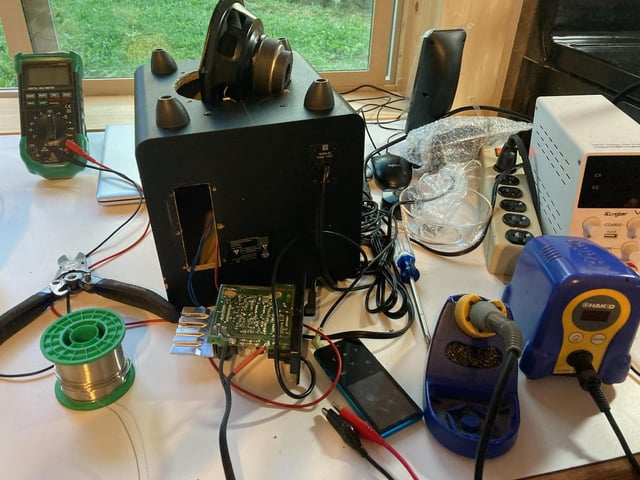
Have you ever wondered how gadgets around you actually work? Or thought about creating your own electronic device from scratch?
That’s where DIY electronics comes in. It’s a hands-on way for you to learn, build, and customize electronic projects using simple tools and parts. Whether you’re a complete beginner or someone looking to explore new skills, DIY electronics opens up a world of creativity and problem-solving right at your fingertips.
Keep reading, and you’ll discover how you can start making your own electronic devices today—no special background needed.
Diy Electronics Basics
DIY electronics is a hobby where you build and fix electronic devices yourself. It helps you learn about circuits, components, and how devices work. Starting with the basics makes complex projects easier to handle. Understanding the key parts and tools sets a strong foundation for success.
Essential Components
Knowing the main parts is vital for any project. Some common components include:
- Resistors – control electric current flow
- Capacitors – store and release energy
- Diodes – allow current to flow one way only
- Transistors – amplify or switch electronic signals
- LEDs – light up when powered
- Microcontrollers – small computers for controlling circuits
Each component plays a specific role in a circuit’s function. Learning their purpose helps you build and troubleshoot effectively.
Common Tools
Having the right tools makes work easier and safer. Basic tools include:
- Soldering iron – joins components by melting solder
- Wire cutters and strippers – prepare wires for connections
- Multimeter – measures voltage, current, and resistance
- Breadboard – test circuits without soldering
- Screwdrivers – assemble or disassemble parts
- Tweezers – handle small components
Using these tools properly improves precision and project quality.
Safety Tips
Safety is important in all electronic projects. Follow these tips:
- Work in a clean, dry area free of clutter
- Wear safety glasses to protect your eyes
- Unplug devices before making changes
- Avoid touching live wires or terminals
- Use a soldering iron stand to prevent burns
- Keep small parts away from children and pets
Safe habits prevent accidents and protect your health.
Popular Diy Electronics Projects
DIY electronics projects bring creativity and learning together. They offer hands-on experience with circuits and components. These projects suit beginners and hobbyists alike. Many projects are simple but rewarding. Others involve modern tech for practical uses. Exploring popular projects helps beginners find ideas and build skills.
Simple Circuits
Simple circuits are great for beginners. They teach basic concepts like current, voltage, and resistance. Common projects include:
- LED blinkers
- Basic alarms
- Light sensors
- Simple sound devices
These projects use easy-to-find parts. Learning to build simple circuits builds confidence. It lays the foundation for more complex work.
Wearable Tech
Wearable tech combines electronics with clothing or accessories. These projects often use small, flexible components. Popular wearable projects include:
- LED light-up clothes
- Fitness trackers
- Smart watches
- Health monitoring devices
Wearable tech projects blend style and function. They introduce microcontrollers and sensors. Great for those interested in fashion and tech.
Home Automation
Home automation projects improve everyday life. They use sensors and smart devices to control home systems. Common projects are:
- Smart lighting control
- Automated fans
- Security alarms
- Temperature monitoring
These projects teach wireless communication and programming. They help users save energy and increase comfort. Perfect for those wanting smarter living spaces.
Getting Started With Microcontrollers
Microcontrollers are the heart of many DIY electronics projects. They act like tiny computers that control sensors, motors, lights, and more. Getting started with microcontrollers can open up a world of creativity, letting you build everything from simple gadgets to complex robots.
Arduino Essentials
Arduino boards are a popular choice for beginners. They come with easy-to-use software and a wide range of tutorials online. You can quickly connect sensors and actuators to an Arduino and write simple code to make things happen.
If you’re new, start with the Arduino Uno. It’s affordable and has plenty of community support. You don’t need to be a coding expert—Arduino’s programming language is straightforward, based on C/C++. Many kits even include detailed guides to walk you through your first project.
Raspberry Pi Projects
Unlike Arduino, Raspberry Pi is a full mini-computer. It runs an operating system and can handle more complex tasks like running a web server or streaming video. This makes it great for projects that need more processing power.
You can use Raspberry Pi for home automation, media centers, or even learning programming languages like Python. If you want to build smart gadgets that connect to the internet, Raspberry Pi offers a flexible platform. Just remember, it requires a bit more setup compared to Arduino.
Choosing The Right Platform
Think about what you want to build before picking a microcontroller. Do you need simple control of lights and sensors? Arduino is perfect. Want to handle multimedia or network applications? Raspberry Pi might be better.
Also, consider your experience level and how much time you want to spend on setup versus coding. Arduino’s simplicity can save you headaches early on. Raspberry Pi offers more power but demands patience and some learning.
What kind of project excites you the most? Your answer can guide your choice and make your DIY electronics journey more rewarding.

Credit: www.circuits-diy.com
Designing Your Own Circuits
Designing your own circuits is a core part of DIY electronics. It lets you create custom devices and gadgets from scratch. Understanding how to build and test circuits helps you learn electronics deeply. This process involves planning, assembling, and checking your designs for proper function.
Using Breadboards
Breadboards allow easy circuit assembly without soldering. They have many tiny holes to plug in components. This makes testing and changing designs quick and simple. You can connect wires and parts to build circuits step-by-step. Breadboards are perfect for beginners and quick prototypes.
Soldering Techniques
Soldering joins electronic parts permanently using melted metal. It creates strong electrical connections on circuit boards. Good soldering needs a steady hand and proper tools. Heat the joint just enough to melt solder and avoid damage. Clean and smooth joints improve circuit reliability and durability.
Circuit Simulation Tools
Circuit simulation tools let you test designs on a computer. They show how circuits behave before building them physically. You can find errors and fix problems early. Many simulation programs offer easy drag-and-drop interfaces. Simulation saves time and components by reducing trial and error.
Programming For Diy Electronics
Programming is the heart of DIY electronics. It turns your hardware ideas into real, working projects. Whether you’re building a simple LED blinker or a complex robot, knowing how to write and understand code is essential.
Basic Coding Skills
You don’t need to be a professional programmer to get started. Learning variables, loops, and conditionals gives you the tools to control your devices. These basics help you tell your microcontroller when to turn on a light or read a sensor.
Start with simple tasks like making an LED blink. This hands-on practice builds your confidence. How could you simplify a complex task into smaller coding steps?
Popular Languages
Some programming languages are more common in DIY electronics. Arduino’s C/C++ style language is beginner-friendly and widely supported. Python, especially with boards like Raspberry Pi, offers powerful options for more advanced projects.
Other languages like JavaScript can be used with specific platforms, making your projects interactive and web-connected. Choosing the right language depends on your goals and the hardware you use.
Debugging Tips
Debugging is part of the learning curve. Start by testing small sections of your code instead of writing everything at once. Use print statements or serial monitors to see what your program is doing step-by-step.
Don’t get discouraged by errors—they’re clues to what’s wrong. Ask yourself: What did I expect to happen? What actually happened? This mindset helps you solve problems faster and learn more deeply.
Troubleshooting Common Issues
Troubleshooting is a key part of DIY electronics. It helps fix problems and improves your skills. Knowing how to find and solve issues saves time and frustration. This section covers common problems and easy solutions for beginners.
Identifying Faulty Components
Start by checking each part carefully. Look for burnt marks, cracks, or broken pins. Some components may look fine but still fail. Test suspect parts with a multimeter for resistance or continuity. Replace any component that shows unusual readings or physical damage.
Fixing Wiring Problems
Wiring errors cause many device failures. Check all connections for loose or crossed wires. Use a magnifying glass to spot tiny breaks or shorts. Secure wires firmly with solder or connectors. Follow your circuit diagram to ensure correct wiring paths.
Testing And Measurement
Use tools to measure voltage, current, and resistance. A digital multimeter is essential for testing circuits. Measure at different points to find where signals stop or drop. Oscilloscopes can show signal shapes and timing issues. Record your measurements to compare with expected values.
Expanding Your Skills
Expanding your skills in DIY electronics opens up new possibilities and challenges. It pushes you beyond basic circuits into a world where creativity meets technical knowledge. You’ll find that every new skill builds confidence and sparks curiosity for the next project.
Online Resources
You can access countless tutorials, videos, and forums online that help you learn at your own pace. Websites like Instructables and YouTube offer step-by-step guides on everything from soldering to microcontroller programming.
Interactive platforms such as Arduino and Raspberry Pi communities provide project ideas and troubleshooting tips. Have you tried following a project video while pausing to practice each step yourself? It’s a great way to solidify your understanding.
Community Involvement
Joining local maker groups or online communities can accelerate your learning. Sharing your progress and asking questions often leads to unexpected solutions and new friendships.
Attending workshops or hackathons exposes you to different tools and techniques. You might find that working alongside others sparks ideas you hadn’t considered before. What’s one skill you wish you could learn from someone else?
Advanced Projects
Once you feel comfortable with the basics, challenge yourself with advanced projects like building drones, home automation systems, or wearable tech. These projects require combining multiple skills, such as coding, circuit design, and mechanical assembly.
Documenting your progress and troubleshooting steps can help you learn faster and assist others in the community. Trying complex builds also teaches patience and problem-solving—skills that are valuable far beyond electronics.

Credit: www.reddit.com

Credit: www.youtube.com
Frequently Asked Questions
What Are Diy Electronics?
DIY electronics involve creating and assembling electronic devices at home. This hobby allows enthusiasts to build custom gadgets and learn about electronics. It often includes projects like building circuits, repairing devices, and creating unique electronic solutions.
How To Start With Diy Electronics?
Begin with simple projects to understand basic components and circuits. Use online tutorials and starter kits to guide you. Gradually, explore more complex projects as you build confidence and skills.
What Tools Are Needed For Diy Electronics?
Essential tools include a soldering iron, multimeter, wire cutters, and a breadboard. A set of screwdrivers and pliers are also useful. These tools help you build, test, and repair electronic projects efficiently.
Why Choose Diy Electronics As A Hobby?
DIY electronics provide a creative outlet and enhance problem-solving skills. It allows you to customize gadgets and learn new technologies. This hobby is rewarding and offers a sense of accomplishment with each completed project.
Conclusion
Diy electronics lets you build and fix devices yourself. It helps you learn how things work inside. You save money by making your own gadgets. It also gives you a fun and creative hobby. Start small, and you will get better with time.
Diy electronics opens many doors to new skills. Give it a try and enjoy the process. You might discover a new passion along the way.
Leave a Reply