Have you ever wondered where the heart of your computer really is? The part that holds all the important electronic pieces making everything work smoothly?
Understanding this can help you better care for your device and even troubleshoot common issues. You’ll discover exactly what part of your computer contains the central electronic components and why it’s so crucial. Keep reading—you’ll gain insights that can make your tech life easier and more exciting.
Credit: medium.com
Core Components Inside The Computer
The heart of any computer lies in its core components. These are crucial for the machine’s functionality. They manage processing, memory, and data storage. Each component plays a specific role in the system. They ensure your computer operates smoothly and efficiently.
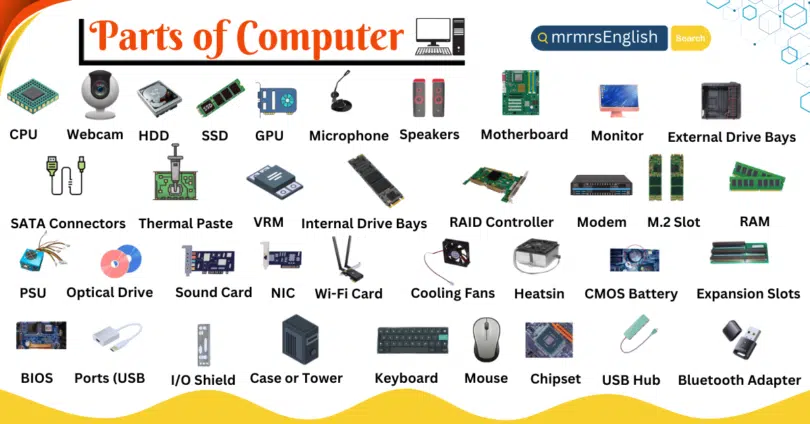
Central Processing Unit (cpu)
The CPU is the brain of the computer. It processes instructions and performs calculations. It handles tasks from basic to complex operations. Its speed affects the overall performance of the system.
Motherboard
The motherboard is the backbone. It connects all components. It houses the CPU, memory, and other essential parts. It ensures communication between the components.
Random Access Memory (ram)
RAM is temporary storage. It holds data that the CPU accesses often. More RAM means better multitasking. It affects the speed of running programs.
Storage Drives
Storage drives hold data permanently. They come in two types: HDD and SSD. SSDs are faster and more reliable. Storage size affects how much data you can store.
Graphics Processing Unit (gpu)
The GPU handles graphics and visual tasks. It is essential for gaming and design work. It offloads tasks from the CPU, boosting performance.
Power Supply Unit (psu)
The PSU provides electricity to the computer. It converts AC to DC power. It ensures all components receive the necessary power. A good PSU protects the system from power surges.
Role Of The Motherboard
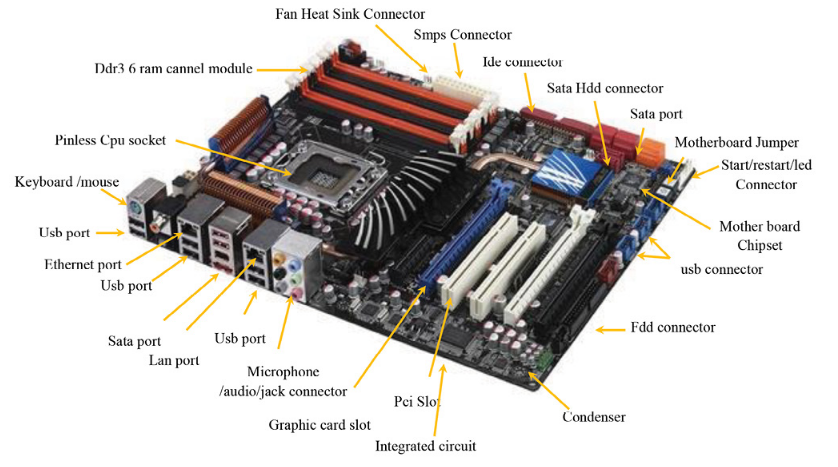
The motherboard plays a crucial role in a computer. It houses the central electronic components that make the system work. This circuit board connects all parts and allows communication between them. Without the motherboard, the computer cannot function as a single unit.
Structure And Layout
The motherboard is a flat, rectangular board made of layers of fiberglass. It contains paths called circuits that carry electrical signals. These circuits link various components together. Slots and sockets hold the CPU, RAM, and other parts firmly in place. The layout is designed to optimize space and airflow inside the computer case.
Connection Hub For Components
The motherboard acts as a central hub for all hardware parts. It connects the processor, memory, storage devices, and expansion cards. Power from the power supply runs through the motherboard to each component. Data flows across it via buses and connectors. This setup ensures all parts work in sync to run software and process tasks efficiently.
Central Processing Unit (cpu)
The Central Processing Unit (CPU) is often called the brain of a computer. It handles all the instructions it receives from hardware and software. Without the CPU, your computer wouldn’t be able to perform any tasks or run programs.
Function And Importance
The CPU processes data by performing calculations and making decisions based on instructions. It controls how your computer responds to commands and manages the flow of information between other components.
Think about a time when your computer slowed down—chances are the CPU was working overtime. A faster CPU means smoother multitasking and quicker responses, which directly impacts your overall experience.
Your CPU affects everything from opening a document to running complex software. It’s essential to choose the right CPU if you want your system to meet your needs effectively.
Placement On The Motherboard
The CPU sits in a special socket on the motherboard, the main circuit board inside your computer. This socket securely connects the CPU to other parts, allowing communication with memory, storage, and peripherals.
Installing the CPU requires precision. If you’ve ever replaced or upgraded a CPU, you know how careful you must be with alignment and applying thermal paste to prevent overheating.
Motherboards support different types of CPUs, so compatibility is key. When selecting or upgrading your CPU, always check the motherboard’s specifications to ensure they match.
Memory Units
The memory units inside a computer are crucial for storing data and instructions that the processor needs to access quickly. Without these units, your computer would struggle to perform even basic tasks. Understanding how memory units work can help you make smarter decisions when upgrading or troubleshooting your system.
Ram And Its Role
RAM, or Random Access Memory, acts as your computer’s short-term memory. It holds the data and programs you’re actively using, allowing the processor to reach them fast. More RAM means your computer can handle more tasks simultaneously without slowing down.
Have you noticed how your computer slows when you open too many apps? That’s often because the RAM is full. Upgrading RAM can give your system a significant speed boost, especially if you work with large files or multiple programs.
Cache Memory Insights
Cache memory is smaller but much faster than RAM. It sits closer to the processor and stores frequently accessed data to reduce the time it takes to retrieve it. Think of cache as a quick-access toolkit for your CPU, speeding up repetitive tasks.
Not all cache memories are the same. They come in levels—L1, L2, and L3—each with different sizes and speeds. The closer the cache is to the processor core, the faster it works, but it also tends to be smaller in size.
Power Supply And Circuitry
The power supply and circuitry form the backbone of your computer’s central electronic components. They ensure that every part receives the right amount of energy and that signals flow smoothly between components. Without a reliable power supply and well-designed circuitry, your computer simply won’t function as expected.
Power Distribution
Your computer’s power supply converts electricity from your wall outlet into usable power for internal components. It distributes this power through various rails, each delivering specific voltage levels. This precise distribution prevents damage and ensures components like the CPU and hard drives get the energy they need.
Have you ever noticed your computer shutting down unexpectedly? Often, this points to a power supply issue. A stable and efficient power distribution system keeps your machine running smoothly even under heavy load.
Electronic Circuits Integration
Electronic circuits connect all the parts inside your computer, allowing them to communicate and work together. These circuits are carefully designed to manage data flow, control timing, and regulate power. Small changes in circuit design can dramatically improve performance and energy efficiency.
Think about the motherboard—a perfect example of electronic circuits integration. It acts like a highway system where data travels between the processor, memory, and storage. If these circuits are poorly integrated, your computer may experience slowdowns or errors.

Credit: softwareg.com.au
Peripheral Connections And Expansion
Peripheral connections and expansion play a crucial role in making your computer versatile and powerful. They allow you to connect external devices and enhance your system’s capabilities without replacing the entire machine. Understanding how these connections work helps you make smarter choices when upgrading or customizing your setup.
Ports And Slots
Ports are the gateways on your computer where you plug in devices like keyboards, mice, or external drives. Common ports include USB, HDMI, and Ethernet, each serving a specific purpose. Slots, on the other hand, are internal openings on the motherboard designed to hold expansion cards such as graphics cards or sound cards.
Have you ever noticed how some USB ports support faster data transfer than others? That’s because different ports follow different standards like USB 2.0, USB 3.0, or USB-C. Knowing which port offers better speed can save you time and frustration when transferring large files or streaming content.
Adding Extra Components
Adding extra components through expansion slots lets you boost your computer’s performance tailored to your needs. You can install a dedicated graphics card to improve gaming or video editing, or add extra RAM cards to speed up multitasking. This flexibility means your computer can grow with your demands without needing a full replacement.
Think about the last time you upgraded your computer. Did you add a new component, or did you buy an entirely new system? Adding components is often more cost-effective and can extend your computer’s life significantly.
When choosing components, check compatibility with your motherboard’s slots and power supply. A powerful graphics card might require more power or a specific slot type like PCIe. Ignoring these details can lead to frustration and wasted money.

Credit: mrmrsenglish.com
Frequently Asked Questions
What Part Houses The Central Electronic Components?
The motherboard contains the central electronic components. It connects the CPU, memory, and other essential parts. It acts as the computer’s main circuit board.
Where Is The Cpu Located In A Computer?
The CPU is located on the motherboard. It is the primary processing unit and manages instructions and operations. The CPU is often covered by a heat sink or fan.
What Role Does The Motherboard Play In A Computer?
The motherboard connects all key components, enabling communication. It supplies power and data pathways for the CPU, RAM, and storage devices. It is essential for the computer’s functionality.
Which Component Controls Data Flow Within A Computer?
The chipset on the motherboard controls data flow. It manages communication between the CPU, memory, and peripherals. The chipset ensures efficient operation of the system.
Conclusion
The central electronic components live inside the computer’s motherboard. This part connects and controls key pieces like the CPU and memory. Understanding this helps you see how a computer works. The motherboard acts like the computer’s main hub. It keeps everything running smoothly and communicates between parts.
Knowing this makes using or fixing computers easier. The motherboard truly holds the heart of the machine.
Leave a Reply