Have you ever wondered why electronic devices suddenly stop working, even when they seem fine? Understanding why electronic components fail can save you time, money, and frustration.
Whether you’re fixing gadgets or designing circuits, knowing the common reasons behind these failures helps you avoid costly mistakes. You’ll discover the hidden causes that break your electronics and learn simple ways to protect your devices. Keep reading—you’ll soon see your electronics in a whole new light.
Common Failure Causes
Electronic components often fail due to overheating, moisture, or poor connections. Physical damage and electrical surges also cause breakdowns. These issues reduce performance and shorten device life.
Understanding the reasons behind electronic component failures can help you prevent costly downtime and ensure longevity for your devices. Various factors can lead to these failures, and recognizing them is key to maintaining your electronics. Let’s explore some common causes.Thermal Stress
Heat is one of the biggest enemies of electronic components. Excessive temperatures can cause expansion and contraction, leading to physical damage and degraded performance. Always ensure your devices have proper ventilation or cooling systems to mitigate thermal stress.Electrical Overload
Electrical overload occurs when a component is subjected to a voltage or current higher than it can handle. This can result in immediate failure or gradual degradation. Using protective devices like fuses and circuit breakers can safeguard your components from overload.Mechanical Damage
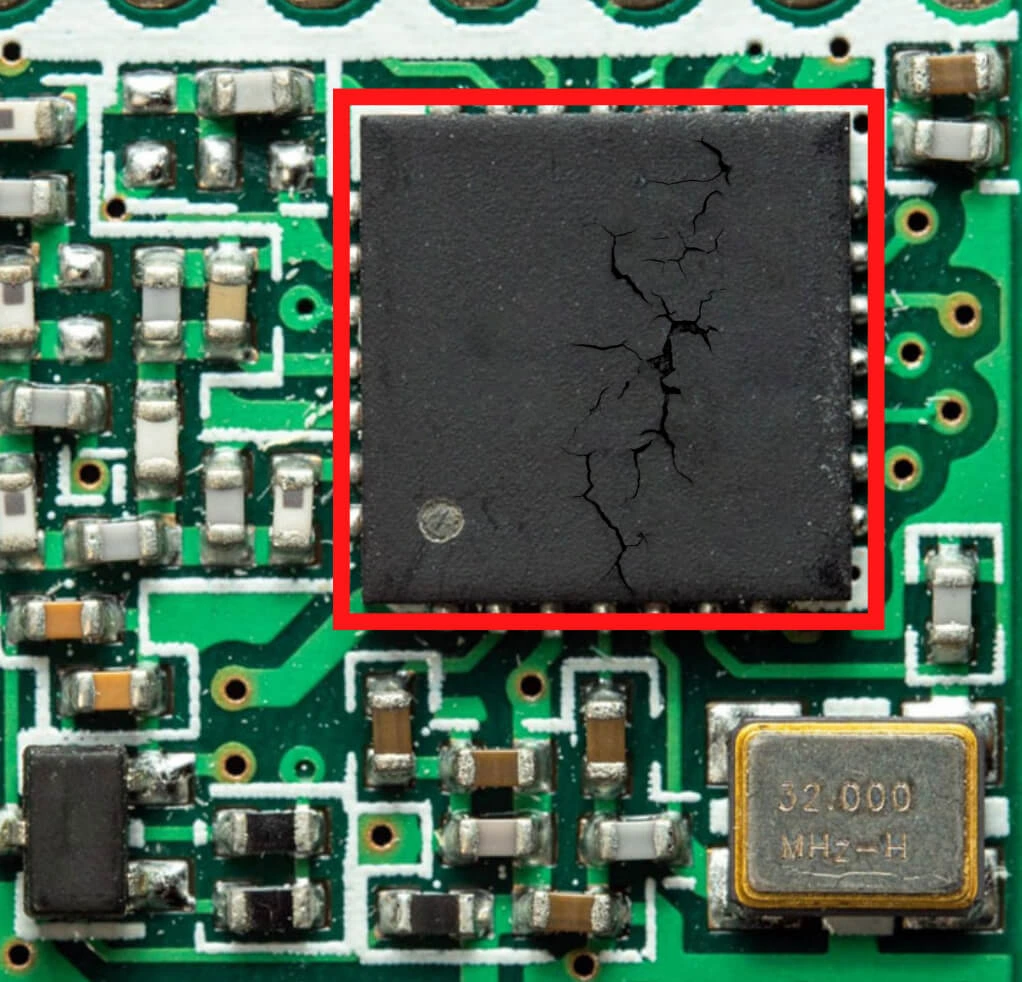
Physical impacts, vibrations, or improper handling can lead to mechanical damage. Even a small crack in a circuit board can cause a component to fail. Handle your devices with care and ensure they are secured in environments prone to movement.Environmental Factors
Dust, moisture, and corrosive substances can infiltrate electronic components and cause failures. Keeping your devices in a controlled environment with appropriate enclosures can prevent these issues. How often do you check if your devices are in a safe environment?Manufacturing Defects
Even with rigorous quality control, defects can sometimes slip through during manufacturing. These defects might not be evident immediately but can lead to early failures. Purchasing components from reputable manufacturers can minimize the risk of encountering defective products. Understanding these failure causes allows you to take proactive measures. Are you doing enough to protect your electronics from these common pitfalls? A little prevention can go a long way in ensuring your devices serve you well for years to come.Signs Of Component Failure
Recognizing the signs of electronic component failure early can save you from costly repairs and downtime. Components rarely fail without warning, and careful observation can reveal clues before things go completely wrong. Knowing what to look for helps you act quickly and protect your devices.
Visual Inspection Clues
Start by closely examining the component for any visible damage. Look for discoloration, burnt marks, or bulging capacitors—these are classic signs of trouble.
Loose connections, cracked solder joints, or corrosion around pins often indicate potential failure. Have you ever noticed a resistor that looks charred? That’s a clear red flag you shouldn’t ignore.
Performance Degradation
Sometimes, components don’t fail outright but gradually lose efficiency. You might notice slower response times, increased heat, or fluctuating voltage levels.
For example, a failing transistor might cause your device to run hotter or slower than usual. Are your gadgets showing odd behavior that wasn’t there before? This could be a sign of performance slipping.
Intermittent Issues
Intermittent problems are tricky because they come and go unpredictably. Your device might work perfectly one moment and then fail without warning.
These irregular failures often point to loose connections or components on the verge of breaking down. Pay attention if your system crashes randomly or resets unexpectedly—these could be early warnings.
Complete Malfunction
When a component fails completely, the device usually stops working or behaves erratically. This could mean no power, no signal, or total system freeze.
If you encounter sudden, total failure, it’s often best to replace the suspect component immediately rather than trying to repair it. Have you faced a device that suddenly stopped working? That’s the final stage of failure you want to avoid.
Preventing Thermal Stress
Thermal stress is a silent killer of electronic components. It occurs when parts heat up too quickly or unevenly, causing expansion and contraction that can crack solder joints, warp circuit boards, or degrade materials. Preventing thermal stress means managing heat effectively to keep your devices running longer and more reliably.
Proper Heat Dissipation
Heat dissipation is about moving heat away from sensitive parts quickly and efficiently. You can achieve this by choosing materials with high thermal conductivity, like copper or aluminum, for your circuit boards and connectors. Ensuring components are spaced properly also helps heat spread out rather than concentrate in one spot.
Have you noticed how some devices feel hotter than others even when performing the same task? That’s often due to poor heat dissipation design. Paying attention to how heat moves inside your device can prevent unexpected failures.
Using Heat Sinks
Heat sinks are essential for components that generate a lot of heat, such as processors and power transistors. These metal pieces increase surface area, allowing heat to escape more easily into the surrounding air. You can find heat sinks in different shapes and sizes, from simple flat plates to complex finned designs.
Installing a heat sink might seem simple, but the thermal interface between the component and the heat sink matters. Using thermal paste or pads improves contact and boosts heat transfer. Have you ever seen a CPU without a heat sink? It’s a quick way to cause damage.
Ventilation Techniques
Good ventilation ensures cool air flows through your device, carrying heat away from hot components. This can be as basic as adding vents or as advanced as installing fans or liquid cooling systems. The key is to create a steady airflow that prevents hot air from getting trapped.
Think about the last time you held a laptop on your lap—it got warm, right? That’s because airflow was blocked. By designing your device with proper ventilation paths, you avoid heat buildup that leads to thermal stress.

Credit: abcadvancedauto.com
Avoiding Electrical Overload
Electrical overload is one of the main reasons electronic components fail. It happens when a component receives more voltage or current than it can safely handle. Avoiding electrical overload is crucial to extend the life of your devices and prevent costly repairs.
Correct Voltage Ratings
Always use components with voltage ratings that match or exceed your circuit’s requirements. Using a capacitor rated for 16V in a 25V circuit, for example, puts it at risk of breaking down quickly.
Check the datasheets carefully before buying parts. It’s easy to assume a small difference won’t matter, but it often does. Have you ever replaced a fuse only to have it blow again? That’s usually a sign of incorrect voltage or current handling.
Surge Protection
Power surges can happen unexpectedly and cause immediate damage. Devices like surge protectors or transient voltage suppressors help absorb sudden spikes.
Installing these can save your electronics from short circuits and permanent failure. Consider adding surge protection especially if you live in an area prone to lightning or unstable power grids.
Current Limiting Methods
Limiting current prevents components from overheating and failing. Resistors, fuses, and circuit breakers are common tools to control current flow.
Using a fuse that matches your circuit’s current rating ensures the fuse blows before components get damaged. Have you checked if your circuit has proper current limiting? It might be the missing step to stop repeated failures.
Protecting Against Mechanical Damage
Mechanical damage is a common cause of failure in electronic components. It happens when parts are bent, crushed, or exposed to sudden forces. Protecting components from such damage ensures they last longer and work properly. Simple measures can reduce the risk of harm during use and transport.
Secure Mounting
Proper mounting keeps components stable and prevents movement. Loose parts can shift and break connections or leads. Using screws, clips, or adhesives designed for electronics helps hold parts firmly. Secure mounting reduces vibrations and stops parts from rubbing against each other.
Shock Absorption
Shock and drops cause internal damage even if the outside looks fine. Materials like foam, rubber, or silicone absorb impacts and protect sensitive parts. Shock absorbers can be placed inside cases or around components. This layer reduces stress from sudden jolts and extends component life.
Handling Precautions
Careful handling prevents accidental damage during assembly or maintenance. Avoid dropping or applying too much force on parts. Use tools designed for electronics to prevent slipping or crushing. Wearing gloves can reduce static electricity and keep components clean. Training workers on proper handling cuts down damage risks.
Mitigating Environmental Risks
Environmental factors play a big role in the lifespan of electronic components. Harsh conditions can cause damage and lead to failure. Controlling these risks improves reliability and performance. Careful measures protect sensitive parts from harm caused by moisture, dust, and corrosion. This section explores key strategies to reduce environmental damage and extend component life.
Moisture Control
Moisture causes short circuits and weakens materials. Use sealed enclosures to keep water out. Desiccants absorb excess humidity inside devices. Proper ventilation helps reduce condensation build-up. Regular checks for leaks or cracks prevent moisture entry. Controlling moisture keeps circuits dry and functioning well.
Dust And Contaminant Protection
Dust blocks cooling vents and causes overheating. Tiny particles may cause electrical shorts. Use filters on air intakes and vents. Clean components regularly to remove dust layers. Store electronics in clean, dust-free areas. Keeping contaminants away lowers failure risks and improves stability.
Corrosion Prevention
Corrosion damages metal parts and connections. It occurs from moisture and chemical exposure. Apply protective coatings to metal surfaces. Use corrosion-resistant materials whenever possible. Avoid storing electronics near corrosive substances. Proper care slows corrosion and maintains component integrity.
Quality Assurance Practices
Quality assurance practices are essential to prevent electronic components from failing prematurely. These practices help identify potential issues early and ensure that every part meets the required standards before it reaches your device. Without rigorous quality control, even the best designs can suffer from unexpected breakdowns.
Component Testing
Testing electronic components before assembly catches defects that might not be visible to the naked eye. This includes stress tests, thermal cycling, and electrical performance checks. Have you ever wondered why some gadgets fail right after purchase? Often, it’s because faulty components slipped through without proper testing.
By running these tests, manufacturers can weed out weak parts that could cause failures later. You can apply this idea by insisting on test reports from your suppliers or using in-house testing tools if you handle components directly.
Supplier Selection
The quality of your electronic components depends heavily on the suppliers you choose. Not all suppliers follow the same standards, so working with reputable ones reduces the risk of receiving subpar parts. Think about your last project—did you check where each component came from?
Good suppliers provide certification and traceability, helping you track the origin and quality of components. Building strong relationships with reliable suppliers can save you time and money by minimizing returns and repairs.
Regular Maintenance
Even the best components can fail if they aren’t maintained properly. Regular inspections and cleaning help catch early signs of wear or damage. Have you scheduled maintenance checks for your devices lately?
Simple actions like cleaning dust from circuit boards or tightening loose connections extend the life of electronic components. Setting up a maintenance routine keeps your systems running smoothly and helps you avoid unexpected failures.

Credit: www.reddit.com
Design Strategies For Reliability
Design strategies for reliability focus on creating electronic systems that last longer and fail less. These strategies help prevent common issues that cause components to break down. Engineers use specific methods to make circuits strong and dependable. The goal is to reduce the chance of failure during normal use and harsh conditions.
Redundancy Implementation
Redundancy means using extra parts to back up critical components. If one part fails, another takes over immediately. This approach increases system uptime and reduces the risk of total failure. Redundancy is common in power supplies and communication links. It helps maintain function during unexpected faults.
Robust Circuit Design
Robust circuit design involves making circuits tolerant to stress and errors. Designers choose components that handle voltage spikes and temperature changes well. They also optimize the layout to minimize noise and interference. Testing under real-world conditions ensures the circuit performs reliably. Strong design reduces the chance of malfunction.
Component Derating
Component derating means using parts below their maximum limits. Running components under less stress extends their life significantly. For example, using a resistor rated for 1 watt at only 0.5 watt load. Derating avoids overheating and early wear. This practice is simple but highly effective for improving reliability.

Credit: www.youtube.com
Frequently Asked Questions
What Are Common Causes Of Electronic Component Failure?
Electronic components often fail due to overheating, electrical overstress, and manufacturing defects. Moisture, corrosion, and mechanical stress also contribute. Proper design and handling reduce failures.
How Does Overheating Lead To Component Failure?
Overheating damages internal structures and degrades materials. Excess heat causes solder joints to weaken and circuits to malfunction. Cooling systems help prevent this issue.
Can Electrical Overstress Damage Electronic Components?
Yes, electrical overstress from voltage spikes or surges can cause immediate or gradual damage. It breaks down insulation and semiconductor junctions, leading to failure.
Why Do Manufacturing Defects Cause Electronic Failures?
Manufacturing defects like poor soldering, wrong materials, or contamination create weak points. These defects reduce reliability and cause early failures during operation.
Conclusion
Electronic components fail for many clear reasons. Heat, moisture, and poor handling cause damage. Over time, parts wear out or break. Simple care helps parts last longer. Knowing why failures happen aids better design. Fixing issues early saves time and cost.
Keep devices cool and dry to protect parts. Regular checks catch problems before they grow. Small steps can prevent big failures. Understanding these facts helps everyone use electronics wisely.
Leave a Reply