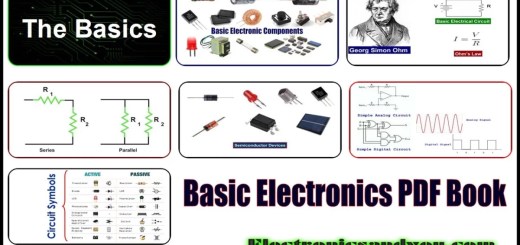
Are you struggling to recognize electronic components quickly and accurately? Imagine having a simple, easy-to-follow PDF guide that helps you identify resistors, capacitors, diodes, and more without confusion.
This article will give you exactly that—a clear, step-by-step approach to understanding electronic parts so you can boost your skills and confidence. Keep reading, and you’ll discover how to make sense of those tiny parts like a pro, saving time and avoiding costly mistakes.
Your journey to mastering electronic components starts right here.
Basics Of Electronic Components
Understanding electronic components is essential for anyone interested in electronics. These components are the building blocks of electronic devices. Knowing their basics helps in identifying and using them effectively.
Common Types And Functions
Electronic components come in various types, each with specific functions. Some common types include:
- Resistors:They control the flow of electric current. Used to manage voltage levels.
- Capacitors:They store and release electrical energy. Essential for filtering and smoothing signals.
- Diodes:They allow current to flow in one direction. Vital for converting AC to DC.
- Transistors:They amplify or switch electronic signals. Key in building circuits.
- Inductors:They store energy in a magnetic field. Useful in tuning and filtering circuits.
Symbols And Markings Explained
Symbols and markings help identify electronic components on circuit diagrams. Each component has a unique symbol. For example:
- Resistor:Represented by a zigzag line or rectangle.
- Capacitor:Shown as two parallel lines or a curved line.
- Diode:Displayed as a triangle pointing to a line.
- Transistor:Depicted as a circle with three leads.
Markings on components provide information like value and tolerance. These markings are crucial for proper identification and use.

Credit: www.electronicsandyou.com
Tools For Identification
Identifying electronic components requires the right tools to ensure accuracy. These tools help check the component’s type, value, and condition. Using proper equipment saves time and prevents errors during repairs or projects.
Some tools are simple and affordable, while others provide detailed information. Choosing the right tool depends on the component and the level of testing needed.
Multimeter And Its Uses
A multimeter measures voltage, current, and resistance. It is essential for testing resistors, capacitors, and diodes. This tool helps confirm if a component is working or damaged. Multimeters often have continuity tests to check connections quickly. They are easy to use and widely available.
Component Testers
Component testers identify various electronic parts automatically. They provide readings for transistors, capacitors, and inductors. These testers display component type and key values on a screen. They are useful for quick and accurate checks without manual calculations. Compact and portable models exist for fieldwork.
Reading Datasheets
Datasheets contain detailed information about electronic components. They include pin layouts, electrical characteristics, and physical dimensions. Understanding datasheets helps verify component specifications and compatibility. Datasheets also explain how to connect and use parts safely. They are available online from manufacturers and suppliers.
Interpreting Component Markings
Electronic components often have small markings that tell you their type and value. Understanding these markings helps you identify parts quickly. This skill saves time and avoids mistakes in electronic projects.
Markings vary by component type. Resistors, capacitors, transistors, and diodes each use different codes and labels. Learning to read these codes makes working with electronics easier.
Resistor Color Codes
Resistors use colored bands to show resistance value. Each color stands for a number. The first two bands give the first two digits. The third band is a multiplier. The fourth band shows tolerance.
| Color | Number | Multiplier |
|---|---|---|
| Black | 0 | x1 |
| Brown | 1 | x10 |
| Red | 2 | x100 |
| Orange | 3 | x1,000 |
| Yellow | 4 | x10,000 |
| Green | 5 | x100,000 |
| Blue | 6 | x1,000,000 |
| Violet | 7 | |
| Gray | 8 | |
| White | 9 |
Example: Red, Violet, Yellow, Gold means 27 x 10,000 ohms with 5% tolerance.
Capacitor Labels
Capacitors often have their value printed directly. Look for numbers and letters. The number usually shows capacitance in picofarads (pF).
- Three-digit codes: first two digits are value, third is multiplier
- Letters indicate tolerance or voltage rating
- Example: “104” means 10 x 10,000 = 100,000 pF or 0.1 µF
Some capacitors show voltage limits or type codes too. Check datasheets for exact meanings.
Transistor And Diode Codes
Transistors and diodes use alphanumeric codes. These codes identify the device type and characteristics.
- Common transistor codes: 2N2222, BC547
- Diode codes: 1N4148, 1N4007
- Letters and numbers indicate manufacturer and specs
Look up these codes in component datasheets. Datasheets give detailed electrical properties and pin layouts.
Using Pdfs For Reference
PDF documents serve as a vital tool for identifying electronic components. They provide clear, detailed information in a portable format. PDFs help users understand component specifications, functions, and physical features. Using PDFs for reference simplifies the process of finding the right parts for projects or repairs.
Finding Reliable Pdfs
Start with trusted sources to find accurate PDFs. Official websites of manufacturers and authorized distributors offer reliable files. Avoid random downloads from unknown sites to prevent outdated or incorrect data. Check for the latest version by noting the publication date on the document. Reliable PDFs ensure correct identification and safe use of components.
Navigating Component Catalogs
Component catalogs in PDF form list many parts in one place. Use the table of contents or search function to locate specific components fast. Catalogs often include images, dimensions, and technical data side by side. Compare similar parts easily by scanning through the tables and charts. This method saves time and reduces errors in component selection.
Leveraging Manufacturer Datasheets
Datasheets provide detailed technical information about a component. They describe electrical properties, pin configurations, and recommended operating conditions. Study diagrams and graphs carefully to understand performance limits. Datasheets also include part numbers and packaging details for ordering. These documents are essential for engineers and hobbyists alike.
Practical Tips For Accurate Identification
Accurate identification of electronic components is essential for any electronics enthusiast or professional. Practical tips can save you time and prevent costly errors when working with circuit boards or repair projects. Understanding how to visually inspect, safely test, and avoid common pitfalls will boost your confidence and efficiency.
Visual Inspection Techniques
Start by examining the component carefully under good lighting. Look for clear markings such as part numbers, voltage ratings, or color codes.
Use a magnifying glass or a digital microscope to spot tiny details you might miss with the naked eye. Pay attention to physical damage like cracks, burns, or corrosion that can affect performance.
Compare the component against a reference chart or datasheet in your PDF. This side-by-side check often reveals subtle differences that indicate component type or value.
Testing Components Safely
Always disconnect power before testing. Using a multimeter is the safest and most common way to check resistors, capacitors, diodes, and transistors.
Set your multimeter to the correct mode (resistance, continuity, diode test) to avoid damaging the component or your meter. Hold probes steadily on the leads and note the readings carefully.
Remember, some components like electrolytic capacitors need to be discharged before testing. This prevents false readings and protects your equipment.
Avoiding Common Mistakes
Don’t rely solely on color codes or faded markings; they can be misleading. Always cross-reference with the datasheet or PDF guide.
Avoid rushing through identification. Mistakes often come from assumptions or skipping steps. Taking your time reduces errors and frustration.
Beware of counterfeit or mislabeled components, especially if sourced from unreliable suppliers. If something looks off, verify it through multiple methods before proceeding.

Credit: electronics.stackexchange.com
Advanced Identification Methods
Identifying electronic components can go beyond just reading labels or datasheets. Advanced identification methods help you decode complex parts and verify unknown components with greater accuracy. These techniques often combine technology, detailed schematics, and practical analysis to give you a clearer picture of what you’re working with.
Using Online Tools And Apps
Online tools and apps have made electronic component identification faster and more accessible. You can upload images of components, and apps use pattern recognition to suggest possible matches. Some platforms even provide datasheets and pin configurations instantly.
If you’ve ever struggled with tiny or faded markings on a resistor or IC, these tools can save you hours. They often include community feedback, so you can cross-check your findings with other users’ experiences. Have you tried using an app to scan a component yet?
Schematic Diagram Analysis
Understanding schematic diagrams helps you identify components based on their function and connections, not just physical appearance. By examining how a component fits into a circuit, you can often deduce its type and specifications.
For example, if a component connects to a power supply and a microcontroller input, it might be a sensor or voltage regulator. This method is especially useful when components lack markings or when you’re dealing with custom-built circuits. Do you keep schematic diagrams handy when troubleshooting?
Reverse Engineering Components
Reverse engineering involves carefully analyzing a component to figure out its internal structure and operation. This can mean disassembling the part or using tools like multimeters and oscilloscopes to test its behavior.
It’s a hands-on approach that reveals details often missing from datasheets. I once identified a damaged transistor by measuring its junctions and comparing results with known types. Could reverse engineering be your key to understanding mysterious parts?

Credit: www.electronicsandyou.com
Frequently Asked Questions
What Is The Best Pdf For Identifying Electronic Components?
The best PDF guides provide clear images and detailed descriptions. Look for PDFs that cover resistors, capacitors, transistors, and ICs. These resources help beginners quickly recognize symbols and component functions in circuits.
How Can I Use A Pdf To Identify Electronic Components?
Open the PDF and match components visually with your parts. Use the charts and tables for reference values and symbols. PDFs often include troubleshooting tips to confirm component types.
Are There Free Pdfs Available For Electronic Component Identification?
Yes, many educational websites offer free PDFs. These include comprehensive guides with diagrams and specs. Always download from reputable sources to ensure accuracy and safety.
Why Is A Pdf Useful For Learning Electronic Components?
PDFs are portable and easy to access offline. They combine images, text, and charts in one file. This format suits both beginners and advanced learners for quick reference.
Conclusion
Identifying electronic components becomes easier with practice and the right tools. A clear PDF guide helps you learn symbols, shapes, and codes quickly. Keep your reference materials handy during projects. Simple steps build your confidence and skills over time. Understanding components saves time and prevents mistakes.
Stay curious and keep exploring new parts. Soon, reading circuit diagrams will feel natural. This knowledge opens doors to many fun electronics projects.
Leave a Reply